How to provide Fin AI with the context of the currently visited page | Community
Skip to main content
Answered

How to provide Fin AI with the context of the currently visited page

  • January 19, 2026
  • 6 replies
  • 256 views

We are currently testing Fin AI and we noticed that the messenger does not take into account the page the user is currently visiting on our website.

For example, if a user is on a specific product page and asks “What is the price?”, Fin responds with a generic answer instead of using the price of the product shown on that page.

We would like to understand:

  • How can we pass the current page context (URL, product ID, metadata, etc.) to Fin?

  • Is there a supported way to provide Fin with dynamic context about the page the user is viewing?

  • Does Fin automatically receive page URL or page-specific data from the Messenger, or does this need to be configured manually (e.g. via attributes, events, or APIs)?

Our goal is for Fin to answer context-aware questions based on the exact product or page the user is interacting with.

Thanks in advance

Best answer by Cédric V

Hi ​@Pietro Lodi Rizzini ,

I couldn’t find anything in the docs indicating that Fin automatically reads the current page URL/product context directly from the Messenger, only things i found points to Fin using:

  • the content you connect (Help Center, synced websites, external pages, etc.),

  • and the attributes and data you explicitly expose to it (people / company / conversation attributes, Fin Attributes, Data connectors).​

What could be supported today may be a pattern where you would explicitly pass the “current page/product” to Intercom and let Fin consume it indirectly:

  1. Track the current page/product as an attribute

    • Create a custom attribute like “current_product_id” (and optionally “current_page_url”) on the contact.

    • On every page or product change in your app, call the JavaScript API to update the contact, for example:

      window.Intercom('update', {
      current_product_id: 'SKU123',
      current_page_url: window.location.href
      });

    • This way, Intercom always stores the latest product/page the user is viewing, including in a single‑page app where you simulate a “page refresh” with update.

  2. Use that attribute in a Data connector for Fin

    • Create a Data connector that calls your product/pricing API with a dynamic URL such as: GET https://api.yourdomain.com/products/{current_product_id}

    • In the connector config, insert “current_product_id” using the supported attribute placeholder syntax (curly braces) so the value is injected at runtime.

    • Fin can then interpret the JSON response from your API when it needs to answer questions about that specific product’s price.​

So in short: Fin doesn’t automatically consume the page the user is on, but you can approximate page‑aware behavior by keeping a “current_product_id (or similar) attribute in sync from your frontend and wiring your Fin Data connectors to use that attribute when answering price or product‑specific questions.​

I haven’t tested this pattern in production, but it seems like a promising direction based on how attributes and Data connectors work.

Hope it’ll help !

6 replies

Cédric V
Innovator ✨
Forum|alt.badge.img+3
  • Innovator ✨
  • Answer
  • January 20, 2026

Hi ​@Pietro Lodi Rizzini ,

I couldn’t find anything in the docs indicating that Fin automatically reads the current page URL/product context directly from the Messenger, only things i found points to Fin using:

  • the content you connect (Help Center, synced websites, external pages, etc.),

  • and the attributes and data you explicitly expose to it (people / company / conversation attributes, Fin Attributes, Data connectors).​

What could be supported today may be a pattern where you would explicitly pass the “current page/product” to Intercom and let Fin consume it indirectly:

  1. Track the current page/product as an attribute

    • Create a custom attribute like “current_product_id” (and optionally “current_page_url”) on the contact.

    • On every page or product change in your app, call the JavaScript API to update the contact, for example:

      window.Intercom('update', {
      current_product_id: 'SKU123',
      current_page_url: window.location.href
      });

    • This way, Intercom always stores the latest product/page the user is viewing, including in a single‑page app where you simulate a “page refresh” with update.

  2. Use that attribute in a Data connector for Fin

    • Create a Data connector that calls your product/pricing API with a dynamic URL such as: GET https://api.yourdomain.com/products/{current_product_id}

    • In the connector config, insert “current_product_id” using the supported attribute placeholder syntax (curly braces) so the value is injected at runtime.

    • Fin can then interpret the JSON response from your API when it needs to answer questions about that specific product’s price.​

So in short: Fin doesn’t automatically consume the page the user is on, but you can approximate page‑aware behavior by keeping a “current_product_id (or similar) attribute in sync from your frontend and wiring your Fin Data connectors to use that attribute when answering price or product‑specific questions.​

I haven’t tested this pattern in production, but it seems like a promising direction based on how attributes and Data connectors work.

Hope it’ll help !


This approach works, thank you!


Nathan Sudds
Top Expert ✨
Forum|alt.badge.img+8
  • Top Expert
  • January 22, 2026

@Pietro Lodi Rizzini I'm curious if you are using an existing store tool etc say Shopify? 


Also have you tried using Guidance for this? I haven't tried it but now you have me curious, before going to all the detailed effort that ​@Cédric V has shared I would try Guidance around this and see if it works. 


Also this feels like a good feature request to add to the Product Wishlist if it doesn't work but I'm going to test this later today as well and report back because I wouldn't be surprised if there's a way to prompt a solution here. 


Just a heads-up before you go this way although I guess it shouldn't be too much work to pass these things to the conversation attributes.


Good luck, I'll let you know what I find out as well. 


Conor
Super User ✨
Forum|alt.badge.img+5
  • Super User ✨
  • January 26, 2026

Jump on to this feature request, it already exists: 

I couldn’t think of a simpler approach than ​Cédric’s, so it sounds like a good custom option for now! 


Nathan Sudds
Top Expert ✨
Forum|alt.badge.img+8
  • Top Expert
  • January 26, 2026

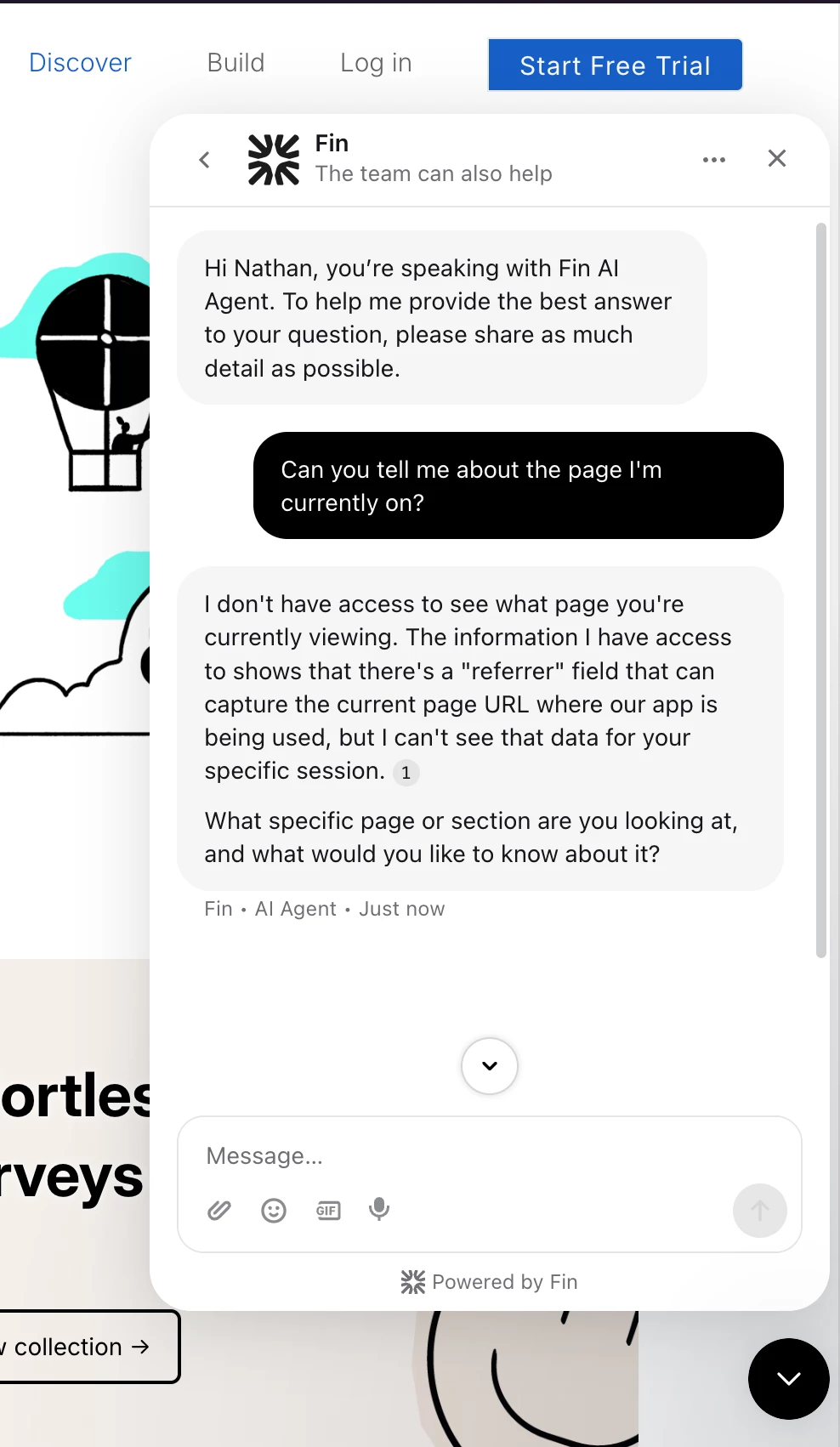
I just tested on Intercom’s site directly and it seems clear that Fin doesn’t know what page I’m on so other than creating a workflow with a target of each specific page you want to pass that information to Fin for or the instructions above from ​@Cédric V I guess that’s the only option. 


But definitely vote up that post shared by ​@Conor so hopefully the team will build this asap!


Julian Murray
Innovator ✨
Forum|alt.badge.img+3
  • Innovator ✨
  • January 27, 2026

Surprised this is not possible yet, have voted on feature request