Handling conversations that become unsnoozed while a teammate is out of office | Community
Skip to main content
Answered

Handling conversations that become unsnoozed while a teammate is out of office

  • March 12, 2026
  • 4 replies
  • 124 views

When teammates are out of office (planned or unexpectedly), how are you handling their conversations that become unsnoozed? We use the Reassign Replies option to handle customer that reply to conversations assigned to an OOO teammate, but we’re struggling to know what to do with conversations that become unsnoozed without having someone monitor the inbox to keep it tidy. 


We don’t want to use a workflow for when a customer has become unresponsive, because sometimes we’re waiting on an update from another team (like engineering). If you have solutions for this problem, too, I’m all ears. Should we do a back office ticket if we are waiting on the engineering team? 


Thanks in advance for any suggestions!
 

Best answer by Shayla C

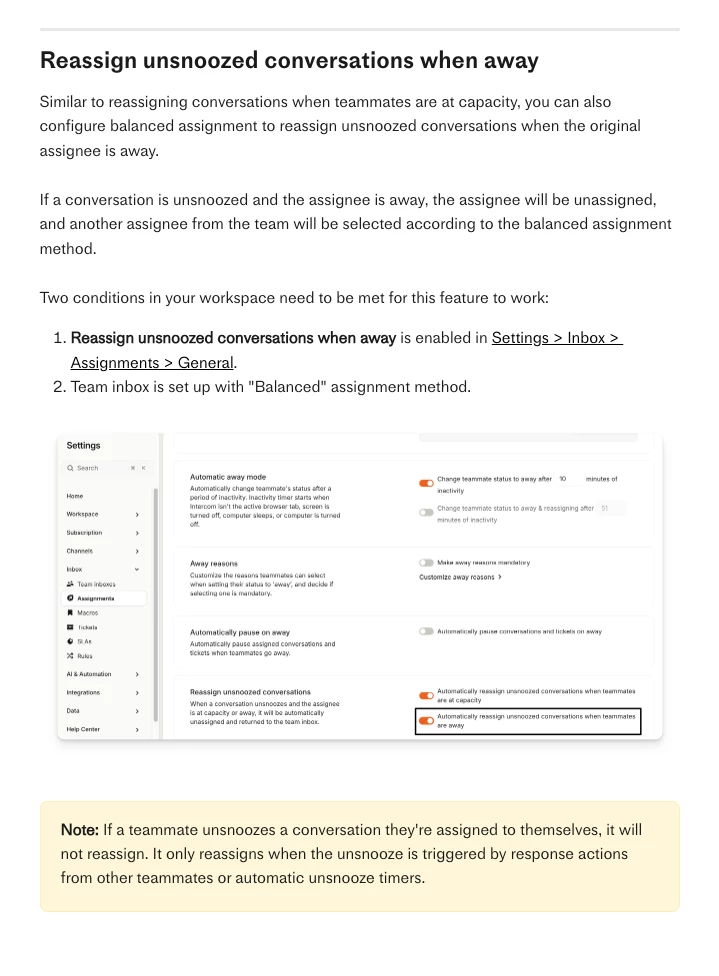
If anyone needs to solve for this problem like me, Intercom already thought of it! 


4 replies

Christopher Boerger
Innovator ✨
Forum|alt.badge.img+3

Hi ​@Shayla C, Good question — the "Reassign Replies" setting only catches customer-initiated activity, so unsnoozed conversations sit there silently.

For the OOO unsnooze problem:

The "If teammate has been unresponsive" workflow trigger should help here. When a snoozed conversation pops back and the OOO teammate doesn't respond within X minutes, it triggers and can reassign to a team inbox or another teammate. Set the timer shorter than however long you're comfortable leaving those conversations unattended.

If you're on the Expert plan, you can also pair this with SLA rules to track and escalate based on response time targets. Key setting: make sure the timer is shorter than your SLA tolerance for these.

One caveat: this trigger only fires if the last message was from a teammate (not a bot). So it works when teammates snooze after sending "I'll follow up" — which is usually the pattern.

Here's the full doc on these triggers: https://www.intercom.com/help/en/articles/7155449-customer-or-teammate-has-been-unresponsive

For the engineering dependency problem:

Yes — back-office tickets are the cleaner approach. Create a linked ticket for the engineering work, assign it to that team, and let the ticket track the internal dependency. The customer conversation stays snoozed until engineering resolves their ticket. When they do, you (or a workflow) can unsnooze and follow up.

Alternative: tag conversations with why they're snoozed ("waiting-customer" vs "waiting-internal"). Then your auto-close workflow can filter to only target customer-waiting conversations.


  • Author
  • New Participant
  • March 13, 2026

Thank you ​@Christopher Boerger! I’m going to give this a shot to see if it works for our workflow. 😁


  • Author
  • New Participant
  • Answer
  • March 13, 2026

If anyone needs to solve for this problem like me, Intercom already thought of it! 


Christopher Boerger
Innovator ✨
Forum|alt.badge.img+3

Ah, nice — that's the cleaner solution. I overcomplicated it with workflows when the native assignment setting handles it directly.

One thing to check: This feature requires Balanced assignment on the team inbox, which is only available on the Expert plan. If you're on Advanced or below, Round robin will stop assigning new conversations to away teammates, but won't reassign existing unsnoozed ones.

Other requirements:

  • Teammate must be marked Away (not just calendar OOO)
  • Won't reassign if the teammate themselves unsnoozes it

If you're not on Expert, the workflow approach (using "If teammate has been unresponsive" trigger) is still an option — just more setup.

For the engineering dependency side — still think back-office tickets are the way to go there. Keeps the internal work tracked separately from the customer conversation.