


React Native SDK Issue: phone Field Not Updating While REST API Works Correctly | Community
Skip to main content
Answered

React Native SDK Issue: phone Field Not Updating While REST API Works Correctly

  • February 18, 2026
  • 1 reply
  • 32 views

Hello community,

I'm experiencing an issue when trying to update the phone field in the user profile using the React Native SDK from Intercom.

When I send the user data through the SDK method, all other fields are updated correctly, except for the phone field, which remains empty and is not saved.

I have reviewed the documentation and understand that the phone number must be in E.164 format, and I am sending it in the correct format. However, the field still does not update.

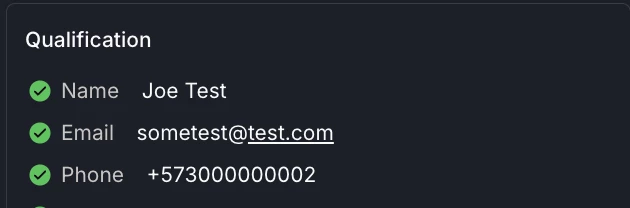
To rule out implementation errors, I tested the same update using the Intercom REST API, and in that case, the phone field is updated correctly using the exact same data.

However, when I attempt to update the phone field using the React Native SDK, the value is not saved at all.

Has anyone experienced this behavior or knows if I might be missing something?
Could this be a limitation or a bug in the SDK?


If I try to update the phone field using the React Native SDK with the provided method, it does not get updated.


        const result = await Intercom.updateUser({
name: 'Joe Test',
phone: '+573000000004',
});
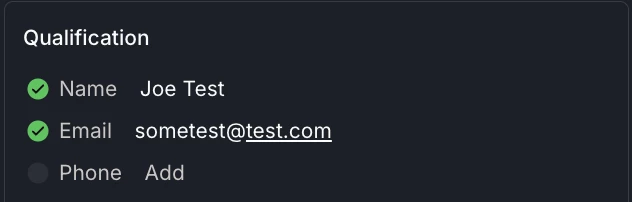
 

If I perform the same update directly through the REST API, the field is updated correctly.


curl https://api.intercom.io/contacts/... \
-X PUT \
-H "Authorization: Bearer <YOUR_ACCESS_TOKEN>" \
-H "Accept: application/json" \
-H "Content-Type: application/json" \
-H "Intercom-Version: 2.11" \
-d '{
"name": "Joe Test",
"phone": "+573000000002"
}'
 

Best answer by Dara K

Hey ​@Mateo J 

The most common cause for issues like this is the workspace has “Prevent updates via the Messenger” enabled for the built‑in Phone attribute. When that toggle is on, updates from the web/mobile Messenger and SDKs (incl. React Native) are ignored silently, while REST API updates still work, exactly what you’re seeing.

Fix:

  • In Intercom, go to Settings > Data > People, edit the built‑in Phone field, and turn OFF “Prevent updates via the Messenger.” Then retry your SDK call.
  • Make sure you pass E.164 (e.g., +15551234567).
  • React Native example: await Intercom.updateUser({ phone: '+15551234567' })

If you must keep that prevention enabled, continue writing phone via the REST API (as you tested), or secure Messenger with JWT and only allow signed updates for sensitive attributes.

1 reply

Forum|alt.badge.img+3
  • Intercom Team
  • Answer
  • February 27, 2026

Hey ​@Mateo J 

The most common cause for issues like this is the workspace has “Prevent updates via the Messenger” enabled for the built‑in Phone attribute. When that toggle is on, updates from the web/mobile Messenger and SDKs (incl. React Native) are ignored silently, while REST API updates still work, exactly what you’re seeing.

Fix:

  • In Intercom, go to Settings > Data > People, edit the built‑in Phone field, and turn OFF “Prevent updates via the Messenger.” Then retry your SDK call.
  • Make sure you pass E.164 (e.g., +15551234567).
  • React Native example: await Intercom.updateUser({ phone: '+15551234567' })

If you must keep that prevention enabled, continue writing phone via the REST API (as you tested), or secure Messenger with JWT and only allow signed updates for sensitive attributes.


