
How do I delete a message (sent or never sent), a campaign or a series? | Community
Skip to main content
Answered

How do I delete a message (sent or never sent), a campaign or a series?

  • July 28, 2021
  • 1 reply
  • 546 views

I have a number of messages that were created as test messages and never sent - the same with campaigns and series. Is there a way to delete them? I click the checkbox next to the item, but I don't see an option to delete them appear (only "tags").


How do I delete the test data?
Best answer by Roy

Hello @jason k11​ ,


Intercom actually stopped the Campaign feature and it's become Series.


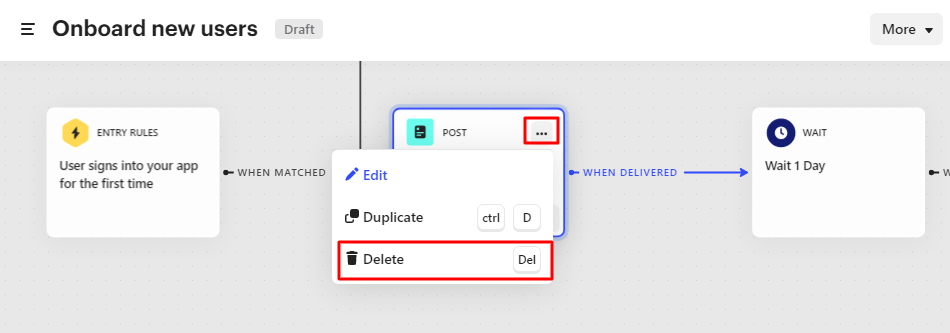
To delete Series block, click on ... and then Delete or just select block and click Delete on your keyboard.

SeriesDelete

1 reply

Roy
Top Expert ✨
Forum|alt.badge.img+5
  • Top Expert ✨
  • Answer
  • July 28, 2021

Hello @jason k11​ ,


Intercom actually stopped the Campaign feature and it's become Series.


To delete Series block, click on ... and then Delete or just select block and click Delete on your keyboard.

SeriesDelete


