Cannot create new contact with custom attributes set via API | Community
Skip to main content
Answered

Cannot create new contact with custom attributes set via API

  • November 26, 2025
  • 2 replies
  • 36 views

Hi all,

 I am working on a feature attempting to automate the creation of few contacts in our workspace by hitting the post endpoint for `{intercom_api_url}/contacts`.

My current data body looks like:

{
email: providerData.providerEmail,
name: providerData.providerName,
phone: providerData.providerPhoneNumber,
// These custom attributes throw an error in intercom when added.
custom_attributes: {
Is_provider: true,
// provider_start_date: new Date().toDateString(),
},
}

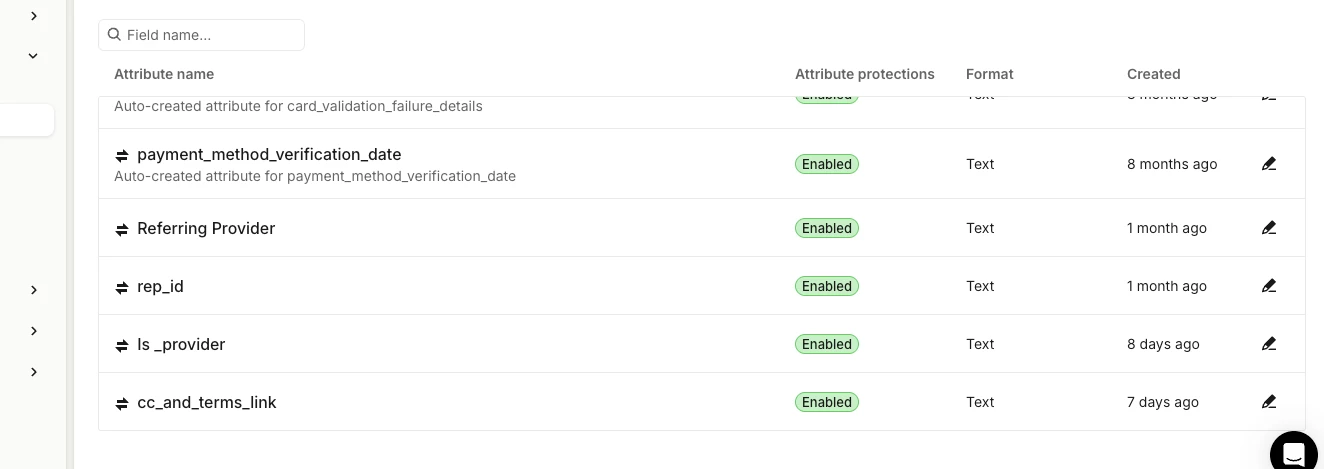
Although the Is_provider custom attribute exists in the test workspace, my call keeps throwing me a 400 error with Bad Request.

Please help with understanding why this is happening and if possible a potential fix. This would allow us to onboard a lot more contacts very quickly.


Best answer by Ebenezer.Laleye

Hi ​@Christopher Johnson ! Ebenezer here from Engineering Support👋.

Here’s why you might be getting 400 Bad Request

You can only write to custom_attributes that already exist on the workspace. If Intercom doesn’t recognize the attribute (or it’s archived), the request fails. Use the Data Attributes API or UI to create it first.

The attribute key must match the attribute’s API name exactly (case‑sensitive). In your example, using Is_provider will fail if the attribute’s API name is is_provider (lowercase). Keys are case sensitive and must use supported characters.

The attribute’s data type must match what you send. If the attribute is a string but you send a boolean true, Intercom will reject it. Supported types include string, integer, float, boolean, and date.

For date attributes, Intercom expects a UNIX timestamp in seconds, not a formatted date string (e.g., new Date().toDateString()).

2 replies

Forum|alt.badge.img+7
  • Intercom Team
  • Answer
  • December 3, 2025

Hi ​@Christopher Johnson ! Ebenezer here from Engineering Support👋.

Here’s why you might be getting 400 Bad Request

You can only write to custom_attributes that already exist on the workspace. If Intercom doesn’t recognize the attribute (or it’s archived), the request fails. Use the Data Attributes API or UI to create it first.

The attribute key must match the attribute’s API name exactly (case‑sensitive). In your example, using Is_provider will fail if the attribute’s API name is is_provider (lowercase). Keys are case sensitive and must use supported characters.

The attribute’s data type must match what you send. If the attribute is a string but you send a boolean true, Intercom will reject it. Supported types include string, integer, float, boolean, and date.

For date attributes, Intercom expects a UNIX timestamp in seconds, not a formatted date string (e.g., new Date().toDateString()).


Hi Ebenezer.

The people attributes is created as above.


Thanks for the unix timestamp clarification.