





Hi everyone!
Just sharing you a short success story when I helped a business owner integrate Fin AI to her Facebook Online Shop. Plus, I added some tips in the later part.
"Totus Tuus Shop" is a small business that was struggling to manage a high volume of repetitive product and order inquiries on Facebook Messenger. The owner needed a way to automate sales without losing the personal touch of her brand.
By applying the Fin QA Flywheel→ Analyze, Train, Test, and Deploy—I built a system that transformed her inbox. Seeing the workflow handle a full customer journey, from "What's the price?" to "Here is my shipping address," gave the owner the confidence and consideration to fully implement Intercom in her shop.
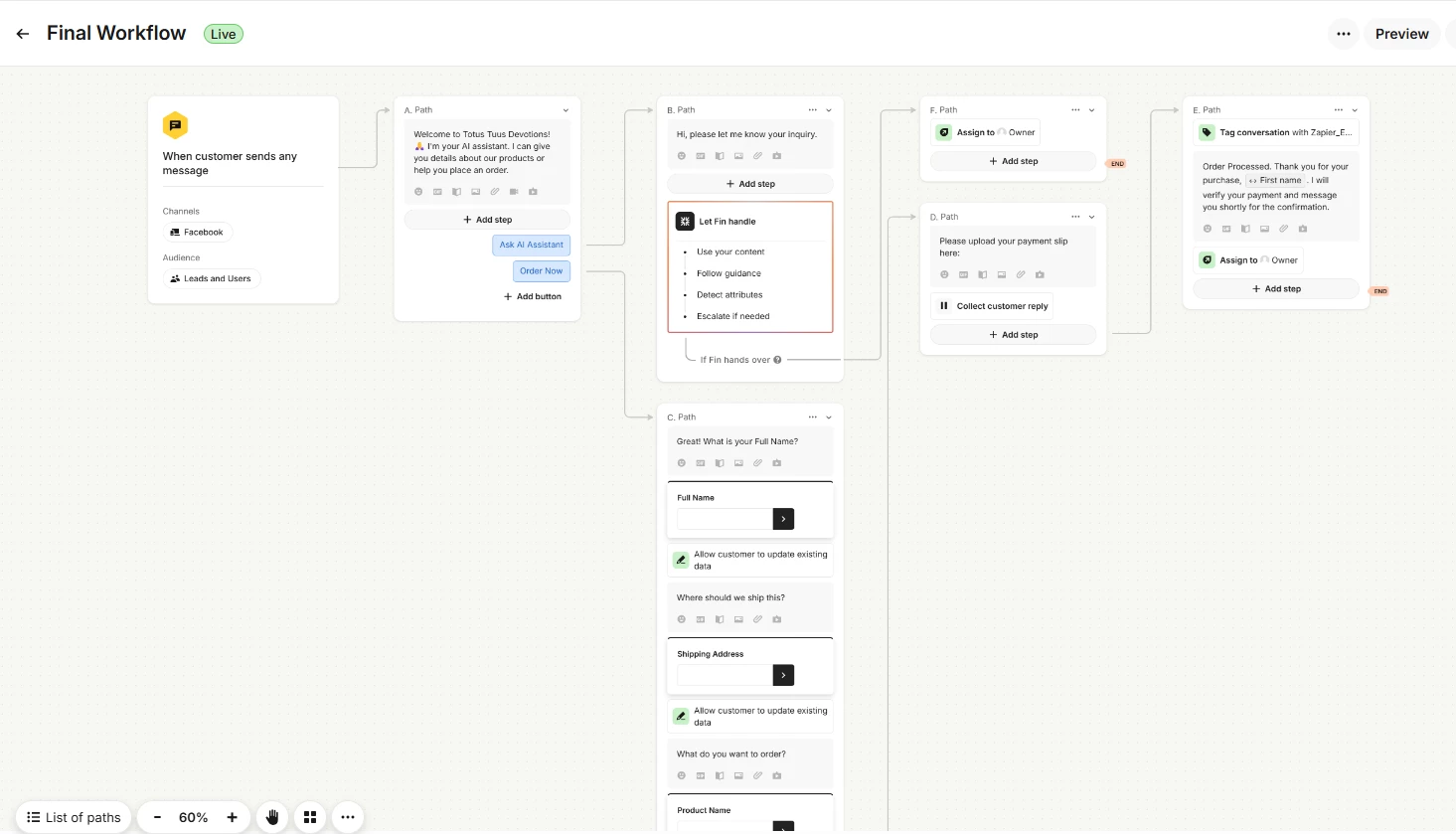
**Please see the attachment below for the recording of the “Preview” of the actual execution of my workflow**
Disclaimer: Note that the preview is different “visually” compared to the actual Facebook messenger/page execution. That’s why I made a few tweaks in order to adjust with Fin’s capabilities.
Workflow Outline & Logic:
- Intent Probing (Triage Menu): Start with clear reply buttons. This limits the "search space" for Fin, ensuring it doesn't get overwhelmed by the endless possibilities of a creative shop.
- The AI Sales Assistant (Let Fin Handle): When a user clicks a product, the button triggers a specific text message. Fin then pulls a Concise snippet with the price and description, acting as a high-speed product expert.
- Structured Order Collection: Once the user decides to buy, we move away from AI into a Data Collection path. This ensures 100% accuracy for addresses and names, preventing the AI from misinterpreting crucial order details.
- Modular Handover: We use "Pass to workflow" nodes for payment instructions. This keeps the main shop canvas clean and allows the owner to update payment methods in one place rather than across every product path.
Challenges: Integrating with Facebook Messenger
- The 7-Day Reply Window: Unlike the standard Intercom Messenger, Facebook has a strict 7-day limit. If a customer doesn't reply for a week, you'll see a warning in your inbox and won't be able to send manual or automated messages until they reach out again.
- Visual Differences in Buttons: Reply buttons don't always look like "buttons" on Facebook. In some cases, they show up as a numbered list (e.g., "Reply 1 for Rosaries, 2 for Mugs"). You need to design your workflow prompts to say, "Click below or reply with the number," to avoid customer confusion.
- Trigger Limitations: Certain common web triggers, like "Customer visits a page" or "Customer clicks a website element," do not work on social channels like Facebook. Your Facebook workflows must rely almost exclusively on "Customer sends a message" triggers.
- Blocking & Syncing Errors: Users can block your Facebook Page or adjust privacy settings that prohibit third-party apps like Intercom from reaching them, leading to "Message Not Sent" errors that can be hard to troubleshoot without checking Facebook’s side.
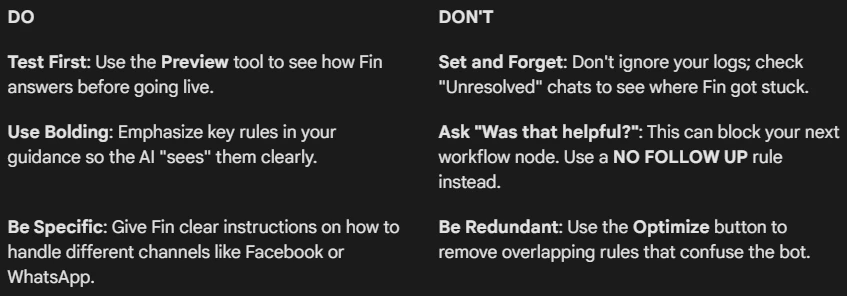
Here are a few simple guidelines and tips if you are just beginning your journey in using Fin AI:
- Feed it Content: Upload your articles or specific "Snippets" (short bites of info) for Fin to use as its source of truth.
- Give it Guidance: Use the Guidance tab to set rules. For example, tell Fin to be Concise so it doesn't give long-winded answers.
- Treat it like a Trainee: Fin works best with literal, step-by-step instructions. If you are vague, it might "hallucinate" or guess.
For Workflows:
- Triage First: Use buttons to ask what the user needs before Fin starts talking.
- Structured Data: When you need 100% accuracy (like an email or address), move the user out of the AI chat and into a Data Collection block.
- The Handover: Use a "Pass to workflow" node to move a customer from a general chat to a specific team or a more complex automated path. You can also set handover guidelines and instructions to make it clearer for Fin.
I hope this helped!
Let me know if you have questions regarding my process, workflow, and other things that needs clarity.
Let help one another to improve Fin! :)