How can I link a collection from the chat? | Community
Skip to main content
Answered

How can I link a collection from the chat?

  • April 21, 2021
  • 3 replies
  • 108 views

How can I link a collection from the chat?

Best answer by Kevin Bendixen

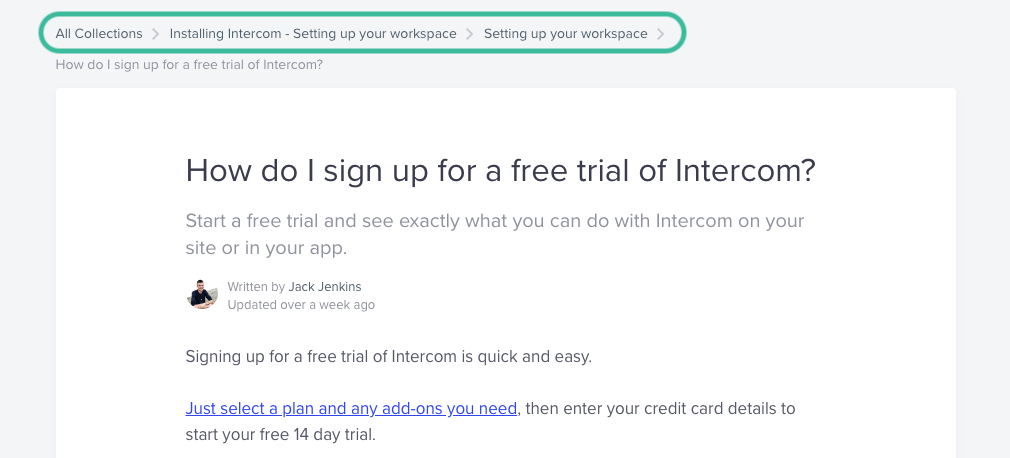
@aya n​ The easiest way is to go to an article in the collection and then go back to the overview via the breadcrumbs above the article (see screenshot). Click on the collection name and you will be redirected to the correct URL, you can then copy-paste that into the chat.Bildschirmfoto 2021-04-21 um 09.11.48
3 replies

Kevin Bendixen
Top Expert ✨
Forum|alt.badge.img+5

You mean like this: https://www.intercom.com/help/en/collections/2094822-installing-intercom-setting-up-your-workspace#setting-up-your-workspace?

That can only be done manually. You can't add a help center section like you can add a specific article.


  • Author
  • New Participant
  • April 21, 2021

I remember seeing an explanation here in the forum explaining how to link to the collections' URL - but don't remember where I saw it 😅 @kevin b​ 


Kevin Bendixen
Top Expert ✨
Forum|alt.badge.img+5

@aya n​ The easiest way is to go to an article in the collection and then go back to the overview via the breadcrumbs above the article (see screenshot). Click on the collection name and you will be redirected to the correct URL, you can then copy-paste that into the chat.Bildschirmfoto 2021-04-21 um 09.11.48