How to make sure articles rank in Google in corresponding Country (Chile/México) | Community
Skip to main content
Answered

How to make sure articles rank in Google in corresponding Country (Chile/México)

  • January 21, 2025
  • 6 replies
  • 481 views

We have two Help Centers, one for México and one for Chile:
https://ayuda.fintual.mx/es/

https://ayuda.fintual.cl/es/

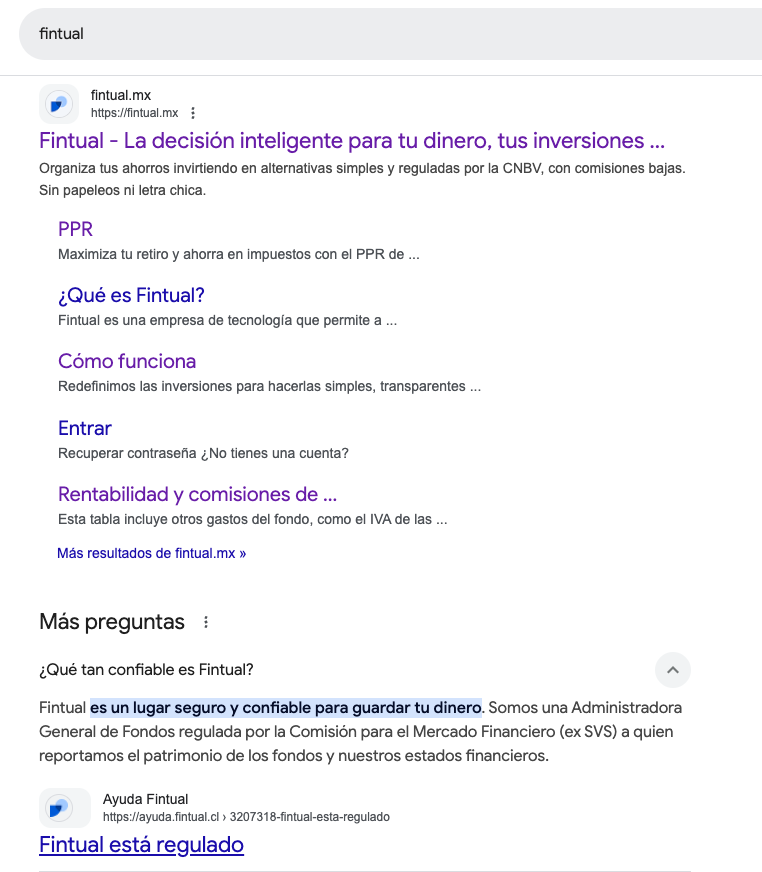
The problem is that articles from Chile rank in Google in México and vice versa. How can we make sure the correct article ranks in the corresponding country? 

From what I´ve read, there is no possibility to implement hreflang tags neither inject code through Google Tag Manager. We still want them indexed in Google so we can also not restrict them to a certain audience.

 

Best answer by Recashm

You can clamp this down with hreflang tags, consistent country‑specific URLs, and making sure each Help Center has fully localized metadata. I’ve had mixed results until I paired hreflang with clearer internal linking and country‑based schema. I also had a broader audit done through redeagle.tech, which helped me spot duplicate signals that confused Google about which version should rank where.

6 replies

Emilygav
Intercom Team
Forum|alt.badge.img+6
  • Intercom Team
  • January 31, 2025

Hey there ​@Isabel Meijer, Emily here from Support Engineering at Intercom 👋🏼
 

You might want to consider the following SEO optimisation strategies for ensuring the appropriate help center shows 👇

  • Optimize Titles and Subheadings: Use clear and simple language in your article titles and subheadings. Incorporate keywords that your visitors might use to search for the problem your article solves. This helps search engines read your articles better and improves discoverability 
  • Use Local Keywords: Identify the words your customers use in each country to ask for help with your product. Integrate these phrases into your article titles, descriptions, and link text. This ensures that your content is relevant to the local audience and improves its ranking in local search results 
  • Track and Adjust: Use tools like Google Analytics to track how much traffic your Help Center receives from search engines. Identify which articles drive the most and least traffic and adjust your content strategy accordingly 

By implementing these strategies, you can improve the local SEO performance of your Help Centers for both México and Chile. Hopefully these tips help a little bit ☺️


  • Author
  • New Participant
  • February 3, 2025

Hi! Thanks but this does not help me, we do all that already. There is content that has the same keywords in each country, I need to implement some coding to make this rank in the correct country, is there a way to implement custom coding?


Ryan Parker
Intercom Team
Forum|alt.badge.img+5
  • Intercom Team
  • March 4, 2025

Hi ​@Isabel Meijer

There isn’t currently any way to implement custom coding for your help center. If you’re still having issues, please reach out to us via the Messenger and our team can take a deeper look! 


  • New Participant
  • March 10, 2026

The issue is they are both in Spanish, both with “hreflang = es” in the source code. This confuses the search engines. I have raised a feature request. 


  • New Participant
  • Answer
  • May 19, 2026

You can clamp this down with hreflang tags, consistent country‑specific URLs, and making sure each Help Center has fully localized metadata. I’ve had mixed results until I paired hreflang with clearer internal linking and country‑based schema. I also had a broader audit done through redeagle.tech, which helped me spot duplicate signals that confused Google about which version should rank where.


Forum|alt.badge.img+6

Hi ​@Isabel Meijer , Seán here from the Fin technical support team 👋

Intercom doesn’t currently offer a native, self-serve way to add country-specific hreflang tags to Help Centers. If you need Mexico and Chile versions to rank separately, the supported levers are separate Help Centers on separate custom domains plus fully localized titles/content/internal linking. If you’re on custom domains, Support may be able to review a custom-script setup case by case, but that isn’t a documented hreflang feature or something you can configure directly in the product. Let me know and I can raise this for the relevant support team to review this and see.