



Intercom Push Notification does not open the chat when cold start in SwiftUI | Community
Skip to main content
Answered

Intercom Push Notification does not open the chat when cold start in SwiftUI

  • February 16, 2026
  • 7 replies
  • 276 views

Forum|alt.badge.img

Hello everyone,

I am facing an issue with Intercom Push Notification when it is a cold start (App is terminated, you receive a Push Notification and this notification will wake the App). While testing on Simulator that, if i am running my app from Xcode, terminate the App (on Simulator, not on Xcode), send a message to my test user, wait the push notification, receive it, tap on it but when i tap on it, Intercom Messenger does not opens the modal chat, it keeps me on my WorkListView (WorkList is a subview of RootView, that appears after SplashViews finish animation and transit to WorkListView).

I have already made installation (API Key, API ID and Push Notifications are enabled on Settings > Channel > Messenger > Install > Install for Mobiles), Apple Developer is already configured, when i open the Messenger on my App, i can send and receive messages. When App is open but in background i am able to receive and wake the app in the correct modal Intercom window chat, but only the cold start is not opening in the Modal Window Chat when Push Notification is tapped when App is terminated (not open on iOS)

Here is a little of the architecture of my App:
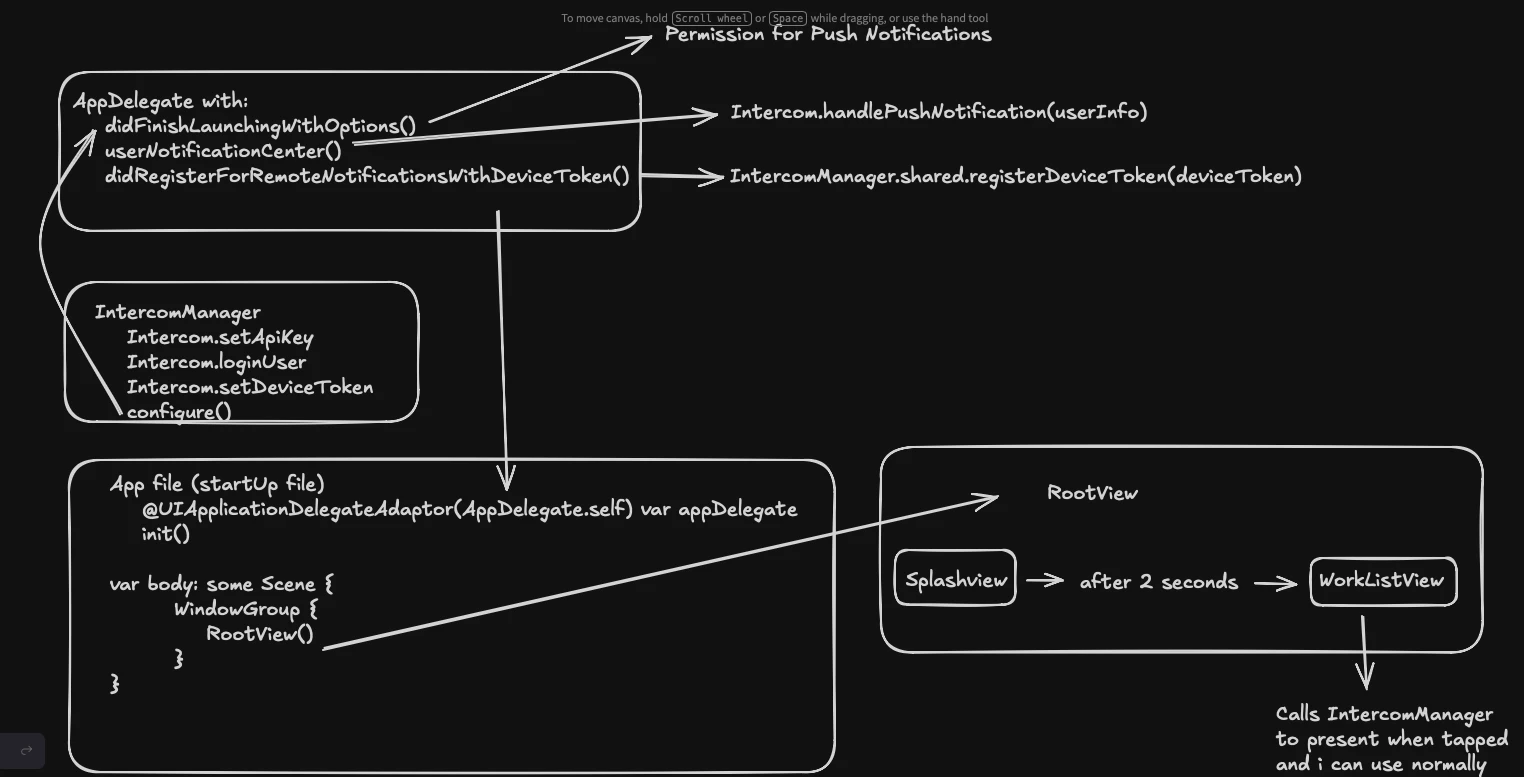
Simulator: iPhone 17 Pro with iOS 26

Intercom dependency version: 19.5.1

Issue is similar to (at least, the title):

and (at least, the title):

The Info.plist of the App has Push Notifications (IntercomAutoIntegratePushNotifications = NO), Remote Notifications, also Camera and Microphone (this both is not interesting but just saying i have it enabled)
Push Notifications capability is enabled also app has the entitlement file

FYI: I have a legacy App written in Obj-c. It was updated to version 19.4.1 some time ago. Cold start on this legacy app is working fine. I tested, just in case, use version 19.4.1 in the problematic SwiftUI App presenting the cold start problem but did not worked too.


Best answer by Dara K

Hey ​@Vitor Gomes da Silva 

Yes, this is the classic cold-start presentation timing issue. Intercom tries to present the chat before your SwiftUI hierarchy is ready or while a transition (Splash → Root) is in-flight.

Do this:

  • Defer handling until UI is active and the user is logged in
    • Save userInfo in didReceive if Intercom.isIntercomPushNotification(userInfo) and either UI isn’t ready or Intercom.isUserLoggedIn() is false.
    • When scenePhase becomes .active and after your splash/transition completes, handle it on main.

SwiftUI pattern:

  • AppDelegate: buffer pending push
  • In App: process when active and UI ready (after splash)

// AppDelegate
final class AppDelegate: NSObject, UIApplicationDelegate, UNUserNotificationCenterDelegate {
var pending: [AnyHashable:Any]?
func application( app: UIApplication, didFinishLaunchingWithOptions : [UIApplication.LaunchOptionsKey:Any]? = nil) -> Bool {
Intercom.setApiKey("<API_KEY>", forAppId: "<APPID>")
UNUserNotificationCenter.current().delegate = self
return true
}
func userNotificationCenter( c: UNUserNotificationCenter, didReceive r: UNNotificationResponse, withCompletionHandler done: @escaping () -> Void) {
let info = r.notification.request.content.userInfo
if Intercom.isIntercomPushNotification(info) {
if Intercom.isUserLoggedIn() {
pending = info   // defer until UI ready
} else {
// login, then set pending = info on success
}
}
done()
}
}

// SwiftUI App
@main
struct MyApp: App {
@UIApplicationDelegateAdaptor(AppDelegate.self) var appDelegate
@Environment(.scenePhase) var phase
@State private var uiReady = false

  var body: some Scene {
WindowGroup {
RootView() // Splash → WorkList inside
.onAppear { uiReady = true }
.onChange(of: phase) { p in
guard p == .active, uiReady, let info = appDelegate.pending else { return }
appDelegate.pending = nil
DispatchQueue.main.asyncAfter(deadline: .now() + 0.25) { // let transitions finish
Intercom.handlePushNotification(info)
}
}
}
}
}

Tips to avoid the “frozen” splash:

  • Present after the splash animation completes (small delay, or post a “UIReady” notification when WorkList is visible).
  • Don’t call Intercom.present() in the push handler; Intercom.handlePushNotification does the presentation.
  • Ensure you’ve completed Intercom.loginUser(...) before handling the push; if login is async, chain handling in the success callback.
  • Always call handlePush on the main thread and return the UNUserNotificationCenter completionHandler immediately.

7 replies

Forum|alt.badge.img

In case you guys need:
IntercomManager:
 

import Foundation
import Intercom

final class IntercomManager {
static let shared = IntercomManager()

private let apiKey = "xxxxxxx"
private let appId = "xxxxxxx"

private init() {}

var isUserLoggedIn: Bool {
Intercom.isUserLoggedIn()
}

// MARK: Setup
func configure() {
Intercom.setApiKey(apiKey, forAppId: appId)
Intercom.setThemeOverride(.light) // TODO: Change to .system when we implement Dark Mode

#if DEBUG
Intercom.enableLogging()
#endif
}

// MARK: User Management
func loginUser(email: String) {
let attributes = ICMUserAttributes()
attributes.email = email

Intercom.loginUser(with: attributes) { result in
switch result {
case .success:
#if DEBUG
debugPrint("💬 🔓 ✅ Intercom Login successful with email: \(email)")
#endif
case .failure(let error):
#if DEBUG
debugPrint("💬 🔒 ❌ Intercom Error when logging in: \(error.localizedDescription)")
#endif
}
}
}

func logout() {
Intercom.logout()
#if DEBUG
debugPrint("đź’¬ đź‘‹ Intercom Logout")
#endif
}

// MARK: Messenger
func presentMessenger() {
// Ensure push notification registration if user authorized after initial app launch
PushNotificationManager.shared.requestPermissionIfNeeded()

// Always present Intercom messenger, regardless of push notification permission status
Intercom.present()
}

// MARK: Push Notifications
// Called from AppDelegate when device token is received
func registerDeviceToken(_ deviceToken: Data) {
Intercom.setDeviceToken(deviceToken) { result in
switch result {
case .success:
#if DEBUG
debugPrint("💬 🔑 ✅ Device token registered successfully with Intercom")
#endif
case .failure(let error):
#if DEBUG
debugPrint("💬 🔑 ❌ Failed to register device token with Intercom: \(error.localizedDescription)")
#endif
}
}
}
}


AppDelegate:


import Intercom

class AppDelegate: NSObject, UIApplicationDelegate, UNUserNotificationCenterDelegate {
func application(
_ application: UIApplication,
didFinishLaunchingWithOptions launchOptions: [UIApplication.LaunchOptionsKey: Any]? = nil
) -> Bool {
IntercomManager.shared.configure()

if SessionManager.shared.isSessionActive,
let email = SessionManager.shared.authEmail {
IntercomManager.shared.loginUser(email: email)
}

UNUserNotificationCenter.current().delegate = self

// Request push notification permission at app launch
PushNotificationManager.shared.requestPermissionIfNeeded()

return true
}

// MARK: UNUserNotificationCenterDelegate
// Handle notification tap (app in background or terminated)
func userNotificationCenter(
_ center: UNUserNotificationCenter,
didReceive response: UNNotificationResponse,
withCompletionHandler completionHandler: @escaping () -> Void
) {
let userInfo = response.notification.request.content.userInfo

if Intercom.isIntercomPushNotification(userInfo) {
Intercom.handlePushNotification(userInfo)
}

completionHandler()
}

// MARK: Push Notifications
func application(
_ application: UIApplication,
didRegisterForRemoteNotificationsWithDeviceToken deviceToken: Data
) {
// Register device token with Intercom
IntercomManager.shared.registerDeviceToken(deviceToken)
}

func application(
_ application: UIApplication,
didFailToRegisterForRemoteNotificationsWithError error: Error
) {
#if DEBUG
debugPrint("🔔 📝 ❌ Failed to register for remote notifications: \(error.localizedDescription)")
#endif
}
}


Startup file:

import SwiftUI
import BackgroundTasks

@main
struct ProduttivoiOSApp: App {
@UIApplicationDelegateAdaptor(AppDelegate.self) var appDelegate
@StateObject private var syncManager = SyncManager.shared

init() {
URLProtocol.registerClass(NetworkLoggingProtocol.self)

_ = AppDatabase.shared

BackgroundSyncHandler.shared.registerBackgroundTask()

Task { @MainActor in
SyncManager.shared.setupSyncTasks([
BaseSyncTask(entity: WorkSyncTask(), identifier: StepSyncDescription.downloadWork)
])
}
}

var body: some Scene {
WindowGroup {
RootView()
.environmentObject(syncManager)
}
}
}


Forum|alt.badge.img

Somethings i changed from yesterday (small changes but, the overall problem still NOT fixed): I moved IntercomManager.shared.configure() from startup init file to first line inside didFinishLaunchingWithOptions of AppDelegate
Also, noticed that, i was not making using sessionManager login information to login on Intercom in cases that user has already used app before and there was information about his account in the app on Defaults, so now, also on didFinishLaunchingWithOptions, after IntercomManager.shared.configure(), i use my SessionManager information to login the user on Intercom


Forum|alt.badge.img

It seems that RootView > SplashView > WorkList flow somehow is breaking presentation of the chat conversation (not confirmed, i am still investigating). The bottom ballon preview shows everytime, but the chat does not


Forum|alt.badge.img

The problem seems to occur even on simple projects.
I created a project from scratch with a single view, like a brand new project.

  • I added remote-notifications flag on and also IntercomAutoIntegratePushNotifications (with value NO) on info.plist
  • Add Push Notifications capabilities on Signing & Capabilities
  • Build to generate entitlement file
  • Add same bundle id of the main project (just to reuse on Push Notifications tests configured on Intercom on Messenger Install panel
  • Added exactly the same AppDelegate, IntercomManager but using my emails and keys hardcoded

The project presented exactly the same problem as the main one
Checking with Claude Code, i was suspecting that cold start push notifications does not have a scene yet to draw, thats why it was presenting the problem on the sample project, here is what the agent said:

“What happens on cold start:

  1. didFinishLaunchingWithOptions executes - configures Intercom, starts login
  2. userNotificationCenter(_:didReceive:) is called almost immediately
  3. Intercom.handlePushNotification(userInfo) tries to present the chat
  4. But the SwiftUI view hierarchy (ContentView) hasn't been built yet - there's no UIWindow with a ready root view controller
  5. Intercom tries to present the chat, doesn't find a window/controller, and fails silently

When the app is already in the background, the UI already exists, so it works normally.

The solution

Save the notification payload during cold start and process it only when the UI is ready. Do you want me to implement this fix? The approach would be:

  1. In didReceive, detect if it's cold start (UI not ready) and save the userInfo
  2. Process the pending notification when ContentView appears (via onAppear) or when the scene becomes active (sceneDidBecomeActive)"

It fixed to me (in the simple project) by this:

class AppDelegate: NSObject, UIApplicationDelegate, UNUserNotificationCenterDelegate {
/// Stores the push notification payload when the app is cold-started from a notification tap.
/// The UI hierarchy is not ready at that point, so we defer handling until the scene is active.
var pendingNotificationUserInfo: [AnyHashable: Any]?
private var isUIReady = false

func application(
_ application: UIApplication,
didFinishLaunchingWithOptions launchOptions: [UIApplication.LaunchOptionsKey: Any]? = nil
) -> Bool {
IntercomManager.shared.configure()

IntercomManager.shared.loginUser(email: "SAMPLEREGISTEREDMAIL")

UNUserNotificationCenter.current().delegate = self

// Request push notification permission at app launch
PushNotificationManager.shared.requestPermissionIfNeeded()

return true
}

// MARK: UI Readiness

func markUIReady() {
isUIReady = true
handlePendingNotificationIfNeeded()
}

func handlePendingNotificationIfNeeded() {
guard let userInfo = pendingNotificationUserInfo else { return }
pendingNotificationUserInfo = nil

#if DEBUG
debugPrint("🔔 ⏳ Processing deferred push notification after UI became ready")
#endif

if Intercom.isIntercomPushNotification(userInfo) {
Intercom.handlePushNotification(userInfo)
}
}

// MARK: UNUserNotificationCenterDelegate
// Handle notification tap (app in background or terminated)
func userNotificationCenter(
_ center: UNUserNotificationCenter,
didReceive response: UNNotificationResponse,
withCompletionHandler completionHandler: @escaping () -> Void
) {
let userInfo = response.notification.request.content.userInfo

if Intercom.isIntercomPushNotification(userInfo) {
if isUIReady {
Intercom.handlePushNotification(userInfo)
} else {
// Cold start: UI is not ready yet, defer handling
#if DEBUG
debugPrint("🔔 ❄️ Cold start detected — deferring push notification handling until UI is ready")
#endif
pendingNotificationUserInfo = userInfo
}
}

completionHandler()
}

// MARK: Push Notifications
func application(
_ application: UIApplication,
didRegisterForRemoteNotificationsWithDeviceToken deviceToken: Data
) {
// Register device token with Intercom
IntercomManager.shared.registerDeviceToken(deviceToken)
}

func application(
_ application: UIApplication,
didFailToRegisterForRemoteNotificationsWithError error: Error
) {
#if DEBUG
debugPrint("🔔 📝 ❌ Failed to register for remote notifications: \(error.localizedDescription)")
#endif
}
}

And the trigger on startup file:

@main
struct TestPushNotificationApp: App {
@UIApplicationDelegateAdaptor(AppDelegate.self) var appDelegate

var body: some Scene {
WindowGroup {
ContentView()
.onAppear {
appDelegate.markUIReady()
}
}
}
}

I was able to replicate this on the main project but… since i have RootView » that shows a SplashView » Then shows WorkList (the view that i want to Chat appears on cold start) the chat shows immediately after cold start with Intercom push notification but it freezes the SplashView and does not let the App continue with RootView flow if i do not close the chat
Speaking with analogy, there is something on the iOS Intercom Messenger dependency like this "if you do not load the chat right way the app start, i will not show to you"


Forum|alt.badge.img

Here is a GIF of what i achived… it is working but not correctly, it should appear after Splash

(I am not good at video editing sorry)

https://imgur.com/a/w47sQrZ


Forum|alt.badge.img

Hey guys, any news from Intercom team?
Tell me if you need more information about the case


Forum|alt.badge.img+3
  • Intercom Team
  • Answer
  • March 6, 2026

Hey ​@Vitor Gomes da Silva 

Yes, this is the classic cold-start presentation timing issue. Intercom tries to present the chat before your SwiftUI hierarchy is ready or while a transition (Splash → Root) is in-flight.

Do this:

  • Defer handling until UI is active and the user is logged in
    • Save userInfo in didReceive if Intercom.isIntercomPushNotification(userInfo) and either UI isn’t ready or Intercom.isUserLoggedIn() is false.
    • When scenePhase becomes .active and after your splash/transition completes, handle it on main.

SwiftUI pattern:

  • AppDelegate: buffer pending push
  • In App: process when active and UI ready (after splash)

// AppDelegate
final class AppDelegate: NSObject, UIApplicationDelegate, UNUserNotificationCenterDelegate {
var pending: [AnyHashable:Any]?
func application( app: UIApplication, didFinishLaunchingWithOptions : [UIApplication.LaunchOptionsKey:Any]? = nil) -> Bool {
Intercom.setApiKey("<API_KEY>", forAppId: "<APPID>")
UNUserNotificationCenter.current().delegate = self
return true
}
func userNotificationCenter( c: UNUserNotificationCenter, didReceive r: UNNotificationResponse, withCompletionHandler done: @escaping () -> Void) {
let info = r.notification.request.content.userInfo
if Intercom.isIntercomPushNotification(info) {
if Intercom.isUserLoggedIn() {
pending = info   // defer until UI ready
} else {
// login, then set pending = info on success
}
}
done()
}
}

// SwiftUI App
@main
struct MyApp: App {
@UIApplicationDelegateAdaptor(AppDelegate.self) var appDelegate
@Environment(.scenePhase) var phase
@State private var uiReady = false

  var body: some Scene {
WindowGroup {
RootView() // Splash → WorkList inside
.onAppear { uiReady = true }
.onChange(of: phase) { p in
guard p == .active, uiReady, let info = appDelegate.pending else { return }
appDelegate.pending = nil
DispatchQueue.main.asyncAfter(deadline: .now() + 0.25) { // let transitions finish
Intercom.handlePushNotification(info)
}
}
}
}
}

Tips to avoid the “frozen” splash:

  • Present after the splash animation completes (small delay, or post a “UIReady” notification when WorkList is visible).
  • Don’t call Intercom.present() in the push handler; Intercom.handlePushNotification does the presentation.
  • Ensure you’ve completed Intercom.loginUser(...) before handling the push; if login is async, chain handling in the success callback.
  • Always call handlePush on the main thread and return the UNUserNotificationCenter completionHandler immediately.
