


[iOS] / [Android] Clicked links are not being tracked in POST | Community
Skip to main content
Answered

[iOS] / [Android] Clicked links are not being tracked in POST

  • December 23, 2025
  • 2 replies
  • 172 views

We are using @intercom/intercom-react-native v9.4.0 with Expo.

When we send mobile push notifications, we can track:
    •    How many users received the push
    •    Which users opened it (tap on the push)
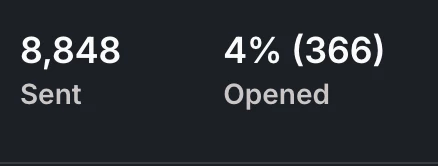


However, we also use POST messages, and inside those POST we include deeplinks to redirect users to specific screens in the app.

Here’s the issue:
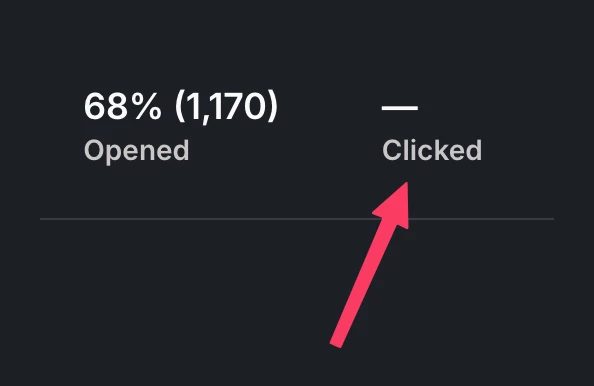
    •    We can track how many users opened the POST message
    •    But we cannot track link interactions inside the POST
    •    The “Clicked” metric is always empty, even when users tap the deeplink

Is there any workaround or recommended approach to track when users tap deeplinks or links inside POST messages?



Best answer by Paul D

Hi ​@Sebastian Labadié 

Thank you for reaching out about the missing click metrics for your Post messages.


The "Clicked" metric shows a dash because deeplinks using custom URL schemes are not trackable by Intercom's analytics system.

Intercom tracks clicks by routing users through a tracking redirect URL before sending them to the final destination. This works for standard HTTPS links, but custom URL schemes (like myapp://screen/home) open directly in your app without going through Intercom's tracking infrastructure.


When a user taps a deeplink in a Post message:
  1. The Intercom SDK intercepts the tap
  2. The SDK directly triggers the deeplink to open in your app
  3. No tracking redirect occurs, so no click is recorded

If you need attribution for those taps, our suggestion would be to add your own event tracking at the deep‑link destination in your app:

  • When your deep link is handled (e.g., your navigation handler routes to Screen X), call Intercom.logEvent (React Native: Intercom.logEvent(name, metadata)) to record “post_deeplink_clicked” with metadata like post_id, screen, and campaign id if available.

2 replies

Paul D
Intercom Team
Forum|alt.badge.img+2
  • Intercom Team
  • Answer
  • January 20, 2026

Hi ​@Sebastian Labadié 

Thank you for reaching out about the missing click metrics for your Post messages.


The "Clicked" metric shows a dash because deeplinks using custom URL schemes are not trackable by Intercom's analytics system.

Intercom tracks clicks by routing users through a tracking redirect URL before sending them to the final destination. This works for standard HTTPS links, but custom URL schemes (like myapp://screen/home) open directly in your app without going through Intercom's tracking infrastructure.


When a user taps a deeplink in a Post message:
  1. The Intercom SDK intercepts the tap
  2. The SDK directly triggers the deeplink to open in your app
  3. No tracking redirect occurs, so no click is recorded

If you need attribution for those taps, our suggestion would be to add your own event tracking at the deep‑link destination in your app:

  • When your deep link is handled (e.g., your navigation handler routes to Screen X), call Intercom.logEvent (React Native: Intercom.logEvent(name, metadata)) to record “post_deeplink_clicked” with metadata like post_id, screen, and campaign id if available.

Hello ​@Paul D. After we started using universal links, the metrics are now working correctly.
Thanks for your help!


