product tour never launches in preview | Community
Skip to main content
Answered

product tour never launches in preview

  • March 4, 2021
  • 5 replies
  • 133 views

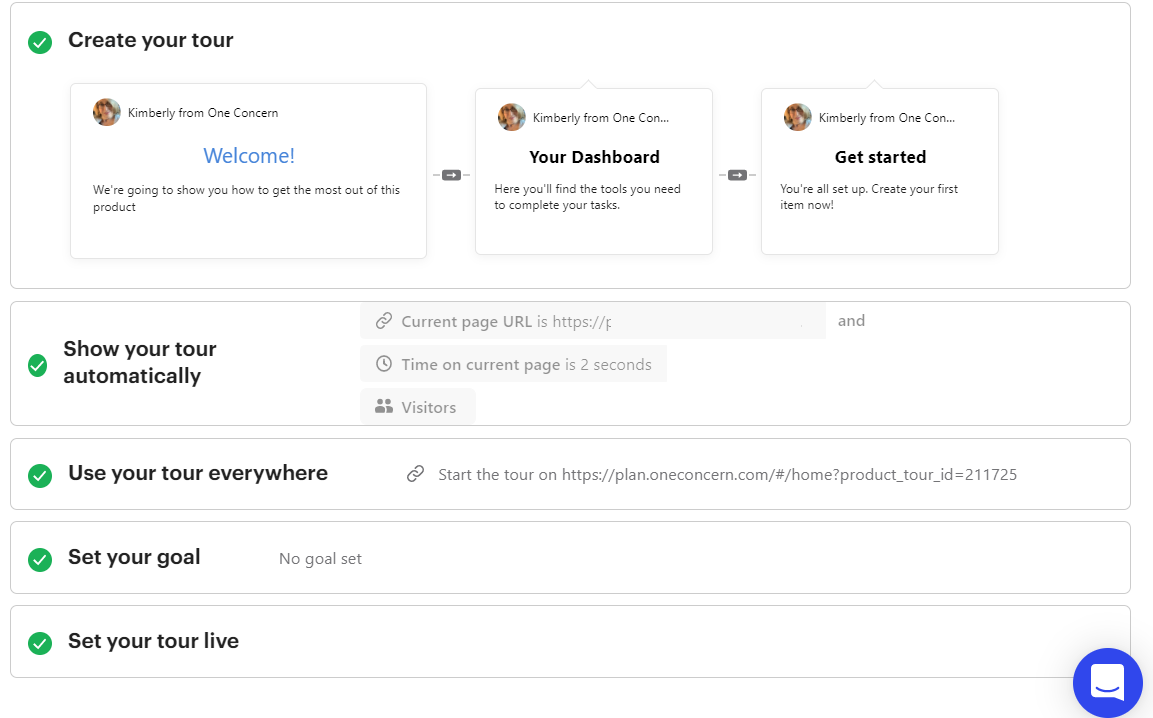
first try at a product tour. when i preview the tour, i'm routed to the correct url, i sign into my webb app, but the tour never displays. what newbie goof am i making?

Best answer by Roy

Hello @user892​ , Thanks for the screenshot, It seems you are targeting visitors instead of the users in your Product tour settings.


To launch a product tour for logged-in visitors, you should select Users here:

visitors 

Please, also make sure that you are tracking logged-in visitors in Intercom, More information can be found here:

Install Intercom on your web app to support and onboard logged-in users.


Let me know if you have any further questions about Product tours.

5 replies

Roy
Top Expert ✨
Forum|alt.badge.img+5
  • Top Expert ✨
  • March 5, 2021

Hello @user892​ 👋, Congratulations on creating your first product tour.


Basically, the users do not indicate the start parameters of the tour correctly. Can you share some screenshots from Product tour settings?


I will try to figure it out, Looking forward.


Best,

Roy


  • Author
  • Active User
  • March 5, 2021

here's a screenshot with url blurred tour


Roy
Top Expert ✨
Forum|alt.badge.img+5
  • Top Expert ✨
  • Answer
  • March 6, 2021

Hello @user892​ , Thanks for the screenshot, It seems you are targeting visitors instead of the users in your Product tour settings.


To launch a product tour for logged-in visitors, you should select Users here:

visitors 

Please, also make sure that you are tracking logged-in visitors in Intercom, More information can be found here:

Install Intercom on your web app to support and onboard logged-in users.


Let me know if you have any further questions about Product tours.


  • Author
  • Active User
  • March 8, 2021

aha! so if we aren't tracking users in Intercom, we can't properly specify when the product tour should launch? there is no all? I tried users, as well, but that didn't work.


Roy
Top Expert ✨
Forum|alt.badge.img+5
  • Top Expert ✨
  • March 8, 2021

@user892​ , Yes, that's right you should first start tracking logged-in visitors.

Intercom should determine which user completed the tour and don't show it again.


Also tracking logged-in visitors allow you to see customer information in the Intercom inbox (If they logged-in to your app).