We’re using Fin with an escalation rule that hands the conversation off to a human when certain conditions are met.
Right now, when escalation triggers, Fin sends the customer a fixed handoff message that repeats word-for-word across conversations.
The phrasing doesn’t match our support tone of voice, and it feels robotic.
Is there a way to control or customize the customer-facing text that Fin sends at the moment of escalation/handoff?
Best answer by Cédric V
@בן גטניו ,
This is a great result, thanks a lot for sharing,
As Communication Style / Escalation Guidance is global and you can only have one core escalation sentence there. To get different messages depending on why the escalation happened, i guess you’ll need to move that logic to the workflow + Fin Attributes / Escalation Rules layer.
I’d do something like :
Keep Fin’s own escalation line very short and generic In Guidance, keep something minimal that can be used for all cases so Fin always says the same, very short sentence when it escalates. (ex. “Just a moment.”)
Model the different escalation reasons as rules/attributes For example:
Escalation because the customer explicitly asked for a human → “ Escalation Rule A”.
Escalation because Fin is stuck / can’t resolve → “Escalation Rule B”.
Other reasons → additional rules/attribute values.
Branch in the workflow on those reasons and send different copy In your Fin workflow, after the “Let Fin handle” step and the handover, add branches on:
either “Escalation Rule = A / B / C”,
(or you use Fin Attribute)
Then in each branch, use a different Send bot message with the specific text you want for each scenario.
So in short:
Guidance = one global, short escalation line from Fin.
Per‑reason escalation copy = lives in the workflow branches, driven by your escalation rules / Fin attributes.
Use a Workflow with Branches to send your own custom handoff message:
Create your Escalation Guidance/Rule in Train > Escalations
Go to your Fin Workflow (Deploy > Chat or Workflows)
Add Branches after the "Let Fin answer" step
Set the condition to "Escalation" → select your escalation rule
Add a "Send Bot Message" step with your custom text
Then add "Assign conversation" to route to the right team/inbox
Optional:
You can also adjust Fin's global tone of voice .
I don't think this will solve your exact use case if you're targeting a very specific handoff message, but it might help someone if the issue is more about Fin's overall tone.
We actually made several adjustments and added guidance to help Fin manage its communication style. That said, this message feels very specific - almost like it’s coming from a preset template Fin is using.
I was under the impression there was a way to edit that without needing to set up a dedicated workflow.
By the way, if we do decide to use a workflow, would it override or conflict with any existing workflows that include escalations?
Just to note - we hadn’t seen this message before we created the escalation rule.
“I was under the impression there was a way to edit that without needing to set up a dedicated workflow.”
I think you’re not totally wrong to think that, because Intercom does let you influence what happens at escalation time with Guidance. But FAQ states:
“How can I customize the Fin's introduction and escalation messages?” →“While this default message itself cannot be directly edited or removed, you can influence this process by creating Guidance in Fin.” (Here :https://fin.ai/help/en/articles/10763810-faqs#h_10327e706c )
So if you want a fully custom, guaranteed, word‑for‑word handoff message, then yes, that does require using a Workflow with a “Send bot message” step on your escalation rule.
“If we do decide to use a workflow, would it override or conflict with any existing workflows that include escalations?”
I know that doc says that for a given conversation, only one customer‑facing workflow can trigger. So that would mean:
You don’t want multiple separate workflows all trying to handle the same Fin conversation in parallel.
In my mind, the safest pattern would be: extend your existing Fin workflow and add a branch on your Escalation Rule, instead of creating yet another separate workflow just for this.
If you do that i think:
You won’t be “fighting” with another workflow, you’re just adding more logic inside the one that’s already running for Fin.
Your other workflows will keep working off their own triggers/audiences
“We hadn’t seen this message before we created the escalation rule.”
I think that actually fits well how Fin is designed:
Before you set up a specific escalation rule, Fin uses its more “default” escalation behaviour.
Once you add an explicit rule, the escalation path becomes more structured and consistent → so that message now shows up every time that rule fires.
But honestly, the best way to be sure is to test it in a sandbox or with a test contact first. That way you'll see exactly how it behaves with your other workflows.
Right now, we have several workflows—some for “during office hours,” some for “outside office hours,” and a few others, such as a pop-up workflow for specific pages, etc.
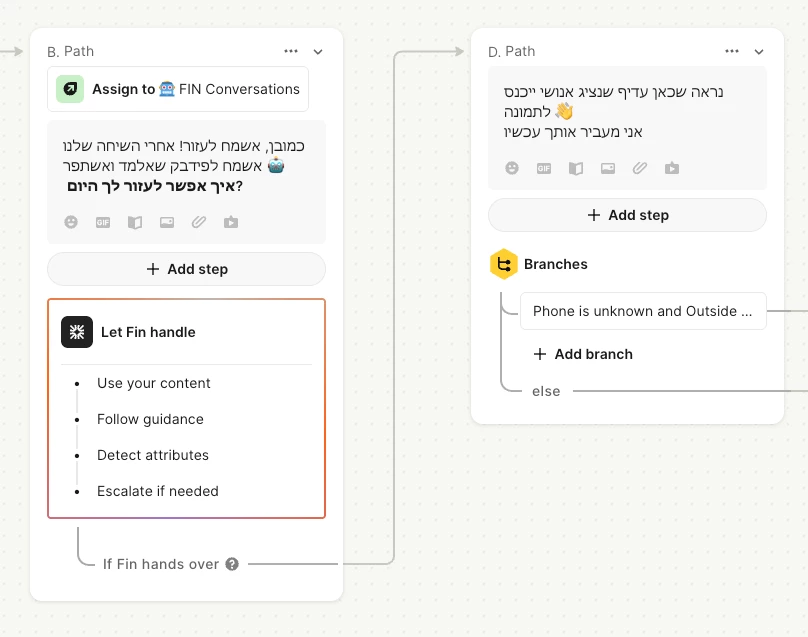
I’ve tried to add a message that appears right after the escalation is triggered. For example:
The message in D.path is what we would like Fin to respond with right when it’s escalated to a human agent.
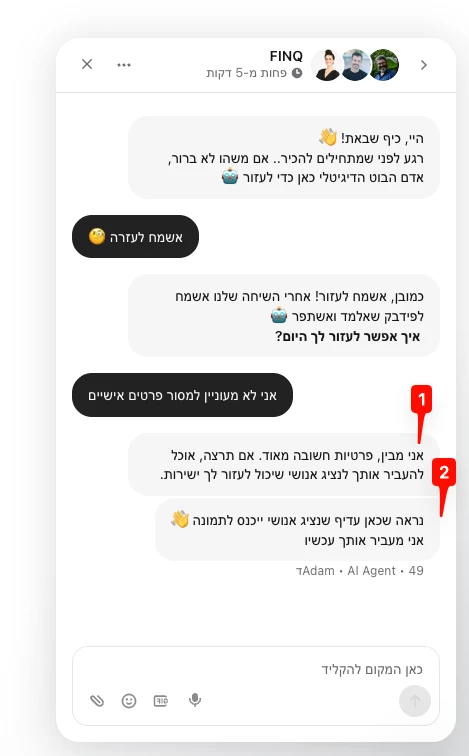
But the problem is that Fin is still using one of its own messages and the message we just set, which doesn’t make sense - we don’t want the customer to receive two messages.
For example:
Any idea how we can make sure that, when an escalation is triggered and we add a message to that workflow, only our message is sent to the customer - not both?
I think that actually we can’t “delete” this automated message.
So i guess the only thing might could work would be :
In Fin Guidance to try to add something like :
“When you decide to escalate to a human, send only this sentence: “Just a moment.” Do not add or change any words, do not add emojis, and do not send any other messages. After sending this sentence once, stop replying so the workflow and the human can take over.”
It’s not guaranteed (Guidance only influences Fin’s behaviour), but it should help keep Fin’s own escalation message as short and neutral as possible so your workflow message is the one that really stands out.
If you do test this, I’d be really curious to hear how it behaves.
I’ve set a Communication Style guidance like this:
When you decide to escalate to a human, send only this sentence: "נראה שכאן עדיף שנציג אנושי ייכנס לתמונה 👋 אני מעביר אותך עכשיו, כבר חוזרים אליך." What NOT to do: Do not add extra explanations before or after this message. Do not ask additional clarifying questions once you have determined the conversation is stuck. Do not use your default escalation text.
At the moment, this behaves exactly as expected and gives us full control over the escalation copy.
However, here’s the challenge 👇 Escalation can be triggered from multiple different scenarios, and each scenario should ideally have a different message.
For example:
If the customer explicitly asks to speak with an agent, the message should be one version
If Fin decides on its own to escalate because it cannot resolve the issue, the message should be different
Potentially other escalation reasons as well
Right now, Communication Style guidance seems global, so I can only define a single escalation message.
Is there a recommended way to vary the escalation message based on the escalation reason or trigger?
As Communication Style / Escalation Guidance is global and you can only have one core escalation sentence there. To get different messages depending on why the escalation happened, i guess you’ll need to move that logic to the workflow + Fin Attributes / Escalation Rules layer.
I’d do something like :
Keep Fin’s own escalation line very short and generic In Guidance, keep something minimal that can be used for all cases so Fin always says the same, very short sentence when it escalates. (ex. “Just a moment.”)
Model the different escalation reasons as rules/attributes For example:
Escalation because the customer explicitly asked for a human → “ Escalation Rule A”.
Escalation because Fin is stuck / can’t resolve → “Escalation Rule B”.
Other reasons → additional rules/attribute values.
Branch in the workflow on those reasons and send different copy In your Fin workflow, after the “Let Fin handle” step and the handover, add branches on:
either “Escalation Rule = A / B / C”,
(or you use Fin Attribute)
Then in each branch, use a different Send bot message with the specific text you want for each scenario.
So in short:
Guidance = one global, short escalation line from Fin.
Per‑reason escalation copy = lives in the workflow branches, driven by your escalation rules / Fin attributes.