How can we control the frequency of Fin’s “Did that answer your question?” follow-up? | Community
Skip to main content
Answered

How can we control the frequency of Fin’s “Did that answer your question?” follow-up?

  • January 28, 2026
  • 3 replies
  • 105 views

Forum|alt.badge.img+1

Hi everyone,


We’re seeing Fin frequently sending a follow-up message after responses, like:

“Did that answer your question?” / “Was this helpful?”


In many cases it happens almost after every message, and it can feel repetitive for customers.


Is there a way to control the frequency of this follow-up (reduce it, change when it appears, or disable it)?


We’d like more control so it doesn’t trigger too often.

Best answer by Nico Magbiray

Hey! I totally get where you're coming from. That 'Did that answer your question?' follow-up is actually Fin’s default 'handshake', it’s baked into the logic to make sure no user is left hanging after a response.

While we can't flip a single 'off' switch for it, I've found a few ways to make it feel less like a broken record:

The Question Mark Trick: This is a bit of a life-saver. If you end your Fin Guidance instructions with a question mark (e.g., 'Ask if they need help with their subscription?'), Fin often thinks it's already fulfilled the 'follow-up' requirement and won't double up on the default one.

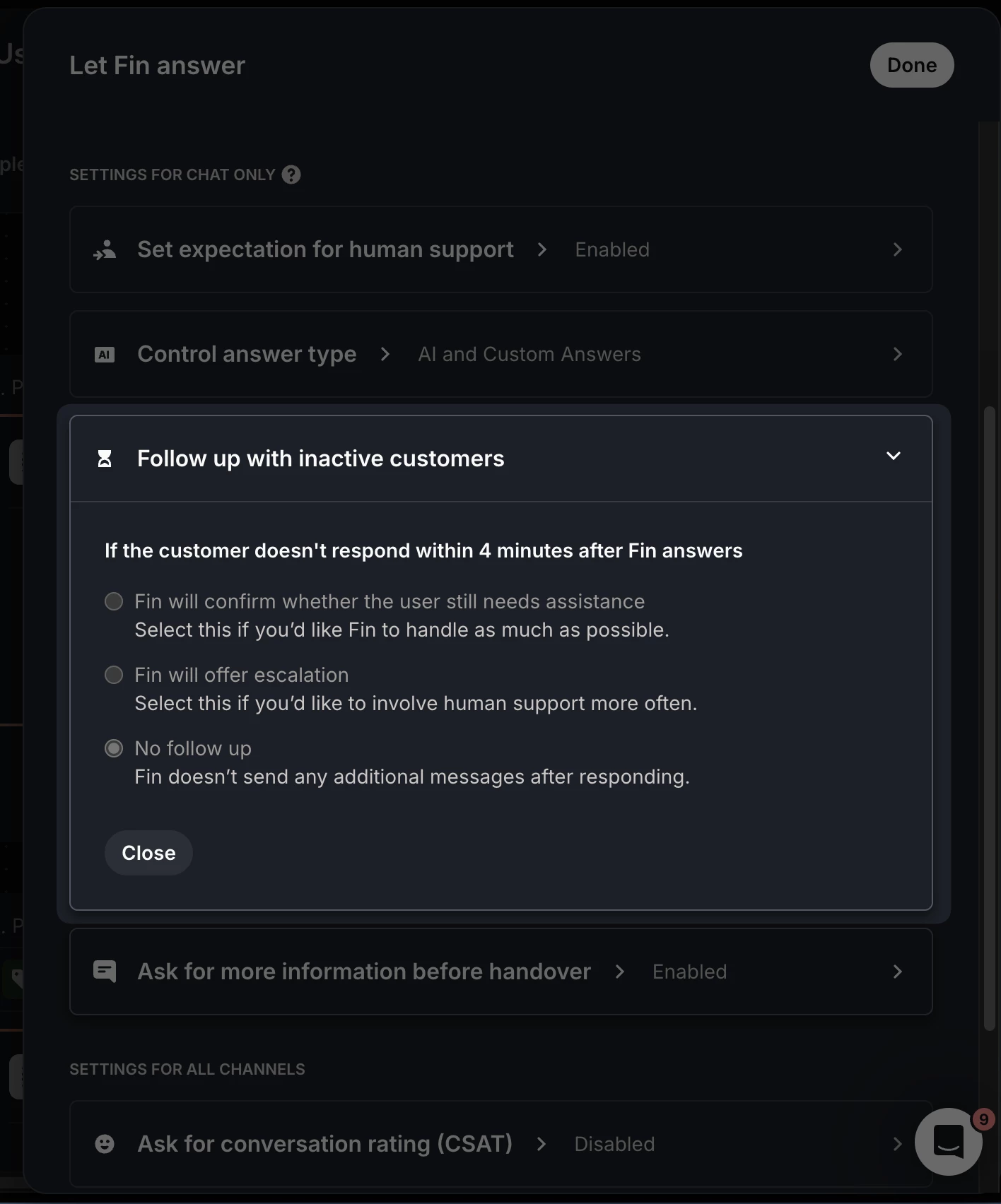
Workflow Tweaks: If you're using the 'Let Fin Answer' block in Workflows, double-check that 'Ask for more information before handover' is toggled off. It keeps things way punchier.

Tone Check: Setting Fin to 'Concise' mode cuts about 30% of the fluff, which makes those follow-ups feel a lot more natural and less like a bot script.

It’s definitely a quirk of the default behavior, but these tweaks usually help it feel a lot more human.


3 replies

Nathan Sudds
Top Expert ✨
Forum|alt.badge.img+8
  • Top Expert
  • January 28, 2026

@בן גטניו  If you’ve got an advanced Fin workflow setup, you can find this setting for Follow Up with Inactive Customers in each of the Fin boxes in the workflow  (see screenshot below) and decide if you want Fin to follow up or not in certain cases -- combined with Fin Attributes for example you can create a branch where certain topics are follow up and others don’t. 


Hope this helps


Forum|alt.badge.img+1

@בן גטניו  If you’ve got an advanced Fin workflow setup, you can find this setting for Follow Up with Inactive Customers in each of the Fin boxes in the workflow  (see screenshot below) and decide if you want Fin to follow up or not in certain cases -- combined with Fin Attributes for example you can create a branch where certain topics are follow up and others don’t. 


Hope this helps


Thanks, ​@Nathan Sudds. But how can I adjust the overall behavior of this follow-up message, regardless of any workflow?


Nico Magbiray
Innovator ✨
Forum|alt.badge.img+4
  • Innovator ✨
  • Answer
  • February 3, 2026

Hey! I totally get where you're coming from. That 'Did that answer your question?' follow-up is actually Fin’s default 'handshake', it’s baked into the logic to make sure no user is left hanging after a response.

While we can't flip a single 'off' switch for it, I've found a few ways to make it feel less like a broken record:

The Question Mark Trick: This is a bit of a life-saver. If you end your Fin Guidance instructions with a question mark (e.g., 'Ask if they need help with their subscription?'), Fin often thinks it's already fulfilled the 'follow-up' requirement and won't double up on the default one.

Workflow Tweaks: If you're using the 'Let Fin Answer' block in Workflows, double-check that 'Ask for more information before handover' is toggled off. It keeps things way punchier.

Tone Check: Setting Fin to 'Concise' mode cuts about 30% of the fluff, which makes those follow-ups feel a lot more natural and less like a bot script.

It’s definitely a quirk of the default behavior, but these tweaks usually help it feel a lot more human.