



Create Title and Description based on a conversation | Community
Skip to main content
Answered

Create Title and Description based on a conversation

  • March 31, 2026
  • 1 reply
  • 97 views

Juan Araujo

We are using the trial version with Expert capabilities to assess if Intercom suits our needs.


We want an AI agent to embed in our software products. This agent should provide level 1 support based on documentation content. If the agent cannot help, it should hand off to our Support and Product Team in Jira Service Desk by calling a data connector to create a new ticket via the Atlassian API.

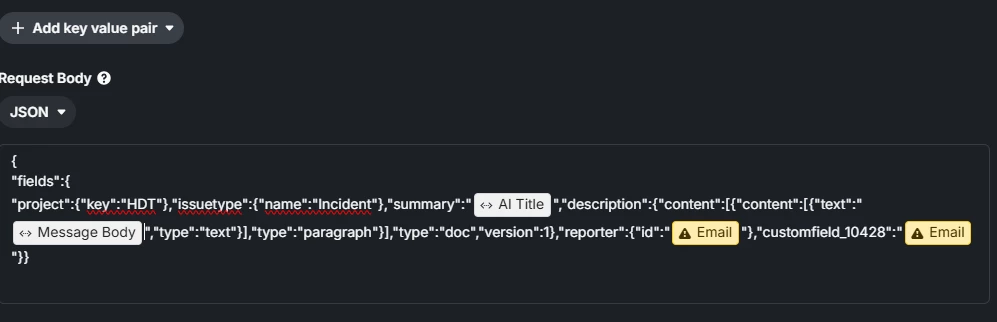
The challenge we face is that there seems to be no way to set a Title and Description or copy the conversation into attributes for the data connector.

Is there a way to achieve this?


We are not going to use Intercom Inbox, as our support team only will interact with our customers via Jira Service Desk. 


using Message Body, just the first user´s message is returned, other attributes from Conversation category doesn´t seems to be working for a data connection.

 

Best answer by Sean Meade Forum Support Lead

Hi ​@Juan Araujo, Seán here from the Fin technical support team 👋

Yes, this is possible with a Data connector, but what you're seeing with Message Body is expected.

At the moment, Data connectors can use attributes like Conversation ID, Conversation URL, Message Body, First Message Body, and Last Message Body, but they can't pass the full conversation transcript as a single field into Jira.

So for Jira title and description, the best approach is to collect the key details earlier in the flow, store them in conversation or temporary attributes, and then send those attributes in the request body.


Jira for Tickets app could work for part of this use case, but there is one important limitation, it works with Intercom Tickets, not directly with conversations.

So if you're happy to use an Intercom Ticket as the handoff layer between Fin and Jira, this is likely the cleaner option. With the Jira for Tickets integration:

  • basic automation syncs the Intercom ticket title and description to Jira,

  • custom automation can sync additional ticket attributes using Workflow templates,

  • and status / comments can also sync back between Jira and the Intercom ticket depending on how the workflow is configured.

If you want to read more, these are the most relevant docs:

The main caveat is that Jira for Tickets doesn’t support creating issues directly from conversations without converting them into tickets. So if your requirement is strictly Fin conversation → Jira Service Desk with no Intercom ticket involved, then the Jira for Tickets app won’t fully match that design, and a Data connector remains the better route.

1 reply

Forum|alt.badge.img+6

Hi ​@Juan Araujo, Seán here from the Fin technical support team 👋

Yes, this is possible with a Data connector, but what you're seeing with Message Body is expected.

At the moment, Data connectors can use attributes like Conversation ID, Conversation URL, Message Body, First Message Body, and Last Message Body, but they can't pass the full conversation transcript as a single field into Jira.

So for Jira title and description, the best approach is to collect the key details earlier in the flow, store them in conversation or temporary attributes, and then send those attributes in the request body.


Jira for Tickets app could work for part of this use case, but there is one important limitation, it works with Intercom Tickets, not directly with conversations.

So if you're happy to use an Intercom Ticket as the handoff layer between Fin and Jira, this is likely the cleaner option. With the Jira for Tickets integration:

  • basic automation syncs the Intercom ticket title and description to Jira,

  • custom automation can sync additional ticket attributes using Workflow templates,

  • and status / comments can also sync back between Jira and the Intercom ticket depending on how the workflow is configured.

If you want to read more, these are the most relevant docs:

The main caveat is that Jira for Tickets doesn’t support creating issues directly from conversations without converting them into tickets. So if your requirement is strictly Fin conversation → Jira Service Desk with no Intercom ticket involved, then the Jira for Tickets app won’t fully match that design, and a Data connector remains the better route.
