
Fin escalates outside office hours, breaks flow, and creates backlog | Community
Skip to main content
Question

Fin escalates outside office hours, breaks flow, and creates backlog

  • May 27, 2026
  • 12 replies
  • 284 views

Tonje Ness Meinhardt
Forum|alt.badge.img+2

Hi,

We’re struggling with Fin’s behavior outside office hours, and at this point it’s becoming a critical issue for us. We’ve been in contact with support, they are looking into it. We’d really like to hear if anyone in the forum has tips or experience with the same issue.


Expected behavior

  • Fin should run 24/7
  • Answer what it can
  • Not escalate when we are closed
  • Inform the customer to return during opening hours if needed
  • Continue the conversation and close it after inactivity
 

What is happening

1. Conversations are escalated anyway

  • Fin sends the away message
  • But still creates an open “unassigned” conversation
  • These pile up into a backlog we explicitly do not want
 

2. Fin stops responding

  • The Fin step is skipped completely
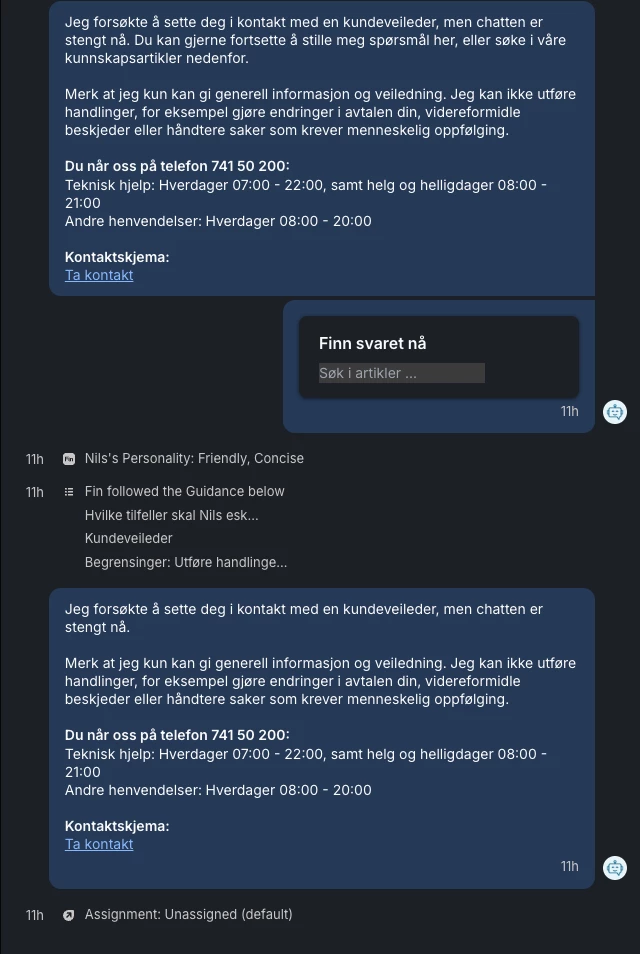
  • Customers often receive the away message twice
  • The conversation just stops

This creates a very poor and confusing experience.


3. Conversations never return to Fin Previously:

  • Fin continued after the away message
  • Conversations were handled and automatically closed

Now:

  • Conversations get stuck after escalation
  • They stay open and unassigned
  • Fin never resumes
 

What it looks like

It seems like:

  • Escalation interrupts the flow completely
  • Fin gets “stuck” and cannot continue
  • Settings like inactivity handling are ignored
 

Impact

  • Customers receive incomplete or confusing responses
  • Conversations remain open with no real follow-up
  • We get unnecessary backlog in unassigned
  • We’re close to disabling Fin outside office hours entirely
 

Key difference from before

This worked fine about a month ago:

  • Fin responded after the first away message
  • The flow continued
  • Conversations were closed automatically

Now:

  • Fin steps are skipped
  • Away message is sent twice
  • Conversations are left open
 

Question

  • Has something changed recently in how escalation interacts with Fin?
  • Is there any way to fully prevent escalation outside office hours while still letting Fin continue and close conversations?
  • Are others seeing the same behavior?
  • Is there anything we might have overlooked or configured incorrectly?


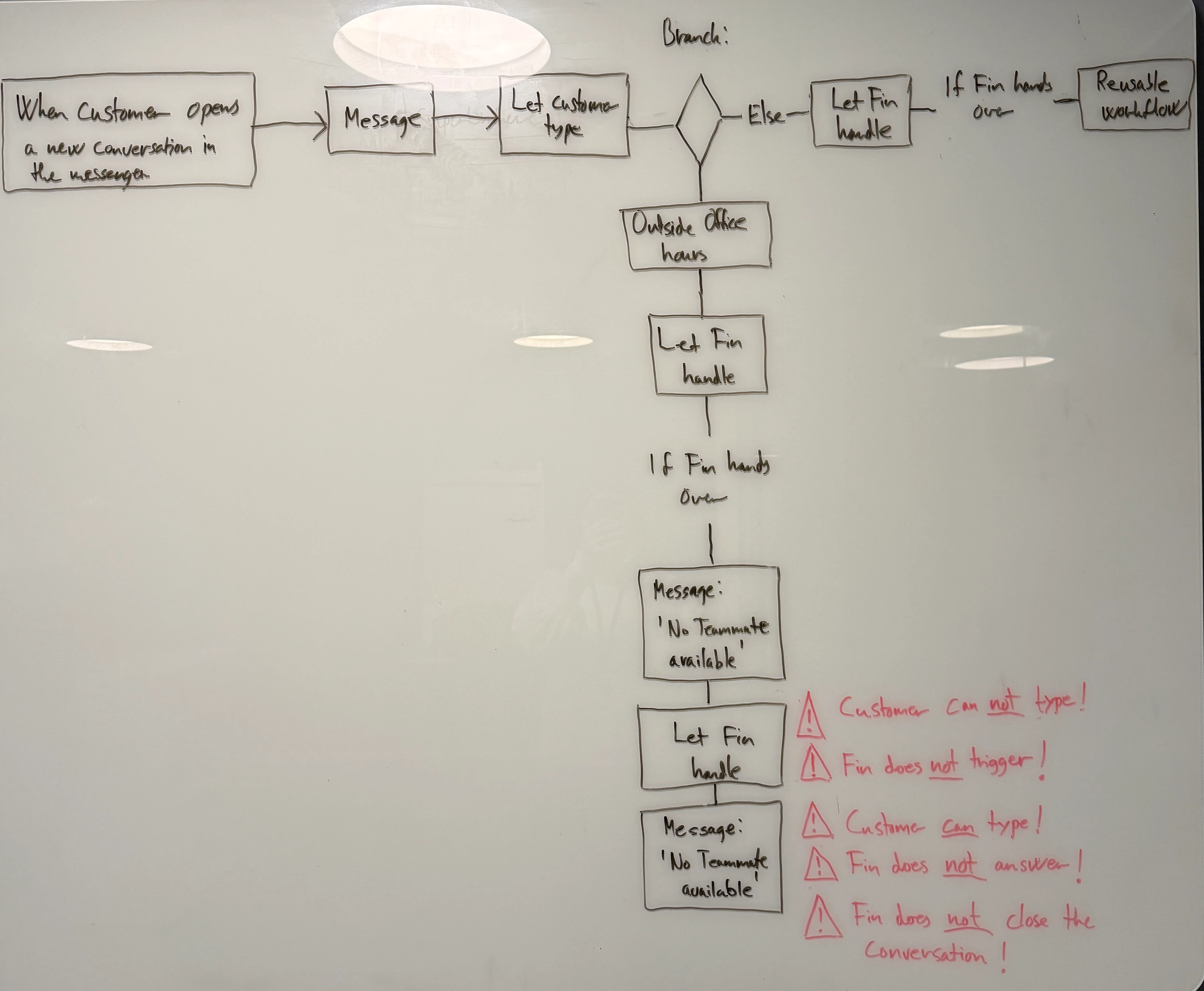
Our workflow today

  • Our current flow worked very well a few months ago, but we strongly feel that something has changed since then.
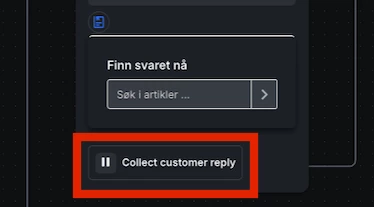
  • Example of a Fin step being skipped: both of our away messages are triggered at the same time, and the customer doesn’t get a chance to respond in between.

     

12 replies

Forum|alt.badge.img+3
  • Active User
  • May 28, 2026

I would let Fin handle at the start of the conversation before branching. And if Fin needs to escalate then branch to decide IF in office hours or not. I feel like that would simplify this quite a bit. 


Customer Messages

  • Let Fin Handle
    • If escalation is needed
      • Outside of office hours collect their information
      • Inside of office hours chat with a human. 


May also be worth checking a conversation and expanding the conversation details to see why exactly it’s not routing as expected. You should be able to see Fin’s thought process, what escalation guidance its using, and where it’s breaking from within the workflow. 


Aleksei O
Super User ✨
Forum|alt.badge.img+5
  • Super User
  • May 28, 2026

Hej ​@Tonje Ness Meinhardt ! 


May I ask if your current escalation logic is done completely via workflows or if there is any Fimn guidance in place, which is supposed to tackle escalations? 


Tonje Ness Meinhardt
Forum|alt.badge.img+2

Hej ​@Tonje Ness Meinhardt ! 


May I ask if your current escalation logic is done completely via workflows or if there is any Fimn guidance in place, which is supposed to tackle escalations? 

Hi, ​@Aleksei O 

We use guidance. We newly got feedback from Intercom support, to try and turn off escalation during outside office hours. They activated a button in our workspace for that. We tried it out yesterday, but quickly realized we had to roll it back.


The immediate issue was that we completely lost the away message. This makes sense, since nothing escalates anymore. However, we also saw that Fin no longer followed any escalation guidance at all, which again is logical when escalation is turned off.


Ideally, we would still want Fin to respect escalation guidance even when escalation is disabled. For example, in cases where it would normally escalate, it should inform the customer clearly, such as: “Chat with a customer advisor is currently closed.” Instead, Fin responds with: “I understand you want to speak with a human. Unfortunately, I can’t connect you directly from this chat.” This response is not sufficient and does not properly set expectations for the customer.


Disabling escalation outside opening hours turned out to be too risky for us. Within the telecom domain, there are many scenarios that require human handling, and we cannot have Fin communicating in this way when escalation is off. It felt as though the chatbot lost its contextual understanding entirely.


If Fin could still apply escalation guidance in some form without fully enabling escalation, that would help significantly. For instance, in cases like cancellations—which require human handling—Fin should clearly say: “We are currently closed, please contact us during opening hours and we will assist you.” And showing our contact form online maybe.


However, this again comes back to the underlying issue: Fin does not sufficiently understand or act on time. It does not clearly recognize when we are actually closed. 


We have tried to create guidance that explicitly references time—when it should apply and when it should not. However, Fin does not take this into account and applies the same guidance regardless of whether we are open or closed.


This makes it very difficult for us to get Fin to distinguish between our setup during opening hours and outside of them. In the telecom industry, we operate with several layers that need to be considered: we offer chat support during the day, phone-based technical support (handled by a third party) until 10 PM, and then we are completely closed until 7 AM the next day.

Sorry for the long response to a short question. I just wanted to provide context on what we’ve been doing recently and the issues we’re still experiencing.


Tonje Ness Meinhardt
Forum|alt.badge.img+2

I would let Fin handle at the start of the conversation before branching. And if Fin needs to escalate then branch to decide IF in office hours or not. I feel like that would simplify this quite a bit. 


Customer Messages

  • Let Fin Handle
    • If escalation is needed
      • Outside of office hours collect their information
      • Inside of office hours chat with a human. 


May also be worth checking a conversation and expanding the conversation details to see why exactly it’s not routing as expected. You should be able to see Fin’s thought process, what escalation guidance its using, and where it’s breaking from within the workflow. 

Hi, ​@Gerald Prado 
Thanks for the suggestion, we haven’t tried that yet. It’s surprising we didn’t think of it earlier. We’ll definitely give it a try and see how it works.


Aleksei O
Super User ✨
Forum|alt.badge.img+5
  • Super User
  • May 29, 2026

God dag ​@Tonje Ness Meinhardt 👋

No, thank you for the long answer. I prefer those over the short ones :) So you use guidance rather than Escalation Rules? 


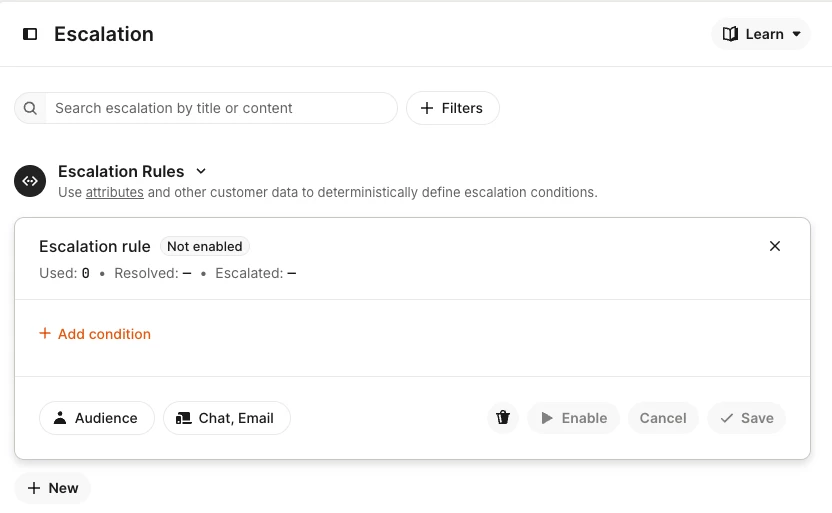
It’s possible to use branches and Office Hours in the Workflows, but it seems like Fin cannot use Office Hours yet. What is available is the Audience, so we can build a workaround: 


  1. Create a Custom user Attribute “Conversation started during office hours” Yes/No
  2. Create a Workflow triggering from Customer Sends Their first message. Use Branches to define if it’s office hours or not, then set “Conversation started during office hours” to Yes/No
  3. Build Fin escalation rules for two audiences, taking into account this attribute
  4. Define logic for outside office hours escalation. Send to a different team? Or create a ticket? 

This way your escalation will tackle actual office hours (if those are up-to-date in Settings). But the bottom line is that Fin will always escalate one way or another, as it’s a built-in feature. Fin cannot discard escalation requests :( 


Please let me know if it makes sense! Happy to try options together if you’d like to. 


Aleksei O
Super User ✨
Forum|alt.badge.img+5
  • Super User
  • May 31, 2026

@Tonje Ness Meinhardt It crossed my mind that you would probably prefer no escalation at all outside office hours. Would it make sense for you to use workflows then, in addition to what I suggested above? 

E.g. your regular flow would run as usual with Guidance on, but outside office hours you could add your away message to the workflow path.


Tonje Ness Meinhardt
Forum|alt.badge.img+2

I would let Fin handle at the start of the conversation before branching. And if Fin needs to escalate then branch to decide IF in office hours or not. I feel like that would simplify this quite a bit. 


Customer Messages

  • Let Fin Handle
    • If escalation is needed
      • Outside of office hours collect their information
      • Inside of office hours chat with a human. 


May also be worth checking a conversation and expanding the conversation details to see why exactly it’s not routing as expected. You should be able to see Fin’s thought process, what escalation guidance its using, and where it’s breaking from within the workflow. 

Hi, ​@Gerald Prado 
Thanks for the suggestion, we haven’t tried that yet. It’s surprising we didn’t think of it earlier. We’ll definitely give it a try and see how it works.

Hi, we tried your suggestion over the weekend. The flow itself looks cleaner, but Fin is still behaving the same as before we changed when the flow checks for opening hours.

Kindest regards
Tonje


Tonje Ness Meinhardt
Forum|alt.badge.img+2


This sounds like a workflow routing conflict rather than a Fin bug, though the timing of it starting a month ago is suspicious and worth flagging hard to support. The most common cause of this pattern is having an "Assign to team" or escalation step in your workflow that fires before Fin gets a chance to finish, especially when office-hours conditions are evaluated. Check whether your workflow has any condition block that routes based on team availability - if that block runs and finds no agents, it can hand the conversation to the unassigned queue and simultaneously kill the Fin thread. The double away message is a classic sign of two separate workflow paths both hitting their own "send message" step.
 

A few things to audit: make sure the "closed hours" branch of your workflow ends with Fin still in control, not with an assignment step. If you have an "escalate to team" step anywhere in the after-hours path, try replacing it with a "send message + wait for reply + close after inactivity" sequence instead. Intercom's inactivity close rule only fires if the conversation is still owned by the bot, so any assignment step that moves it to a human queue will prevent that from triggering. If your workflow used to work and nothing on your end changed, it is genuinely worth asking support whether there were any recent changes to how Fin interacts with office-hours routing logic, because your description of the regression is very specific.


(Disclosure: I work on Velax, an analytics layer on top of Intercom - https://velax.ai - so I see a lot of Fin workflow patterns. The stuck-open unassigned conversations you're describing show up clearly in backlog aging reports, which can at least help you quantify the scope while you debug the root cause.)

Hi, ​@Ilija Milovic 

Thanks for your feedback. We’ve checked what feels like everything together with Intercom support and implemented the suggested settings. They suggested to disabled the “Set expectations for human support” option in the same Fin flow (for outside office hours) and added a confirmation step so Fin asks whether the user still needs assistance. However, the next Fin step is still being skipped, and users are not given the opportunity to reply in between.

Thank you for the suggestion. We’ve now added a “Wait for reply” step after “Send message” to see if that makes a difference.

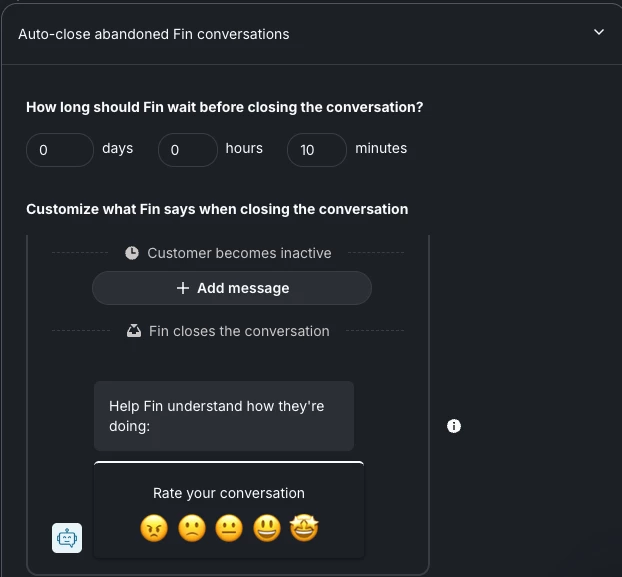
Regarding “close after inactivity,” I don’t see it as a separate step in the flow, but it’s usually handled by the one shown in the screenshot below. However, this step is also being skipped, and the conversations are left open in the unassigned inbox.

We’ve also shared examples with Intercom from a few months ago, when the same setup was working as expected. However, our unassigned inbox is now filling up with open conversations.


Tonje Ness Meinhardt
Forum|alt.badge.img+2

Tonje, the part that stood out is Fin sending the away message but still creating open unassigned conversations. That feels like the worst version of automation: the customer gets a half-answer and the team still gets a backlog to clean up.

I'm not with Intercom and I don't sell a support bot. I'm testing whether teams dealing with this kind of issue would want a small real-case comparison: take a few past after-hours conversations with customer details removed, run the same cases through the support AI options or setups they're considering, and send back which one handles them cleanly and where it breaks.

Would that be useful?

Hi, ​@Jaden Ahn Thank you for your reply. We have examples from when the same setup—even with three Fin steps—worked without any issues, sending the away message and closing inactive conversations as expected. We’re unable to recreate this behavior today, as something is no longer functioning as it did before. We have submitted all of this for review.


Tonje Ness Meinhardt
Forum|alt.badge.img+2

God dag ​@Tonje Ness Meinhardt 👋

No, thank you for the long answer. I prefer those over the short ones :) So you use guidance rather than Escalation Rules? 


It’s possible to use branches and Office Hours in the Workflows, but it seems like Fin cannot use Office Hours yet. What is available is the Audience, so we can build a workaround: 


  1. Create a Custom user Attribute “Conversation started during office hours” Yes/No
  2. Create a Workflow triggering from Customer Sends Their first message. Use Branches to define if it’s office hours or not, then set “Conversation started during office hours” to Yes/No
  3. Build Fin escalation rules for two audiences, taking into account this attribute
  4. Define logic for outside office hours escalation. Send to a different team? Or create a ticket? 

This way your escalation will tackle actual office hours (if those are up-to-date in Settings). But the bottom line is that Fin will always escalate one way or another, as it’s a built-in feature. Fin cannot discard escalation requests :( 


Please let me know if it makes sense! Happy to try options together if you’d like to. 


God dag ​@Aleksei O 
We’ll definitely give this a try sometime this week. Thanks for the suggestion!

Kindest regards
Tonje


Tonje Ness Meinhardt
Forum|alt.badge.img+2


This sounds like a workflow routing conflict rather than a Fin bug, though the timing of it starting a month ago is suspicious and worth flagging hard to support. The most common cause of this pattern is having an "Assign to team" or escalation step in your workflow that fires before Fin gets a chance to finish, especially when office-hours conditions are evaluated. Check whether your workflow has any condition block that routes based on team availability - if that block runs and finds no agents, it can hand the conversation to the unassigned queue and simultaneously kill the Fin thread. The double away message is a classic sign of two separate workflow paths both hitting their own "send message" step.
 

A few things to audit: make sure the "closed hours" branch of your workflow ends with Fin still in control, not with an assignment step. If you have an "escalate to team" step anywhere in the after-hours path, try replacing it with a "send message + wait for reply + close after inactivity" sequence instead. Intercom's inactivity close rule only fires if the conversation is still owned by the bot, so any assignment step that moves it to a human queue will prevent that from triggering. If your workflow used to work and nothing on your end changed, it is genuinely worth asking support whether there were any recent changes to how Fin interacts with office-hours routing logic, because your description of the regression is very specific.


(Disclosure: I work on Velax, an analytics layer on top of Intercom - https://velax.ai - so I see a lot of Fin workflow patterns. The stuck-open unassigned conversations you're describing show up clearly in backlog aging reports, which can at least help you quantify the scope while you debug the root cause.)

Hi, ​@Ilija Milovic 
Thanks for your feedback. We’ve thoroughly reviewed everything and implemented recommended settings. Support advised us to disable the “Set expectations for human support” option in the same Fin flow (for outside office hours) and to add a confirmation step where Fin asks whether the user still needs assistance. However, the next Fin step is still being skipped, and users are not given the opportunity to reply in between.

Thank you for the suggestion. We’ve now added a “Wait for reply” step after “Send message” to see if that makes a difference.


Tonje Ness Meinhardt
Forum|alt.badge.img+2

Hi everyone,

I just wanted to close the loop on this and share what ended up working for us.

Based on a suggestion from someone here in the forum, we introduced an additional step in our flow. This extra step prevents duplicate out-of-office messages and allows the customer to re-engage properly in the next Fin step. Fin now also closes the conversation automatically at the end, just like before.

We’ve tested this across all flows for a couple of days, and it has resolved the issue. We’re no longer seeing conversations left unassigned.

A big thank you to everyone who contributed with ideas, suggestions, and engagement — this forum is what led us to the solution 🙌

Really appreciate the help!