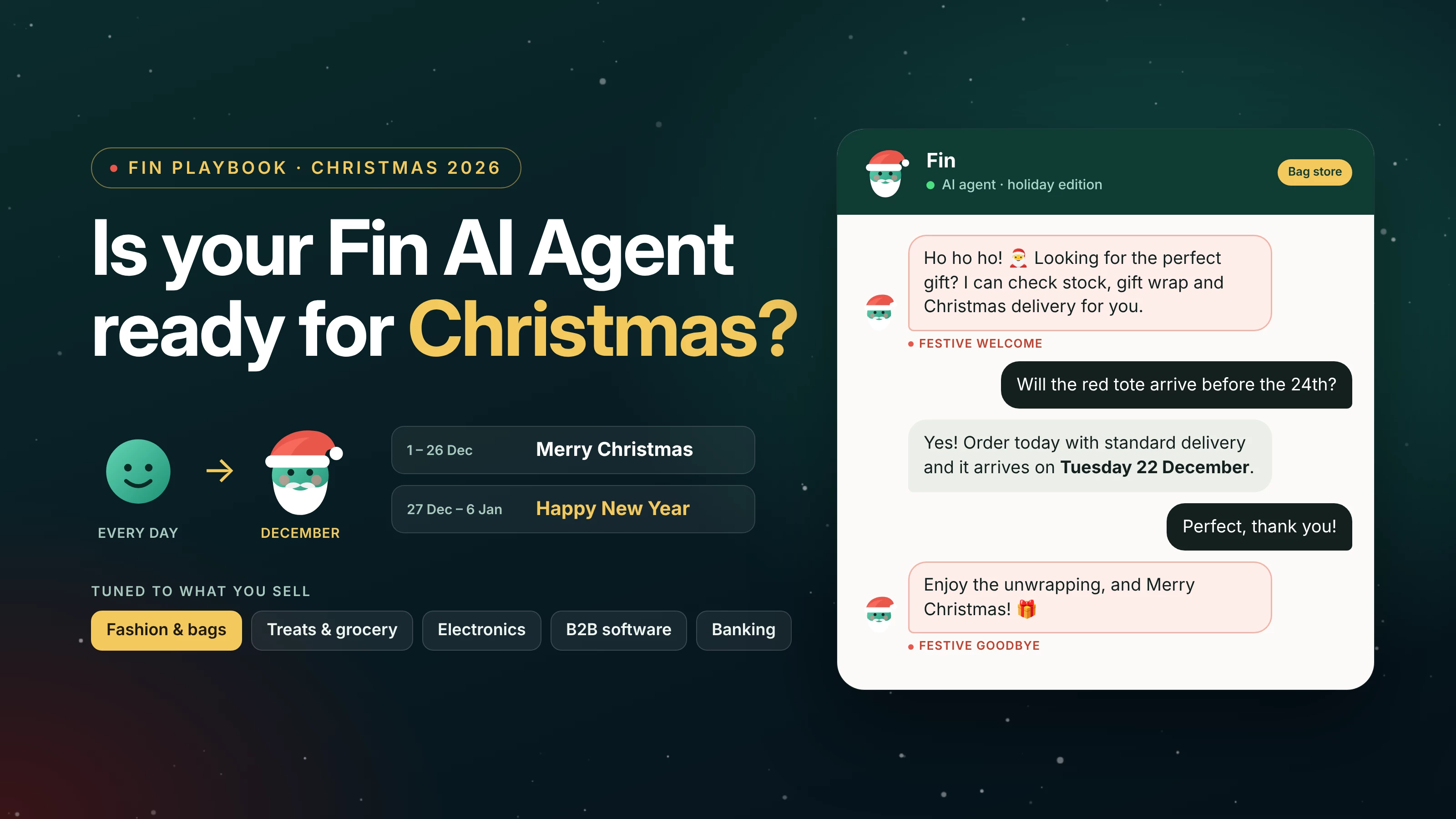
Hi everyone 👋 🎅
I wanted to share this with the community because I couldn't find a single article on how to get Fin ready for Christmas. There's plenty out there on getting support teams ready for the holidays, but nothing on the AI agent itself.
I think this is really important, so I'm sharing it now while there's still time before Black Friday. It's the playbook I use myself, it's all practical, and every step shows where it lives in Intercom. Fingers crossed it makes it onto the Intercom blog one day 🙂
Your team is ready for Christmas, but is your AI agent?
Every year we see the same "how to prepare your support for Christmas" guides. Hire temps, write macros, extend your hours. It's good advice, but it was written for human teams, and in December Fin is the first one most of your customers talk to.
So for me the real question is a different one. Does Fin know your Christmas cut-off dates, does it tell people honestly when a human is back, and does it feel even a little bit like Christmas when someone opens the chat?
Intercom has its own holiday help article that covers switching Fin on and adding holiday hours. In this post I go through everything after that, and for every step I show you where it lives in Intercom.
The old playbook still works, Fin just owns it now
I went back through the classic holiday guides from Shopify and Intercom's own blog. Most of the advice is still right, the only difference is that now Fin is the one doing it.
| The classic advice | The Fin version | Where in Intercom |
|---|---|---|
| Give the support portal a festive look | Give Fin a holiday avatar | Fin's identity settings |
| Train agents on a warm holiday tone | A festive hello, a festive goodbye and the right tone setting | Deploy > Chat, Train > Guidance |
| Write canned replies for holiday FAQs | One holiday article Fin reads from | Knowledge Hub |
| Warn customers about shipping delays | Procedures that check the real order and the live tracking | Train > Procedures, Data connectors |
| Publish your holiday hours | Holiday office hours and a clear message about when a human is back | Office hours, Train > Escalation |
Step 1: Put a Santa hat on your AI agent
Honestly this is the easiest win, and customers see it straight away. Most teams forget their AI agent even has a face.
Go to Settings > AI & Automation > Fin AI Agent > Fin's identity, hover over the avatar and upload a new image. I'd go with your normal avatar wearing a Santa hat, or a friendly Santa Claus if your brand is more playful. Keep it recognisable so people still know it's you. And keep the name, a new name in December just confuses people.
If you run several brands, each one has its own Fin identity with the Multiple Brands feature, so every brand can get its own festive version.
A few things to know:
- The avatar shows on all bot messages in the Messenger, workflows too
- It doesn't show in email clients
- Conversations that already started keep the old avatar
- It won't switch back by itself, so add a reminder for January
Step 2: Be festive at hello and goodbye, not in every reply
Please don't add "Merry Christmas" to every answer. By the second message it gets annoying, and on a lost parcel complaint it's simply wrong. The festive touch belongs in two places, the hello and the goodbye.
The wish also needs to match the date, because Christmas and New Year are two different moments:
| Dates | Wish |
|---|---|
| 1 to 26 December | Merry Christmas |
| 27 December to 6 January | Happy New Year |
| Rest of the year | No seasonal wish |
The hello: printed welcome or Guidance, pick one
This is the part people mix up, because two different things in Intercom can say hello.
The welcome message is fixed text. You type it in Fin AI Agent > Deploy > Chat under "Let Fin introduce itself", or in the greeting at the start of your Fin workflow, and Fin shows it exactly as you wrote it. Guidance can't change it and it doesn't know the date. In Simple deploy Fin does translate it automatically though.
Fin's answers are different. They're written by AI, so Guidance shapes them, and Guidance knows the current date and the conversation so far.
So you have two ways to do it:
- Printed welcome: change the text on 1 December to your Christmas welcome and on 27 December to the New Year one. If you'd rather change it less, write one "Happy holidays" welcome that works for the whole period
- Guidance: keep your normal welcome and add one rule, so Fin opens its first answer with the right festive hello by itself. The only catch is that it shows up after the customer sends their first message, not the moment they open the chat
[Xmas] Festive hello · Communication style
In your first reply in a conversation, start with one short festive greeting. From 1 to 26 December wish them a merry Christmas, and from 27 December to 6 January wish them a happy New Year. On any other date don't add a seasonal greeting. If the customer opens with a problem or a complaint, skip the greeting and go straight to helping
Just don't use both together, or your customers get greeted twice.
The goodbye: one Guidance rule
For the goodbye one rule is enough, since Guidance already knows the date. Add it in Fin AI Agent > Train > Guidance:
[Xmas] Seasonal goodbye · Communication style
Only add a seasonal wish when the customer thanks you, confirms their issue is solved, or says goodbye. In every other reply, just answer the question. From 1 to 26 December wish them a merry Christmas, and from 27 December to 6 January wish them a happy New Year. On any other date add no seasonal wish. If the customer reported a problem or a complaint in this conversation, close warmly but without a seasonal wish
If Fin auto-closes inactive chats, that closing message in Deploy > Chat is fixed text as well, same as the welcome. Give it a Christmas and a New Year version.
A few small things that make all of this work:
- Fin only adds emojis on the Friendly or Humorous tone (Train > Guidance > Basics)
- Describe the wish instead of dictating exact words, because dictated text isn't translated
- Start every seasonal rule title with [Xmas], so you can find them all in January
Step 3: Match the festive tone to what you sell
A bag shop shouldn't sound like a grocery store in December, and a bank shouldn't sound like either of them. Use these as a starting point for your hello, your goodbye and the one thing Fin has to get right in your industry.
| You sell | Christmas hello | Goodbye wish | What Fin must get right |
|---|---|---|---|
| Fashion, bags and accessories | "Ho ho ho! 🎅 Looking for the perfect gift? I can check stock, gift wrap and Christmas delivery for you" | "Enjoy the unwrapping, and merry Christmas!" | Last order dates, gift wrap, gift receipts, extended returns |
| Christmas treats, food and grocery | "Merry Christmas from our kitchen! 🎄 I can help with delivery slots, ingredients and substitutions" | "Have a delicious Christmas!" | Christmas Eve slot cut-offs, closed days, substitutions. Ingredients only from product data |
| Electronics and toys | "Ho ho ho! 🎅 Need help choosing a gift, or setting one up? I'm here, even on Christmas morning" | "Have fun with the new gadget, and merry Christmas!" | Setup guides and warranty. Christmas Day is your setup peak, and your team is off |
| Software and B2B | "Hi there! Our team is away from 24 December to 3 January, but I can help with most things right now" | "Wishing you a great end to the year" | Holiday support hours, renewals, year-end invoices. Skip the ho ho ho |
| Banking, fintech and gambling | "Season's greetings! I'm here 24/7 over the holidays" | "Have a safe and happy Christmas" | Bank holiday payment dates and holiday scam warnings. Safer gambling messages stay on. Never mix festive cheer with spending or betting |
For the New Year window just swap the wish, for example "Here's to a delicious New Year!" for the grocery store. You can also steer the hello and goodbye rules from Step 2 with one extra line about your style, like "Keep the wish playful and mention unwrapping" for a gift shop, or "Keep it short and professional" for B2B.
Step 4: Give Fin one holiday source of truth
Fin answers from your content first. If your Christmas dates live in three different places, sooner or later Fin will quote the wrong one.
- Write one article, something like "Christmas 2026: delivery, returns and hours", with last order dates per shipping method, the returns window, support hours and bank holidays. For the UK that's Friday 25 December, Monday 28 December and Friday 1 January
- Point Fin to it with a Content guidance rule (Train > Guidance > Content and sources): "When a customer asks about Christmas delivery, returns or support hours, use @Christmas 2026 delivery, returns and hours"
- Add one more rule against false promises: "Never promise that an order will arrive before Christmas. Instead, share the last order dates from our Christmas article"
- Switch off last year's article in Fin's content settings. Just telling Fin to avoid it isn't enough, because Fin can still use a source if it's the best match
- Use the same dates everywhere, your site banner and Messenger News item included, so nothing contradicts Fin
Step 5: Let Procedures handle the delivery questions
Most December questions are about delivery, and almost all of them need date maths. Intercom says it clearly in their docs: Fin can't reliably calculate dates in a normal answer, that logic belongs in a Procedure. So both of these go into Fin AI Agent > Train > Procedures.
Will it arrive by Christmas?
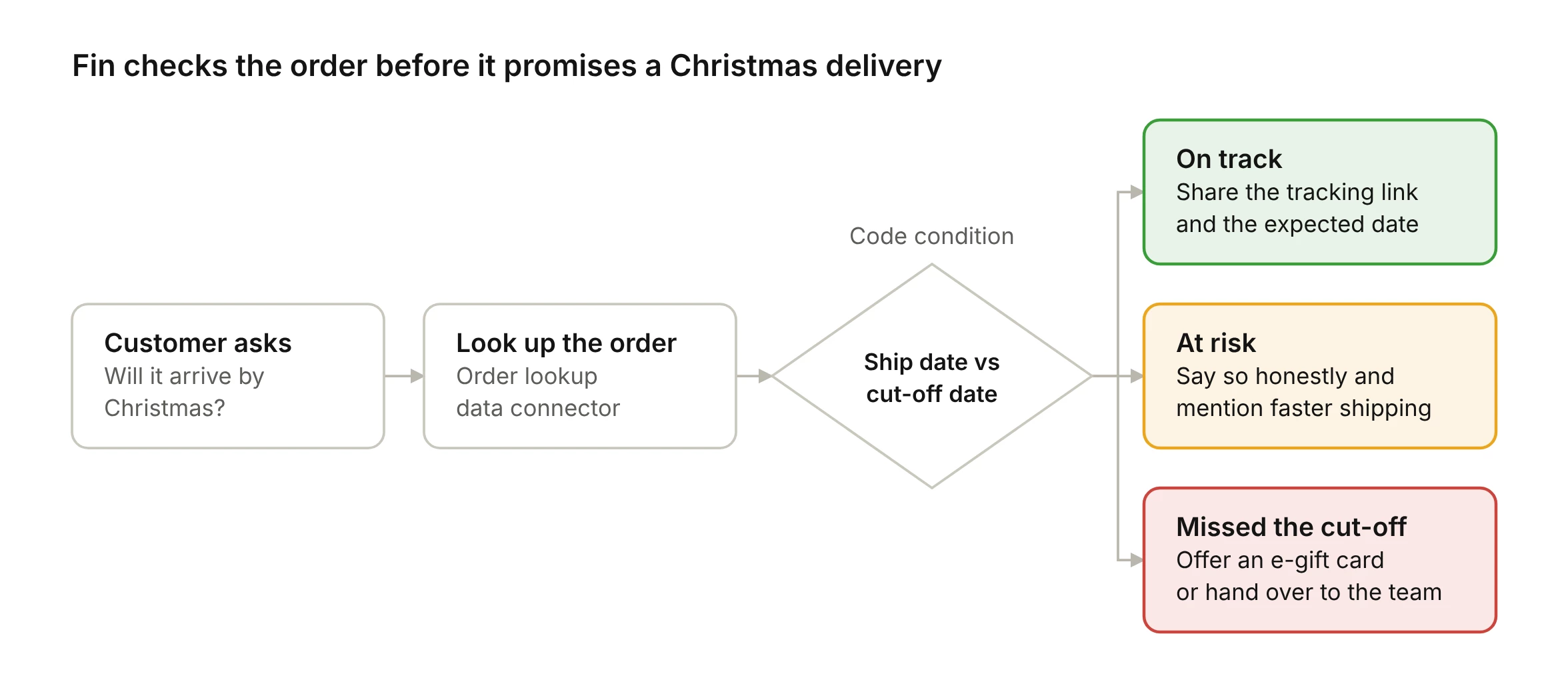
In the Procedure editor the instructions look like this:
When to use: The customer asks whether an order will arrive before Christmas
- Find the order with the order lookup data connector
- Code condition: compare the ship date and shipping method with the last order dates
- On track: share the tracking link and the expected date
- At risk: say so honestly, and mention faster shipping if you offer it
- Missed the cut-off: offer an e-gift card, or hand over to the team
Where is my parcel? Connect the tracking directly
On Shopify with Fin for Ecommerce, Fin already drafts order tracking Procedures from your store and has the tracking number. You can go one step further and build a data connector straight to your carrier's tracking API, or to the tracking platform you use. Then Fin sees the live status and the last scan, not just "shipped". You set it up in Settings > Integrations > Data connectors.
With live tracking Fin can also decide who really needs a human. Only the very delayed parcels go to your team, everything else stays with Fin:
When to use: The customer asks where their order is
- Find the order with the order lookup data connector
- Get the live status from the tracking data connector, using the tracking number from step 1
- Code condition: work out how many working days the parcel is late against the promised delivery date
- On time or up to 3 working days late: share the status, the last scan and the tracking link, and explain that carriers are slower in December
- More than 3 working days late, or marked as lost: hand off to the team, with the order and tracking details already in the chat
You pick the number, 3 days is just my example. The point is that your team only gets the parcels that are really stuck, and the normal "where is my order" chats stay with Fin. The Handoff to team step ends the Procedure and sends the chat to your team through your normal Fin workflow.
I've built Shopify data connectors for Fin and I always follow the same pattern: look up the data first, branch on it, then talk. Before you go live, run both Procedures through Simulations with mock responses, for example on time, 2 days late and 6 days late.
Step 6: Be honest about when a human is back
Fin works on Christmas Day, your team hopefully doesn't. These three settings stop Fin from promising a reply that isn't coming:
- Holiday hours. In Settings > Workspace > Office hours add your closed days under Holidays & Closures. They override your normal hours and count in reply time calculations. You need the Expert plan for this one
- What Fin says when nobody is online. Add escalation guidance in Fin AI Agent > Train > Escalation: "If a customer asks to speak to a person between 24 December and 3 January, explain that the team is away for the holidays and back on Monday 4 January. Offer to keep helping in the meantime"
- The special notice. Show a short note at the top of the Messenger that the team is off. You can't schedule it, so set yourself reminders to turn it on and off
One more setting worth turning on: in Deploy > Chat, let Fin collect more information when a customer asks for the team. Then in January your team opens tickets with real context, not just "hi?".
Step 7: Test it before Black Friday
Black Friday is on 27 November this year, so use it as a test run for Christmas.
- Batch test in Fin AI Agent > Test: run last December's real questions through Fin, it's free
- Simulations: test each Procedure end to end with mock connector responses, no live systems involved
- Preview: check the avatar, the hello and the goodbye exactly how a customer will see them
- Watch the date trap: a rule that says "from 1 to 26 December" won't fire in a November preview, because Fin uses today's real date. Test with a temporary copy without the dates, limited to an internal audience, and delete it after
Step 8: Watch it daily, then take the decorations down
From Black Friday until New Year I'd check three things every morning:
- Fin AI Agent > Analyze > Performance for resolution rate and CX Score. A sudden dip usually means one wrong date somewhere. CX Score needs the Pro add-on
- Train > Guidance to see how often each [Xmas] rule fires and whether those chats get resolved
- Topics Explorer for the holiday question you didn't plan for
Then on 7 January take it all down. A Fin that still says "Happy New Year" in February looks just as outdated as one that never said it.
- Switch the avatar, the welcome and the closing message back
- Pause all [Xmas] guidance and escalation rules
- Turn off the special notice
- Keep the Christmas article live until your returns window closes, then retire it
Your Fin Christmas checklist
October
- Design the holiday avatar
- Write your Christmas and New Year hello and goodbye lines for your industry
- Decide where your hello comes from, the printed welcome or Guidance
- Write the "Christmas 2026" article and switch off last year's
November, before Black Friday (27 November)
- Add the goodbye rule, the hello rule if you went with Guidance, and the content rules
- Build the arrive-by-Christmas and parcel tracking Procedures, including the tracking connector
- Run Simulations and batch test last December's questions
- Add Holidays & Closures and the holiday escalation guidance
1 December
- Switch on the holiday avatar and the Christmas closing message, plus the printed welcome if you use one
24 December
- Turn on the special notice
27 December
- Swap the closing message to New Year, and the printed welcome if you use one
4 January
- Team is back, turn off the special notice
7 January
- Take the decorations down (Step 8)
Over to you
It's only October, so it's definitely not too late, but this is the moment to start. If you begin now, Fin is set up and tested well before Black Friday, and you're not fixing guidance on Christmas Eve.
I don't think this December will be won by the biggest seasonal hire. It will be won by the teams whose Fin knows the dates and the cut-offs, and knows when to say merry Christmas.
So tell me, what's in your Fin's Christmas guidance? Share your best seasonal rule or Procedure in the comments and I'll collect the best ones in a follow-up post before Black Friday.
Let's give our AI agents a bit of soul this year and bring the real Christmas spirit into every chat 🎄
Have a Londonful Week Ahead 💂
Roy Shengelia