
Is there any way to send new conversations assigned to a team/teammate into Slack? | Community
Skip to main content
Answered

Is there any way to send new conversations assigned to a team/teammate into Slack?

  • Dec 22, 2023 3:09 PM UTC
  • 6 replies
  • 1032 views

I tried the Intercom/Slack app, but it does not appear to be a way to send assigned conversation notifications. Does anyone know how to make this work?

Best answer by Jacob Cox

Hi @Paula Shuler !

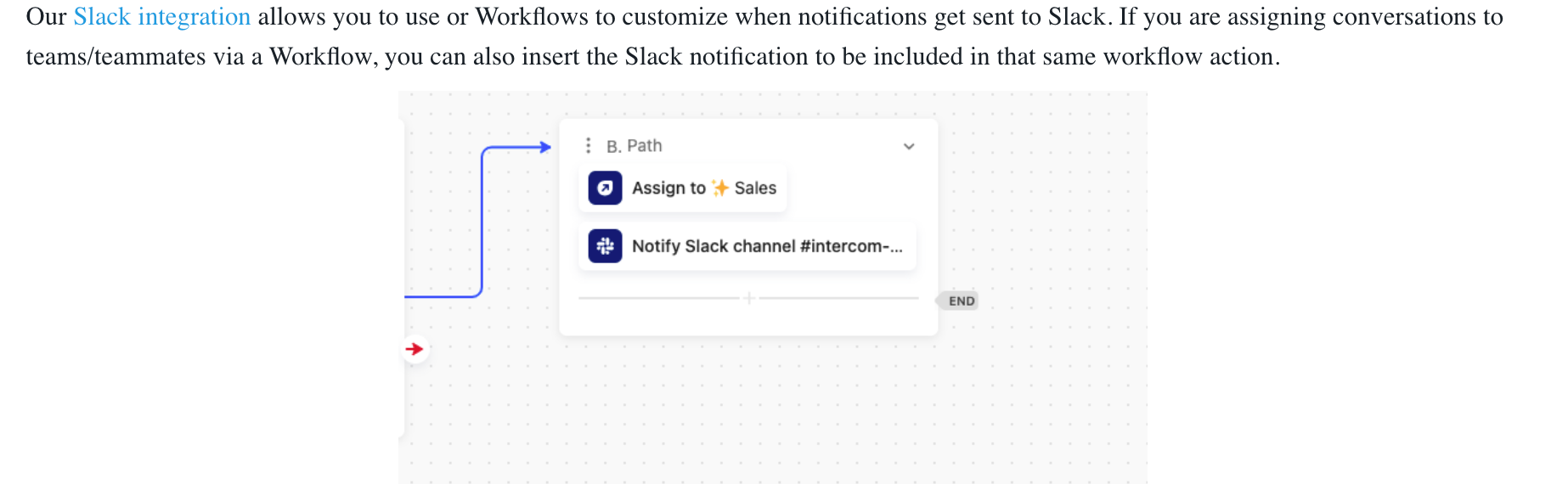
Our Slack integration allows you to use or Workflows to customize when notifications get sent to Slack. If you are assigning conversations to teams/teammates via a Workflow, you can also insert the Slack notification to be included in that same workflow action.
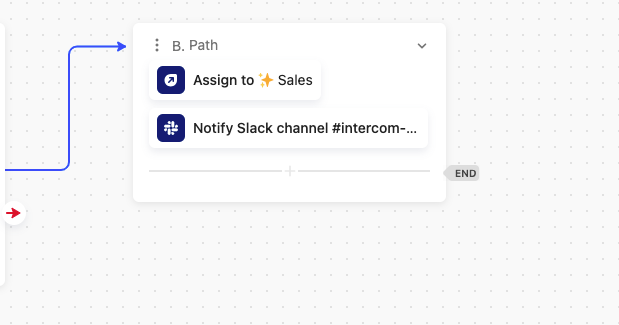
If you are assigning the conversations from within the Help Desk instead of automatically via a Workflow, you can now trigger Reusable Workflows directly from your Help Desk. To do this you’ll first need to create a Reusable Workflow that assigns the conversation to the appropriate team and then assigns the conversation to slack (like in the screenshot above).

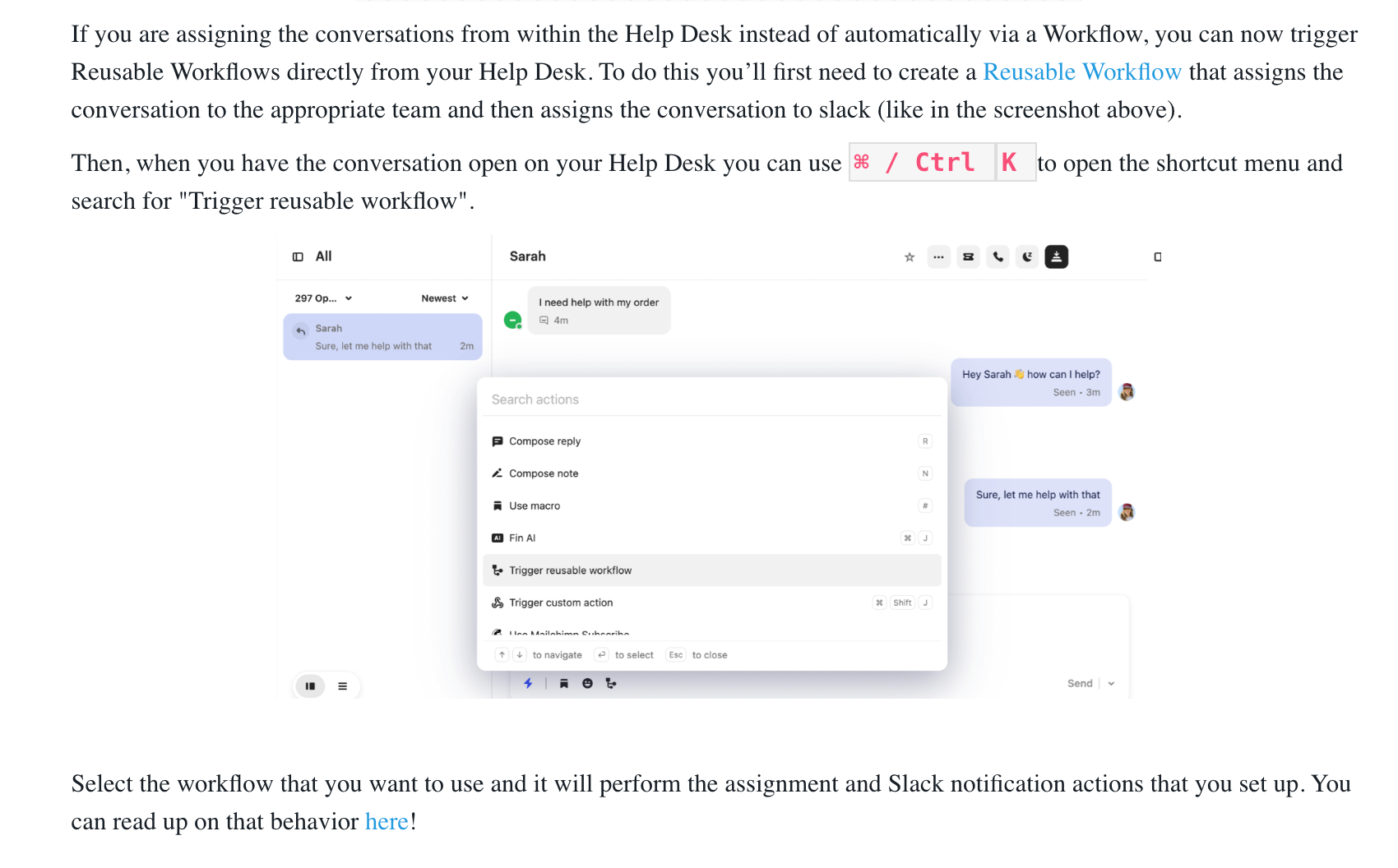
Then, when you have the conversation open on your Help Desk you can use ⌘ / Ctrl K to open the shortcut menu and search for "Trigger reusable workflow".
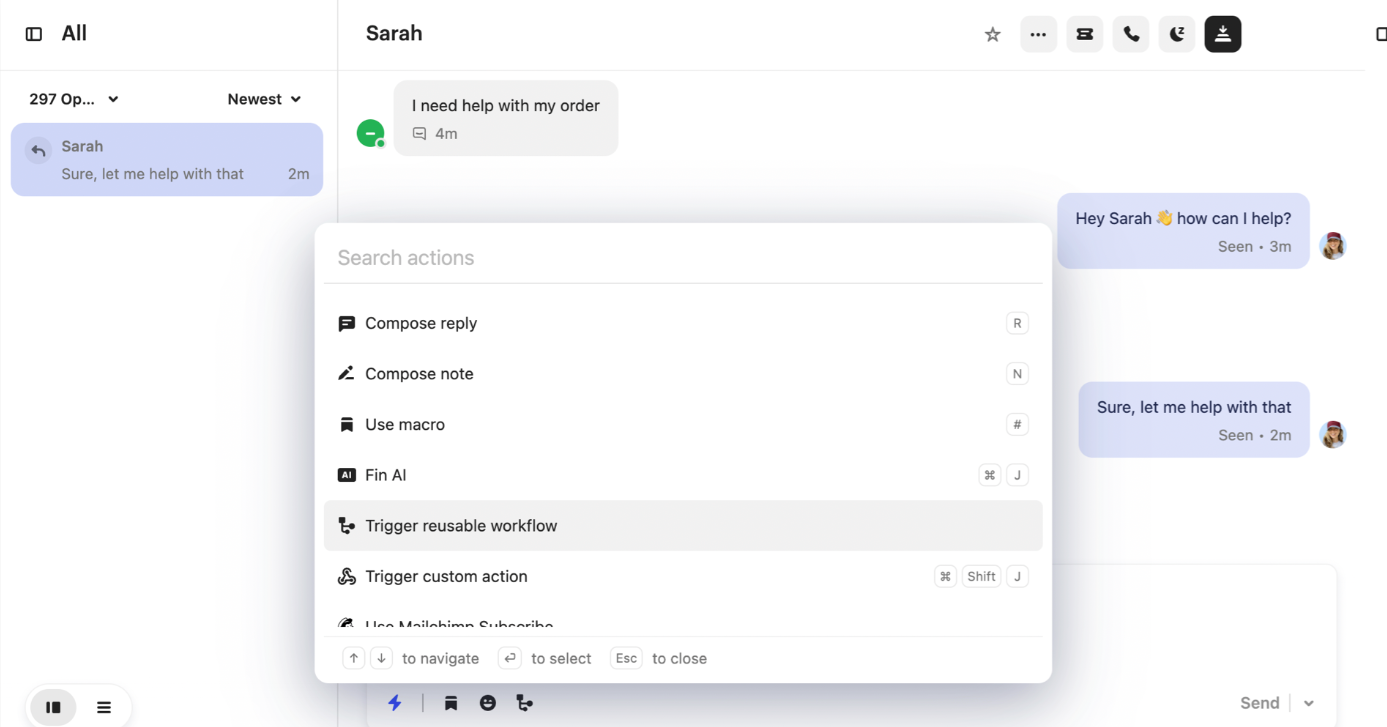
 

Select the workflow that you want to use and it will perform the assignment and Slack notification actions that you set up. You can read up on that behavior here!

 

View original

6 replies

Jacob Cox
Intercom Team
Forum|alt.badge.img+5
  • Sr. Technical Support Engineer
  • Answer
  • Jan 6, 2024 11:19 PM UTC

Hi @Paula Shuler !

Our Slack integration allows you to use or Workflows to customize when notifications get sent to Slack. If you are assigning conversations to teams/teammates via a Workflow, you can also insert the Slack notification to be included in that same workflow action.

If you are assigning the conversations from within the Help Desk instead of automatically via a Workflow, you can now trigger Reusable Workflows directly from your Help Desk. To do this you’ll first need to create a Reusable Workflow that assigns the conversation to the appropriate team and then assigns the conversation to slack (like in the screenshot above).

Then, when you have the conversation open on your Help Desk you can use ⌘ / Ctrl K to open the shortcut menu and search for "Trigger reusable workflow".


Select the workflow that you want to use and it will perform the assignment and Slack notification actions that you set up. You can read up on that behavior here!



  • Author
  • New Participant
  • Jan 8, 2024 3:23 PM UTC

Hey Jacob -


So someone manually from the help desk needs to trigger the workflow, if it’s within the help desk?


Jacob Cox
Intercom Team
Forum|alt.badge.img+5
  • Sr. Technical Support Engineer
  • Jan 13, 2024 11:30 PM UTC

Hi @Paula Shuler !

As I mentioned in my response above, you can send those notifications automatically to Slack in a Workflow ….


...or you can trigger a reusable workflow from the Help Desk to do this.

If you have any confusions around how to do any of that, please send along your specific questions and I can dig into it further!


  • New Participant
  • Jul 4, 2025 12:57 AM UTC

Hello, 

I followed the workflow above but it isn’t sending the notification to our Slack. We know the integration is working because when a conversation starts we get a notification but when it is assigned the notification doesn’t come through. Any ideas on how we fix it? 
Thanks, 


Ryan Parker
Intercom Team
Forum|alt.badge.img+5
  • Intercom Team
  • Aug 25, 2025 9:04 PM UTC

Hey ​@Alex Forde,

Please reach out to our Support Team via the Messenger if you’re still running into this issue that so we can take a look at your set up directly. Thanks! 


  • New Participant
  • Aug 25, 2025 9:13 PM UTC

Hi ​@Ryan Parker thanks for messaging back. I did reach out to the support team and they said it wasn’t possible at this stage. Has new developments been released and it is now possible? Thanks, Alex