Feature Request: Stable Article URLs and Redirect System | Community
Skip to main content
Submitted

Feature Request: Stable Article URLs and Redirect System

Related products:Knowledge & Help Center
  • April 12, 2026
  • 7 replies
  • 85 views

Currently, when we edit article titles in the help center, the URL automatically updates to match the new title. This breaks all existing links to that article across our ecosystem, including:

  • Article cross-references
  • External website academy links to our articles in helpcenter
  • Email automation sequences directing to articles in helpcenter
  • Any other systems linking to our help center

Requested Solution:

  1. URL Persistence: Keep article URLs stable when titles are edited, similar to how website platforms handle page URLs
  2. Manual URL Control: Allow manual editing of article URLs when needed
  3. Redirect System: Automatically redirect old URLs to new ones when URLs are manually changed

Business Impact:

For organizations with extensive linking systems (cross-references, external websites, email automations), title changes create significant maintenance overhead. We make regular title updates for clarifications, spelling corrections, and content improvements as our platform evolves, making this a frequent pain point.

Current Workaround:

None available - we must manually track and update all links across multiple systems whenever we edit article titles.


7 replies

Roy
Top Expert ✨
Forum|alt.badge.img+7
  • Top Expert ✨
  • April 13, 2026

Hi ​@Webbas team 👋, 


I feel your pain on this one—it’s a bit of a nightmare when a simple spelling tweak or a title refresh ends up breaking links across your entire ecosystem. "Going pear-shaped" doesn't even begin to cover it when you have to manually hunt down links in email sequences!


While we wait for Intercom to introduce proper URL persistence or manual slugs, there is a pro-tip workaround that I use to keep things from breaking:


The "ID-Only" Linking Strategy

Instead of using the full, SEO-friendly URL that Intercom generates: https://www.intercom.com/help/en/articles/1234567-your-article-title


Strip it back to just the Article ID: https://www.intercom.com/help/en/articles/1234567


Why this sorts it out: Intercom’s architecture is smart enough to recognize the ID alone. If you link using just the numbers, the system will automatically redirect the user to the correct, current title regardless of how many times you've edited it. By using this method for your cross-references and email automations, you won't have to worry about manual updates ever again. It’s a much more robust way to handle things until we get a native fix!


Hope that helps save you a bit of aggro!


Cheers,

Roy 🇬🇧


Forum|alt.badge.img

Big +1! Especially when article links are embedded into the product itself! It creates a tracking and CloudFlare redirect nightmare. 

This is yet another reason I’m still requesting: 


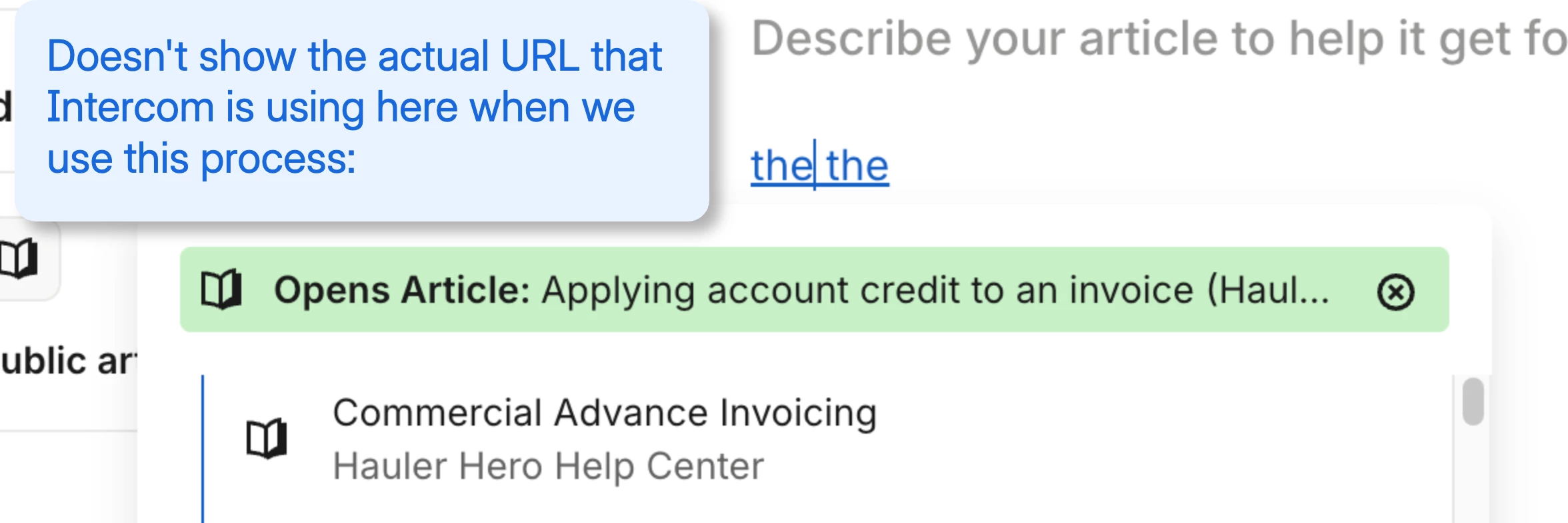
In the current WYSIWYG editor, I’m not able to even see the actual full URL that Intercom adds in when I use the built in process of letting Intercom create the link by selecting the content that you want to link to. 


Forum|alt.badge.img

@Roy Thank you so much for that pro tip! 

I’m curious...is that only applicable when we’re manually adding the link via the 🔗 icon or Cmd+K? Or is there still a way to strip the URL down to just the Article ID, even if we use the built-in Intercom process (where instead of a URL, you select the actual content itself and Intercom does the rest)? I was under the impression that using that method was the way to have Intercom automatically update links and titles if we made any changes, no? 


Roy
Top Expert ✨
Forum|alt.badge.img+7
  • Top Expert ✨
  • April 14, 2026

@Casey Maxwell 👋 , 
 

So glad you found the tip useful! ❤️


"Is that only applicable when we’re manually adding the link via the 🔗 icon or Cmd+K?"

Spot on. At the moment, you do have to manually enter the URL using the Article ID format: https://www.intercom.com/help/en/articles/1234567


"Regarding the built-in Intercom Article dropdown..."

You’re absolutely right in principle—if Intercom allows you to select an article directly, it should dynamically update the link and title across your content if changes are made. However, I’ve just run a few tests and, unfortunately, it doesn't seem to work quite like that in practice. It’s certainly something the Product Teams ought to look into!


The most reliable "quick fix" for now is to link the article, but then ensure the URL follows that specific ID format: https://www.intercom.com/help/en/articles/1234567


Thanks for the feedback! Do let me know if you have any other questions at all—always happy to help ❤️.
 

Cheers,

Roy 🇬🇧


  • Author
  • New Participant
  • April 14, 2026

 Amazing tip Roy!

Huge thank you for that. Will do so from now on 🙌🏼


Roy
Top Expert ✨
Forum|alt.badge.img+7
  • Top Expert ✨
  • April 14, 2026

@Webbas team,  Cheers for the kind words! 💙


Spot on—it’s brilliant to hear that’s sorted for you. Sometimes a cheeky workaround is exactly what’s needed to get the job done when the standard route is being a bit rubbish.


Happy to help!


Cheers,

Roy 🇬🇧


Forum|alt.badge.img+1
  • Intercom Team
  • June 23, 2026
The following idea has been merged into this idea:

All the votes have been transferred into this idea.