
Are there best practices for linking directly to articles from within a localized SaaS product? | Community
Skip to main content
Answered

Are there best practices for linking directly to articles from within a localized SaaS product?

  • Mar 26, 2021 5:01 PM UTC
  • 11 replies
  • 191 views

We have a product that is developed in English and localized for Japanese. We want to link directly to articles. Looking for best practices for managing those links. Should we just treat them like strings to be localized?

Best answer by Milan

You do not need to translate the URL, it works just fine with the ID of the article and the language code.


Example:

The original URL is https://www.intercom.com/help/en/collections/382-what-is-intercom


It will open in English version even if you go for shorter URL like https://www.intercom.com/help/en/collections/382

And will open the German version if you just change en to de and go for https://www.intercom.com/help/de/collections/382 while the full URL in German is https://www.intercom.com/help/de/collections/382-was-ist-intercom


Hope this helps.

 

View original

11 replies

Eric Fitz
Employee
Forum|alt.badge.img+5
  • Employee
  • Mar 29, 2021 10:30 AM UTC

Hey @user892​, have you configured your Help Center yet to be multilingual so as to have articles in both English and Japanese? You'll need to manually write and translate these, but it'll allow for easy linking.


  • Author
  • Active User
  • Mar 29, 2021 4:37 PM UTC

I inherited it, so I assumed it was configured correctly. There are versions for the two languages, but the displayed url includes the japanese or english article title. that would imply that the in-product links pointing to the articles would need to be localized. is there an indicator that would definitively indicate correct configuration?


Eric Fitz
Employee
Forum|alt.badge.img+5
  • Employee
  • Mar 29, 2021 4:54 PM UTC

This is expected behaviour. Each language version would have a separate URL, but this URL is automatically generated based on the title of your article.


  • Author
  • Active User
  • Mar 29, 2021 5:10 PM UTC

Cool. That's why I was asking for best practices. So the URLs need to be treated as strings and localized with the rest of the UI, yes?


Eric Fitz
Employee
Forum|alt.badge.img+5
  • Employee
  • Mar 30, 2021 10:25 AM UTC

Sorry, I'm not quite sure what you mean by "localized within the rest of the UI". Do you mean within the Help Center UI or elsewhere on your site/app?


Roy
Top Expert ✨
Forum|alt.badge.img+7
  • Top Expert ✨
  • Mar 30, 2021 12:09 PM UTC

Hi @user892​ 👋,


As @eric f11​ mentioned, each language version has a separate URL. Does this complicate the linking process?

Like if there were help.domain.com/en/103 and help.domain.com/ja/103 - The linking process be easier?


In your case it depends how you where would you like to link articles:


1) Every product feature page, like Intercom?

Help Center-Intercom2) Inside some text information (like Blogs...)?


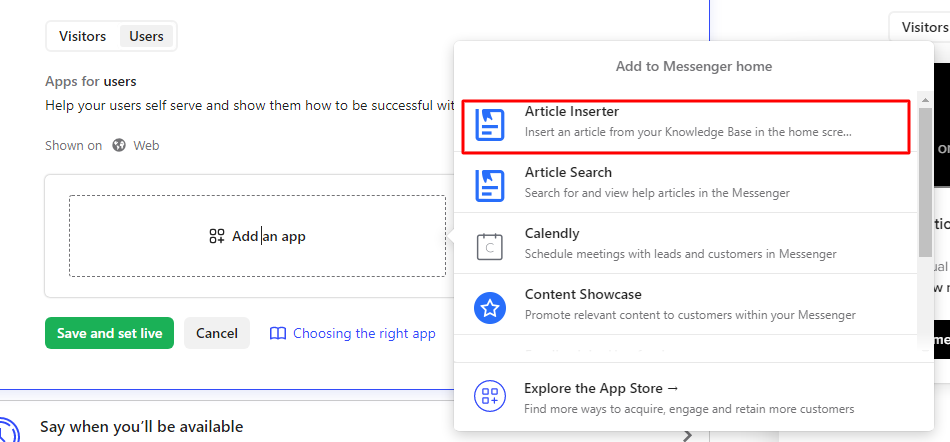
I will suggest one workaround, you can use Article inserter and display articles inside your Intercom messenger:

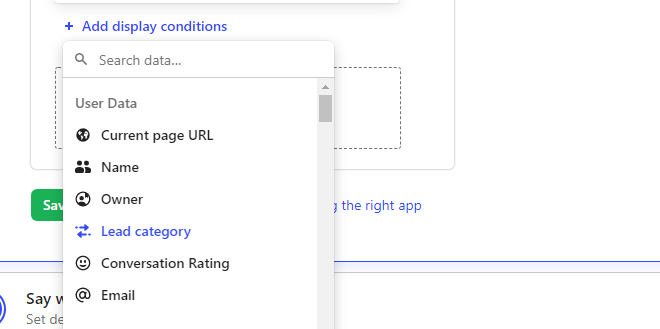
Article InserterArticles can be displayed based on different conditions (like - User Language, Current page URL, Current plan and etc):

article display 

Once you set-up all the following, you can open Intercom messenger instead of linking Articles one by one.


Let me know if you have any further questions, Will be more than happy to provide more information.


  • Author
  • Active User
  • Apr 5, 2021 5:49 PM UTC

Within our app. We are embedding links to articles in our screens. Those links will have a localized article title. Normally, there is just the string to translate. In this case, there is the link string to translate (e.g., Learn more). But with the underlying URL needing to be handled for translation, I'm assuming the URL would be treated like the string, as well.


Milan
Top Expert ✨
Forum|alt.badge.img+7
  • Top Expert
  • Answer
  • Apr 5, 2021 11:02 PM UTC

You do not need to translate the URL, it works just fine with the ID of the article and the language code.


Example:

The original URL is https://www.intercom.com/help/en/collections/382-what-is-intercom


It will open in English version even if you go for shorter URL like https://www.intercom.com/help/en/collections/382

And will open the German version if you just change en to de and go for https://www.intercom.com/help/de/collections/382 while the full URL in German is https://www.intercom.com/help/de/collections/382-was-ist-intercom


Hope this helps.



  • Author
  • Active User
  • Apr 5, 2021 11:07 PM UTC

i was hoping someone would say that :-)


Eric Fitz
Employee
Forum|alt.badge.img+5
  • Employee
  • Apr 6, 2021 10:01 AM UTC

Ha - thanks for cutting through my extra questions and providing the clarity that was needed, @user382​ 😄


Milan
Top Expert ✨
Forum|alt.badge.img+7
  • Top Expert
  • Apr 6, 2021 10:31 AM UTC

;) here to help!