Custom Help Center domain not working | Community
Skip to main content
Answered

Custom Help Center domain not working

  • Sep 26, 2022 4:18 AM UTC
  • 4 replies
  • 277 views

Hi team,


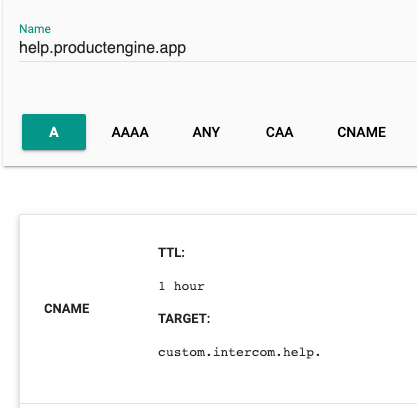
I have updated our CNAME help.productengine.app to point to custom.intercom.help

image 

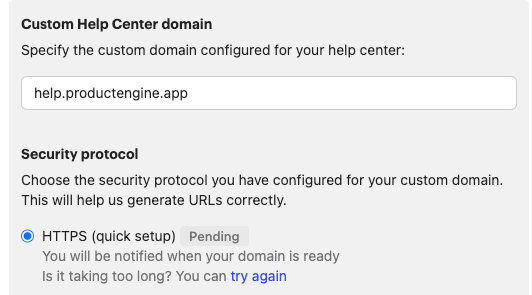
However, the config in Intercom has been stuck on Pending for a few hours now:

image 

When I click try again, i get an error pop up.


Can you please help point me in the right direction?

Best answer by Racheal

Hey @talha​ Racheal from the Support Engineer team here 👋


Do you know if you have your own CAA (Certification Authority Authorization) record of domain "productengine.app" on DNS? This will stop us from creating SSL for your subdomain if so.


In order to resolve this you will need to follow this this guide to update your record (specifically adding both "digicert.com" and "letsencrypt.org" to the CAA record) or remove the CAA record from your side. After that you will need to wait until this DNS update is propagated to the world.


If you run into any trouble or have any questions please write into the team so we can take a better look!


View original

4 replies

Racheal
Intercom Team
Forum|alt.badge.img+7
  • Customer Support Engineer
  • Answer
  • Sep 27, 2022 1:04 AM UTC

Hey @talha​ Racheal from the Support Engineer team here 👋


Do you know if you have your own CAA (Certification Authority Authorization) record of domain "productengine.app" on DNS? This will stop us from creating SSL for your subdomain if so.


In order to resolve this you will need to follow this this guide to update your record (specifically adding both "digicert.com" and "letsencrypt.org" to the CAA record) or remove the CAA record from your side. After that you will need to wait until this DNS update is propagated to the world.


If you run into any trouble or have any questions please write into the team so we can take a better look!



  • Author
  • New Participant
  • Sep 27, 2022 1:16 AM UTC

Hey @racheal​


Thanks for picking this up. We don't have CAA record on this domain. We have been able to use this specific domain for articles before so not sure what is different this time.


I have dropped a message to the support team as well.


Racheal
Intercom Team
Forum|alt.badge.img+7
  • Customer Support Engineer
  • Oct 3, 2022 11:58 PM UTC

It looks like Cam was able to get you sorted here! 🎉


  • Author
  • New Participant
  • Oct 4, 2022 12:02 AM UTC

Hey was!


For anyone else who stumbles upon this, we had to remove the CNAME and essentially wait for the Quick setup tool to reset. It took about half a day but when it did, we were able to update the DNS and it started working from there.


Oh and Cam is awesome!