Enable users to view a public article in the Help Center while logged in, and via a direct link without being logged in, without having to duplicate the article | Community
Skip to main content
Question

Enable users to view a public article in the Help Center while logged in, and via a direct link without being logged in, without having to duplicate the article

  • October 2, 2026
  • 2 replies
  • 15 views

Enable users to view a public article in the Help Center while logged in, and via a direct link without being logged in, without having to duplicate the article

→ Users : can view the article through the Help Center if they are connected

→ Can also view the article through a direct link our team shares before they sign in or if they are not logged in 

2 replies

melzayat
Innovator ✨
Forum|alt.badge.img+2
  • Innovator ✨
  • October 2, 2026

Hi ​@Pauline! as far as I know there's no single setting that does both.
The two native visibility options work against each other here:

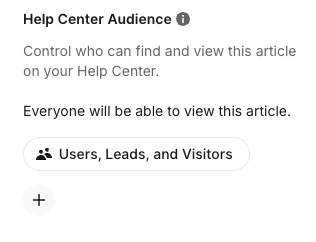
  • Help Center Audience set to Users (article Details panel → Help Center Audience): the article is listed and searchable for logged-in users, but anyone outside that audience is blocked even with the direct link. Visitors and leads get redirected to the login link you set under Settings > Help Center > Configure & Style > Privacy. Audience targeting also requires a custom domain with cookie forwarding, custom data attributes, and the Messenger installed for logged-in users.
  • Unlisted (publish the article without adding it to a collection): reachable by direct link for anyone, but not listed or searchable in the Help Center, for logged-in users either.

So depending on what you need:

  1. If it's fine for non-logged-in people to see it in the Help Center: leave the audience as Everyone. It's listed for logged-in users and the direct link works for everyone.
  2. If it needs to stay hidden from visitors browsing the Help Center, but your team still shares the link: you'd need two versions (one Users-only, one unlisted), which is the duplication you're trying to avoid. A lighter option is to keep the unlisted version as the single source of truth for the link, and add a short Users-only article in the collection that just points to it.

Quick note: the Audiences page under Settings > AI & Automation only controls what Fin can use. It doesn't affect Help Center visibility, so it won't help with this one.

Docs: Control who can see your public articles

If you tell me what the article's audience is set to now and why it needs to be hidden from visitors, I can suggest a cleaner setup.


  • Author
  • New Participant
  • October 2, 2026

Hi ​@melzayat thank you for the reply :) 
The article’s audience is currently set to “Users” and we need to remain this way because we used this audience to make the difference between two Help Centers (B2B vs B2C).

What we need is just to be able to share the article’s link to someone who doesn’t have an account so they can see it, but I understand that it needs to be a different “unlisted” article