[solved] How can I use pre-formatted data in emails? | Community
Skip to main content
Answered

[solved] How can I use pre-formatted data in emails?

  • Nov 12, 2021 2:13 PM UTC
  • 5 replies
  • 167 views

Hi,

​

I want to send users an e-mail containing a summary of a form they filled in externally, the data contains a single formatted text summary.

​

however intercom strips all formatting when i put that summary ​only whitespaces are left.

​

i tried to put the data in the message

  • by putting into an custom attribute
  • by putting into an metadata with a event
  • formatting the summary as html and putting it into a html block but i sees it as an string

​Does anyone know what else I can try?


=============================

update


After searching for a while, there seems no direct way to do what I wanted in intercom it self.


but it is possible if you use the api https://developers.intercom.com/intercom-api-reference/reference#admin-initiated-conversation


Best answer by Jeffrey H

like i mentioned in my update it's possible to do it with the api https://developers.intercom.com/intercom-api-reference/reference#admin-initiated-conversation/p>

View original

5 replies

Eric Fitz
Employee
Forum|alt.badge.img+5
  • Employee
  • Nov 15, 2021 11:14 AM UTC

Hey @jeffrey h​, can you advise how you've tried to build this in HTML? If you can share some sample HTML, that would be great.


  • Author
  • Connector
  • Nov 17, 2021 9:56 AM UTC

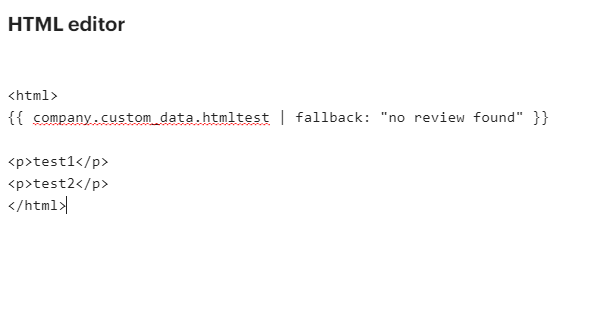
hi Eric, it was nothing special, just some paragraphs

​

imagethe data attribute contains the same html as below


  • Author
  • Connector
  • Nov 17, 2021 9:57 AM UTC

see my reply below


Eric Fitz
Employee
Forum|alt.badge.img+5
  • Employee
  • Nov 22, 2021 2:29 PM UTC

Thanks for sharing, @jeffrey h​. At this point, I'd recommend messaging our Support team about this directly, via the Messenger icon in your Intercom workspace (app.intercom.com). They'd be best placed to help you resolve this issue!


  • Author
  • Connector
  • Answer
  • Dec 1, 2021 10:49 AM UTC

like i mentioned in my update it's possible to do it with the api https://developers.intercom.com/intercom-api-reference/reference#admin-initiated-conversation/p>