


Can't find "Adjusted conversation handling" metric in reports | Community
Skip to main content
Answered

Can't find "Adjusted conversation handling" metric in reports

  • February 15, 2026
  • 2 replies
  • 55 views

Hello,

 
I need to create a custom report in intercom utilizing the “Adjusted conversation handling time” metric, which I understand is currently in beta


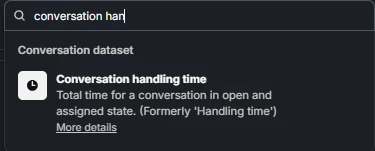
When searching for a metric, this option is not available. I can only find the regular “conversation handling time”. 

Am I missing something? 


Best answer by Dara K

Hey ​@Ben Nissley 

It’s not missing, it’s behind a feature flag. “Adjusted conversation handling time” only appears in Custom Reports after the adjusted AHT reporting is enabled for your workspace. Once enabled, you’ll find:

  • Conversations dataset: Adjusted conversation handling time
  • Teammate Handling dataset: Adjusted teammate handling time

If you can send me the App ID for your workspace I can enable the feature flag for you.

2 replies

Forum|alt.badge.img+4
  • Intercom Team
  • Answer
  • February 20, 2026

Hey ​@Ben Nissley 

It’s not missing, it’s behind a feature flag. “Adjusted conversation handling time” only appears in Custom Reports after the adjusted AHT reporting is enabled for your workspace. Once enabled, you’ll find:

  • Conversations dataset: Adjusted conversation handling time
  • Teammate Handling dataset: Adjusted teammate handling time

If you can send me the App ID for your workspace I can enable the feature flag for you.


  • Author
  • New Participant
  • February 23, 2026

Hey ​@Ben Nissley 

It’s not missing, it’s behind a feature flag. “Adjusted conversation handling time” only appears in Custom Reports after the adjusted AHT reporting is enabled for your workspace. Once enabled, you’ll find:

  • Conversations dataset: Adjusted conversation handling time
  • Teammate Handling dataset: Adjusted teammate handling time

If you can send me the App ID for your workspace I can enable the feature flag for you.

Hi Dara, thanks for your reply. Sean from Support was able to enable the feature for us.


