


Keeping customer-specific data available to Fin throughout a conversation | Community
Skip to main content
Question

Keeping customer-specific data available to Fin throughout a conversation

  • Nov 4, 2026 8:12 AM UTC
  • 3 replies
  • 34 views

Forum|alt.badge.img+2

Hi everyone,


We want Fin to have natural, ongoing conversations using customer-specific data retrieved from our backend, alongside our Knowledge Hub content.

Our current setup uses a Procedure to complete our SMS OTP verification flow, retrieve the customer’s data through a Data Connector, and present an initial overview. The response contains multiple related records and nested arrays. The connector is currently called only by the Procedure.

After the Procedure ends, Fin appears to answer follow-up questions from general knowledge rather than consistently using the full retrieved dataset, including details omitted from the initial overview.


Intercom’s Fin support bot told us that data returned by connectors called within a Procedure is retained only for that Procedure run. It recommended:

  • A separate read-only connector with direct triggering for follow-up questions.

  • A short-lived, server-side verified session established after successful OTP verification.

  • Simplifying deeply nested responses and returning the data relevant to each question.

We’re awaiting human confirmation of this approach, but I’d also like to hear from anyone who has implemented something similar.


The questions we still have are:

  1. How long does Fin retain and reuse a directly triggered connector’s response across subsequent messages? Does it need to retrieve the data again for every relevant follow-up?

  2. How have you managed verified sessions after a custom SMS OTP flow, including expiry and re-verification, without repeatedly interrupting the conversation?

  3. For question-specific retrieval, how do you pass the current question and relevant context from earlier messages into the connector so it returns the right records?

What setup has worked reliably for you while keeping the ongoing discussion outside a Procedure?


Thanks!

3 replies

Forum|alt.badge.img+7

Hi ​@בן גטניו, Seán here from the Fin technical support team 👋


When a Data connector runs inside a Procedure, Fin keeps its response for the whole Procedure run, including all steps and sub-procedures. When the Procedure ends, that response is no longer part of the context Fin uses for later answers. Fin still sees the conversation itself, including what it already told the customer. Any details from the response that Fin did not mention in the overview are no longer available. That is why follow-up questions fall back to your Knowledge Hub content.


1. How long does Fin keep a directly triggered connector's response?
 

Fin uses the response to answer the message that triggered the call. It does not keep the full raw response for later messages. On each later question where the connector is relevant, Fin decides again whether to call it, and it can call it again. In practice, plan for one connector call per relevant follow-up. This is why a fast, read-only connector that returns a small response works best.


2. Verified sessions after your own SMS OTP flow


The pattern that works well:

  • Keep your Procedure for the OTP challenge and the initial overview.
  • After a successful verification, your bridge stores a short-lived verified session on your server, keyed on the Intercom user identifier (user_id). Your bridge decides how long the session lasts.
  • The follow-up connector sends the user_id as an input with the source set to a People attribute. That way Fin never needs to ask for it, and no token passes through the conversation.
  • If the session is valid, the bridge returns the data. If it has expired, the bridge returns a clear status such as "verification_required" and no personal data.

One important security point: the bridge can only trust the user_id if your Messenger authenticates users with JSON Web Tokens (JWTs). Without that, a visitor could present someone else's identifier. You can also limit the connector's audience to logged-in users only, in the connector's Fin settings.

For expiry, describe the "verification_required" case in the connector description. Write a Procedure trigger description that covers "customer asks about their personal recommendations but is not verified". Fin can then start the verification Procedure again only when it is needed. We have not tested this exact routing end to end, so please test it in Preview with a test user before you go live.


3. Passing the current question into the connector
 

Add a data input with the source set to "Let Fin collect". For example, a "topic" or "product" input, with a description such as "the product, provider or recommendation the customer is asking about". Fin fills this from the conversation, including context from earlier messages. Your bridge can then return only the records that match. If the input is empty, return a small summary.


4. Shaping the response


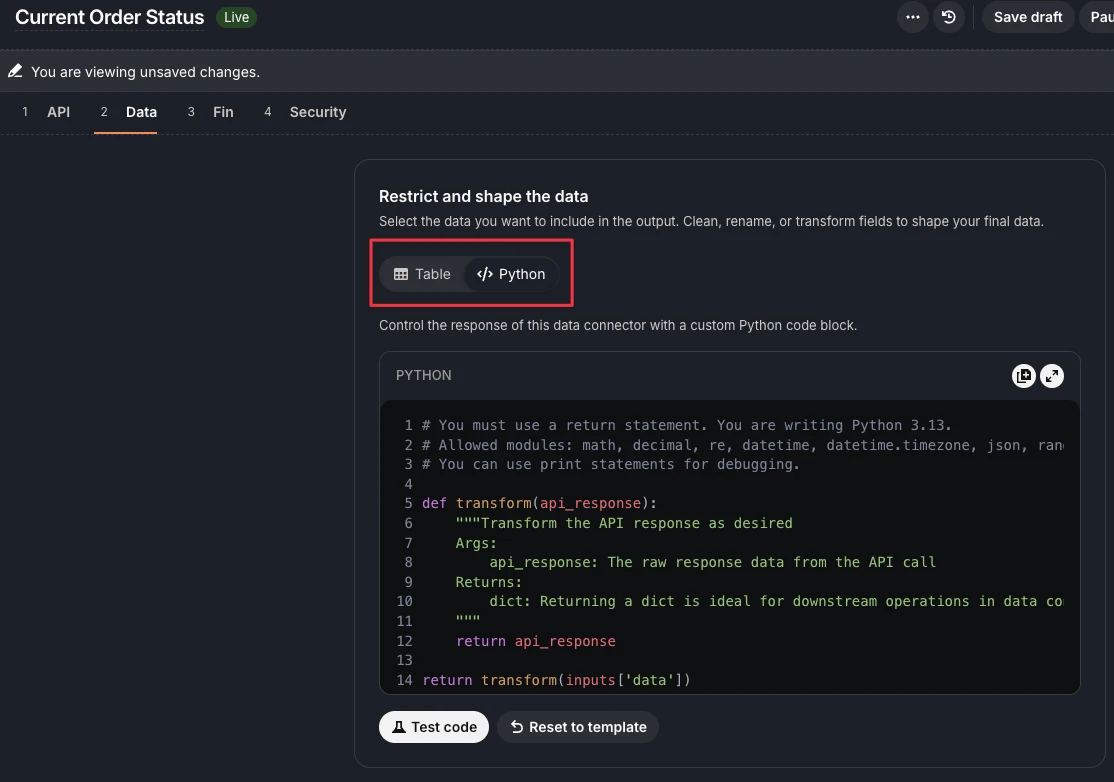
Keep the response small and flat if possible. Fin works most reliably with one or two levels of nesting. You can reshape the response in the connector's response settings, using the table view or Python (see image), before Fin sees it. Return only the fields that matter for the question asked, instead of the full dataset every time.

Recommended setup

  • Procedure: OTP verification and the initial overview.
  • A read-only Data connector with direct trigger enabled, limited to logged-in users. It takes user_id (People attribute) and a topic (Let Fin collect), and returns the relevant records or "verification_required".
  • A clear connector description that explains when to use it: personal pension recommendations, provider comparisons, fees, risk levels, rankings and benefits.


Articles you might find useful for this set up:

https://www.intercom.com/help/en/articles/13459820-how-to-use-data-connectors-in-fin-procedures

https://www.intercom.com/help/en/articles/9916497-how-to-set-up-data-connectors

https://www.intercom.com/help/en/articles/10589769-authenticating-users-in-the-messenger-with-json-web-tokens-jwts


Hope this helps. I’d love to hear more about your specific situation and if there are certain things here that don’t work well for it so we can fine tune it.


  • New Participant
  • Nov 13, 2026 3:20 AM UTC

The answer above covers the mechanics. One thing worth adding before you roll it out: test whether Fin really uses the data on follow-ups. Write 20 follow-up questions whose answers exist only in the nested records, not in the overview and not in the Knowledge Hub. Run them after verification, and mark each answer right, wrong, or "sounded right but came from general knowledge". That third bucket is the dangerous one. Then add guidance for the gap: if the detail isn't in this customer's records, Fin says it will check and hands off rather than guessing.


  • New Participant
  • Nov 13, 2026 6:38 PM UTC

Test the session expiry first, before you widen the setup. Ask Fin the same follow-up after the session should have ended and check that it asks for verification again instead of answering from old data.