


Hi Intercom Team,
We are using Workflows to set up an IVR keypad mapping, but our phone menu options are non-sequential. To match the phone keypads (e.g., Press 1–4, and Press 8), we had to create "Blank" placeholder reply buttons (Blank 5, Blank 6, etc.).
The Problem: When customers open the Messenger widget, these placeholder buttons ("Blank 5", "Blank 6", etc.) are visible to them, creating a confusing user experience.
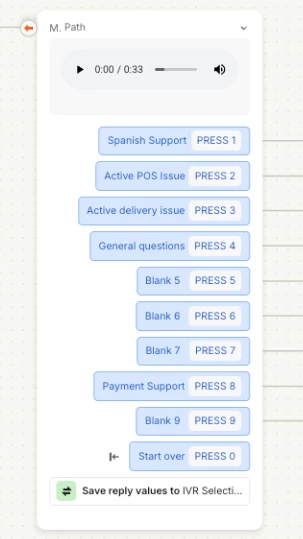
Proposed Feature: Add a toggle or setting to hide specific Reply Buttons from the Messenger UI so we can keep the IVR key mapping without showing empty buttons to customers on chat.
Would love to see this added to the roadmap!