


Hi Intercom Team,
I'd like to request a feature that allows us to manually set the key number (e.g., Press 1, Press 2, Press 8 for Reply Buttons in Phone IVR Workflows.
Current Limitation: Currently, when you add Reply Buttons for an IVR flow, Intercom automatically assigns the numbers sequentially (1, 2, 3, 4...). There is no way to jump or assign specific numbers to specific options (e.g., setting an option directly to "Press 8").
To work around this, we are forced to create dummy/blank buttons (e.g., "Blank 5", "Blank 6") just to push a specific option down to "Press 8". This clutters the workflow and creates unnecessary options on the UI.
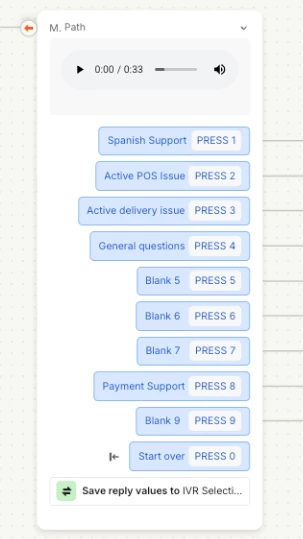
Proposed Solution: Allow admins to manually edit or assign the key value for each reply button option in the Workflow builder (e.g., a dropdown or input field to select which DTMF/keypad number triggers that path).
This would make building non-sequential IVR menus much cleaner without needing dummy placeholder options!