




Adding a "Tags" Conversation Attribute | Community
Skip to main content
Submitted

Adding a "Tags" Conversation Attribute

Related products:Core Inbox
  • August 5, 2024
  • 3 replies
  • 45 views

Pierre G
Forum|alt.badge.img+1

Conversation tags are currently only visible on one message in the conversation. This makes it difficult to find a conversation’s tags as we need to skim through the entire conversation in order to identify them.


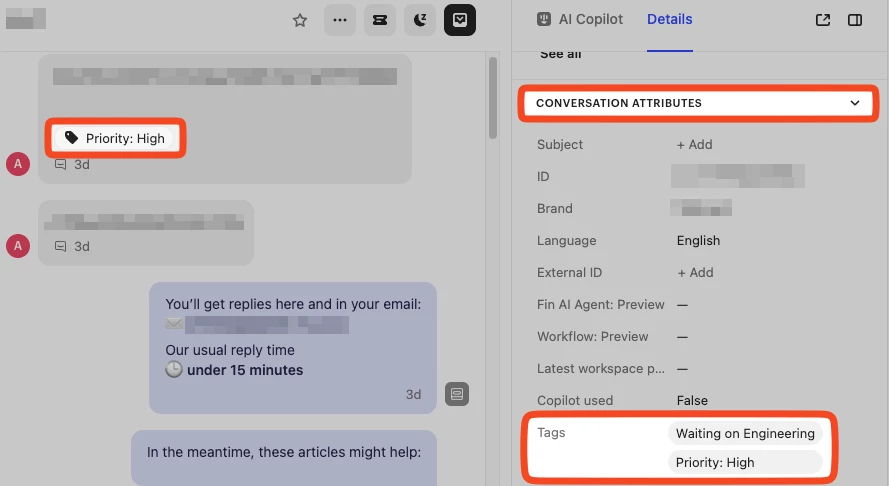
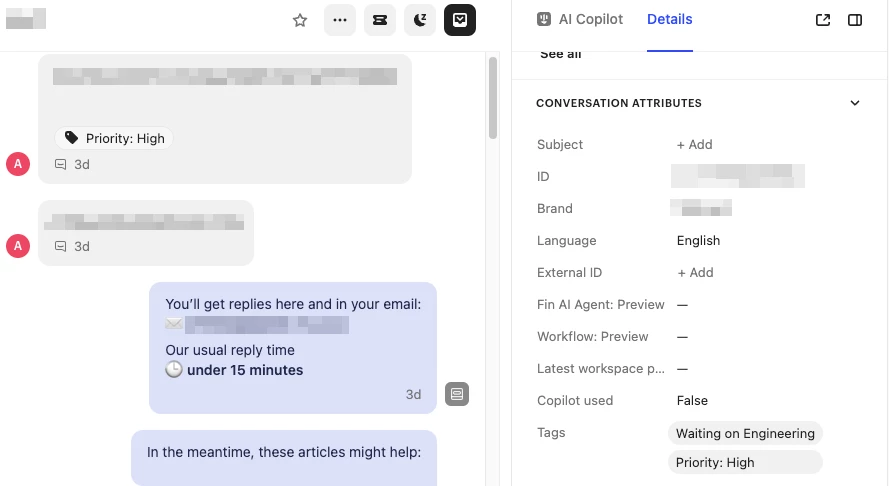
I suggest adding a conversation tags attribute in the “Conversation Attributes” section of a conversation, in the right panel. When hovering on a tag in the Conversation Attributes section, it should allow us to remove it. 


Here is a mockup of the design

With Highlighting:
 

Without Highlighting:
 

3 replies

Jennifer K
Intercom Team
Forum|alt.badge.img+3
  • Intercom Team
  • August 13, 2024

Hi @Pierre G 

Jennifer here from Intercom 👋

What a great suggestion, I will pass this on to our Product Team on your behalf 🚀

Whenever we do release new features, we announce them on the Product Changes page, so I would recommend keeping an eye there. 


Jennifer K
Intercom Team
Forum|alt.badge.img+3
  • Intercom Team
  • August 13, 2024
NewDiscussion ongoing

Pierre G
Forum|alt.badge.img+1
  • Author
  • Active User
  • August 13, 2024

Hi @Pierre G 

Jennifer here from Intercom 👋

What a great suggestion, I will pass this on to our Product Team on your behalf 🚀

Whenever we do release new features, we announce them on the Product Changes page, so I would recommend keeping an eye there. 

Sounds good, thanks! Let me know if you need anymore details or have any questions.


