


Allow full-screen or zoomed view of an individual message (both outbound / inbound chats) in the messenger | Community
Skip to main content
Submitted

Allow full-screen or zoomed view of an individual message (both outbound / inbound chats) in the messenger

Related products:Messenger
  • February 21, 2024
  • 4 replies
  • 49 views

Currently, long and complex explanations delivered to end-users are difficult to consume or view in their entirety in the messenger. Intercom product design believes that brief communication is always effective in solving a support issue, with longer explanations siloed to a static help center article. There needs to be better support for longer messages to be viewed in their entirety in the messenger.


In our use-case, our agents are level 2 support, and our end-users are level 1 techs in the field. Discussions are often around complex endpoint or networking issues that often involve long explanations to be delivered - and also not in a standard enough use case that a help article can be or should be made for it. This is impacting our decision to adopt the product.

I propose the option to ‘zoom’ on individual messages if they exceed a certain size (i.e. one chat extends >50% of the messenger window size.

This modal is displayed in how you handle zooming on images. For example here is my option to zoom on a messenger:


 

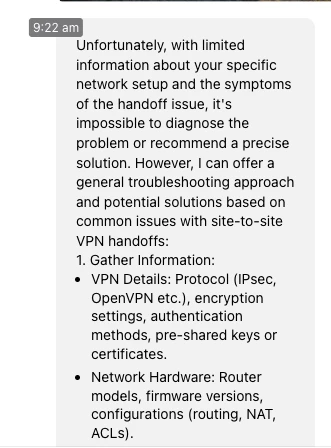
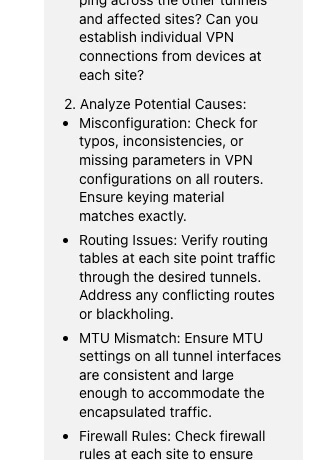
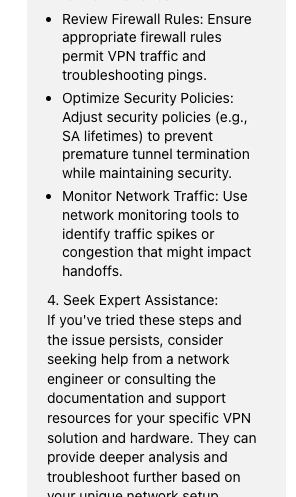
In my example of a complex explanation here ; you can see readable is dismal and paragraphs are difficult to parse out and consume. If there was an option to present this specific message full-screen it would be a better reading experience for the end user.
 

4 replies

Jennifer K
Intercom Team
Forum|alt.badge.img+3
  • Intercom Team
  • March 12, 2024

Hi @ZachB 

Jennifer here from Intercom

This looks really useful and I'm more than happy to pass it on to our product team and keep my fingers crossed for you 🤞


Jennifer K
Intercom Team
Forum|alt.badge.img+3
  • Intercom Team
  • March 12, 2024
NewDiscussion ongoing

  • Author
  • New Participant
  • March 12, 2024

Thanks so much!


Forum|alt.badge.img
  • Connector
  • September 15, 2025

Additional to this useful use case. We have another very big issue that would be solved by this if also applied to the Help tab on Messenger. We have a multi-tenant setup with different customer-specific environments for each, and Intercom can’t authenticate customers when they are in the full screen support page from teh URl only in the messenger. We have only just found out about this and it’s a nightmare for us. 

We can’t direct customers to full screen browsing of articles and videos for onboarding and support they have to use the messenger, which is a real issue with links from our software and checklists and messenges in the messenger. 

If there was a fullscreen button on the messenger for users on chat and help that would fix this issue entirely from what I see. It would be even better if it opened a second window with the fullscreen messenger for our purposes. Thanks



