Article review workflow | Community
Skip to main content
Submitted

Article review workflow

Related products:Knowledge & Help Center
  • March 7, 2024
  • 6 replies
  • 54 views

Forum|alt.badge.img

I’d love to see some features to enable an article review workflow. For example, additional status categories (pending review, in review, reviewed), reviewer markup and/or comments. 

6 replies

Jennifer K
Intercom Team
Forum|alt.badge.img+3
  • Intercom Team
  • April 16, 2024

Hi @Colleen Weatherall 

Jennifer here from Intercom 😀

I will pass this feedback on to our product team as a feature you would like implemented. I’ll keep my fingers crossed for you.🤞

Whenever we do release new features, we announce them on the Product Changes page, so I would recommend keeping an eye there.


Jennifer K
Intercom Team
Forum|alt.badge.img+3
  • Intercom Team
  • April 16, 2024
NewDiscussion ongoing

  • New Participant
  • July 16, 2024

The ability to collaborate when writing articles, like being able to comment or suggest edits, is critical for us and is what is currently preventing us from using the Intercom Help Centers more.

Context: Our documentation is not always written by subject matter experts but by Support or Product team members. For more advanced documentation, we’d like subject matter experts to be able to review a help article and provide with feedback (inline comments would be great).


  • New Participant
  • July 17, 2024

@Mikael Grave Same. We can’t have an Intercom account for each of our SMEs. The ability to make a PDF at least would help.


Nathan Sudds
Top Expert ✨
Forum|alt.badge.img+8
  • Top Expert
  • July 17, 2024

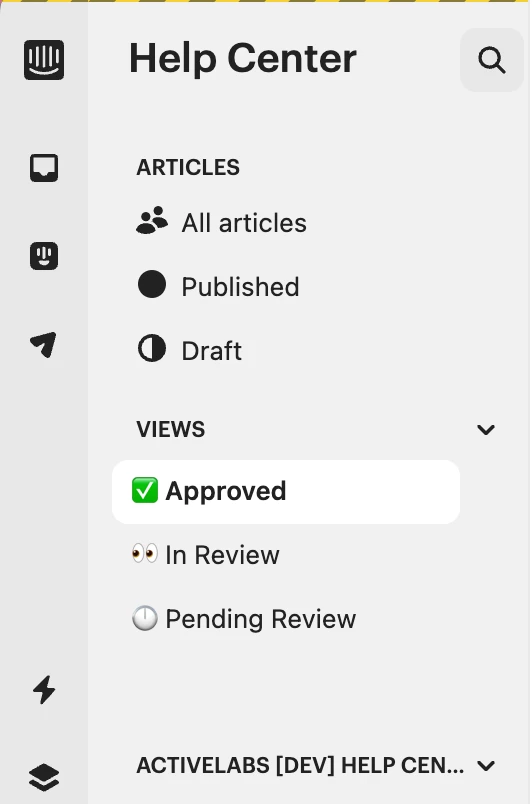
@Colleen Weatherall  Although the collaborative features aren’t fully there, when working with teams on improving their article workflow we’ve found the combination of tags and views to be very helpful!

Basically, create a few tags related to your workflow and tag the articles in draft. 
(pending review, in review, reviewed)

Then go to Add Filter button in the top of the All Articles section and filter by tag -- select one of the tags click Save View, add an icon and name for the view i.e. Pending and then repeat for the other statuses. 

Here’s an example with an approval workflow


You won’t have commenting etc but it can help with some of the challenges of that last step of finalizing articles.   We are also giving teams suggestions to use this for managing content that needs to be updated etc, tag. an article when you see it has outdated content so when someone has time to fix the article if they can’t do it on the fly -- they tag it as outdated but that workflow would definitely improve a lot if you could add comments etc.  

I need to write up an article or make a video about this workflow, maybe this is a good one for the tips section @Diana Tripac 😁

Hope this helps!


OHMYGOSH This!! Having to manually work with Word documents etc to get comments and approvals on some types of documentation is incredibly tedious and well behind what other help centres offer as standard :)