


Summary
When an article is created or updated through the REST API / MCP then the `style` attribute on table <td> tags are removed, undoing styling that was applied in the web editor to customize colors or widths.
Steps to Reproduce
- Use the Knowledge web editor to create an article with a table, assign colors the to the column headers and adjust the column widths.
- Use the REST API / MCP to retrieve the article HTML, note that the retrieved article’s body contains the `style` attribute defining background-color and width on the <td> tags.
- Use the REST API / MCP to re-save the article as-is.
- In the web editor refresh the article and note that the table styling was removed.
- Use the REST API / MCP to retrieve the article HTML, note that the retrieved article’s body no longer contains the `style` attribute on the <td> tags.
Expected Result
The `style` attribute on the <td> tags defining the background-color and column width is preserved.
Actual Result
The `style` attribute on the <td> tags is removed.
Example Step 1
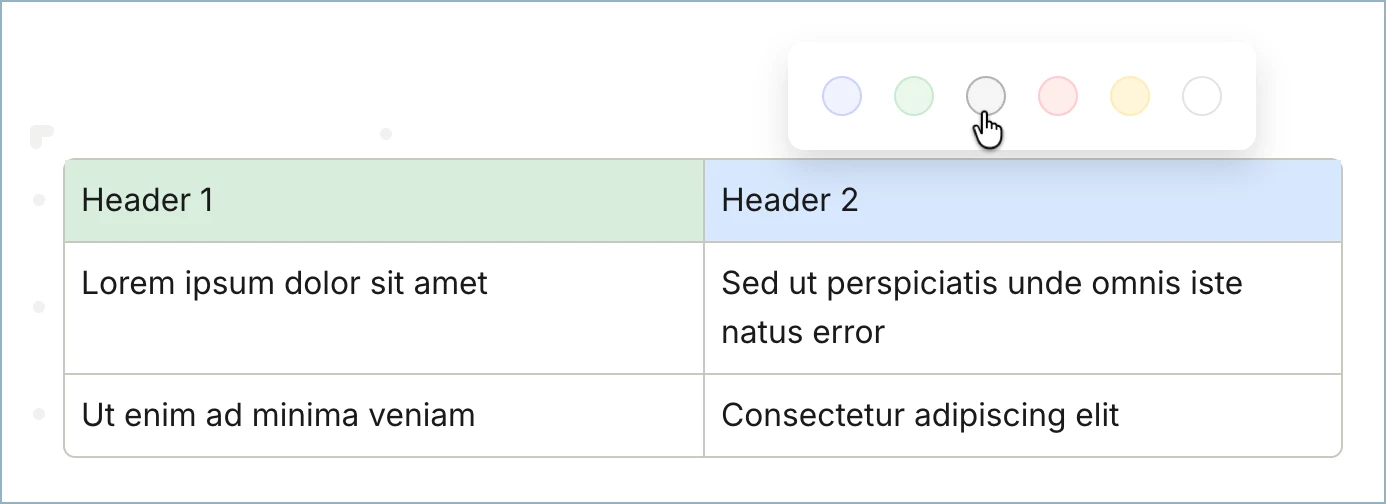
Example Step 2
<div class="intercom-interblocks-table-container">
  <table role="presentation">
    <tbody>
    <tr>
      <td style="background-color: #d7efdc; width: 320px;">
        <p class="no-margin">Header 1</p>
      </td>
      <td>
        <p class="no-margin">Header 2</p>
      </td>
    </tr>
    <tr>
      <td style="background-color: #e8e8e8; width: 320px;">
        <p class="no-margin">Lorem ipsum dolor sit amet</p>
      </td>
      <td>
        <p class="no-margin">Sed ut perspiciatis unde omnis iste natus error</p>
      </td>
    </tr>
    <tr>
      <td style="width: 320px;">
        <p class="no-margin">Ut enim ad minima veniam</p>
      </td>
      <td>
        <p class="no-margin">Consectetur adipiscing elit</p>
      </td>
    </tr>
    </tbody>
  </table>
</div>
Example Step 4
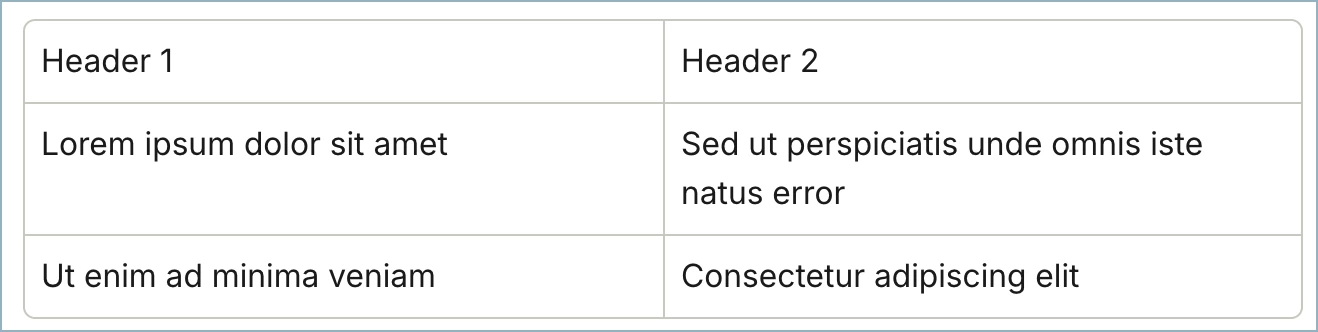
Example Step 5
<div class="intercom-interblocks-table-container">
  <table role="presentation">
    <tbody>
    <tr>
      <td>
        <p class="no-margin">Header 1</p>
      </td>
      <td>
        <p class="no-margin">Header 2</p>
      </td>
    </tr>
    <tr>
      <td>
        <p class="no-margin">Lorem ipsum dolor sit amet</p>
      </td>
      <td>
        <p class="no-margin">Sed ut perspiciatis unde omnis iste natus error</p>
      </td>
    </tr>
    <tr>
      <td>
        <p class="no-margin">Ut enim ad minima veniam</p>
      </td>
      <td>
        <p class="no-margin">Consectetur adipiscing elit</p>
      </td>
    </tr>
    </tbody>
  </table>
</div>