Feature request: Load Messenger before cookie consent with contextual cookie prompt
Current behavior: The Intercom Messenger is currently only loaded after a visitor has given cookie consent via a cookie banner (e.g., OneTrust, Cookiebot, UserCentrics).
If a visitor declines or dismisses the cookie banner, the Messenger does not load at all.
The problem: This creates a poor user experience:
- Visitors who decline cookies have no way to contact support or ask questions
- There is no visible support channel on the page
- Users may not realize that accepting cookies would unlock the support option
From a business perspective, this means:
- Lost support inquiries
- Reduced engagement
- No alternative communication path for privacy-conscious users
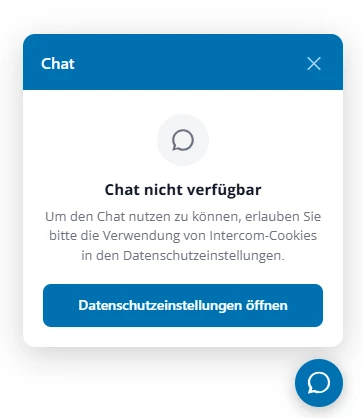
Proposed solution: Allow the Messenger to load in a "cookie-pending" mode before consent is given.
In this mode:
- The Messenger widget is visible and can be opened
- When a user tries to interact (e.g., start a chat), the Messenger displays a contextual message explaining that cookie consent is required
- A button is shown that re-opens the cookie consent dialog
This approach:
- Maintains visibility of the support channel
- Educates users on why consent is needed
- Provides a clear path to grant consent in context
- Complies with GDPR (no cookies set before consent)
Technical note: The Messenger could load in a "consent-required" state and trigger the cookie banner via standard IDs or API calls, for example:
- OneTrust:
<button id="ot-sdk-btn">Manage cookie settings</button> - UserCentrics: trigger via their JavaScript API or custom element
This would work seamlessly with common consent management platforms.
How this would support our workflow:
- Visitors always see a support option, regardless of their initial cookie decision
- We can offer a consent-in-context flow that's clearer and more user-friendly
- Support remains accessible for privacy-conscious users who may reconsider after understanding the value
- Reduces friction in the customer journey
References: This pattern is already used by some modern support tools and is considered a best practice for GDPR-compliant UX.