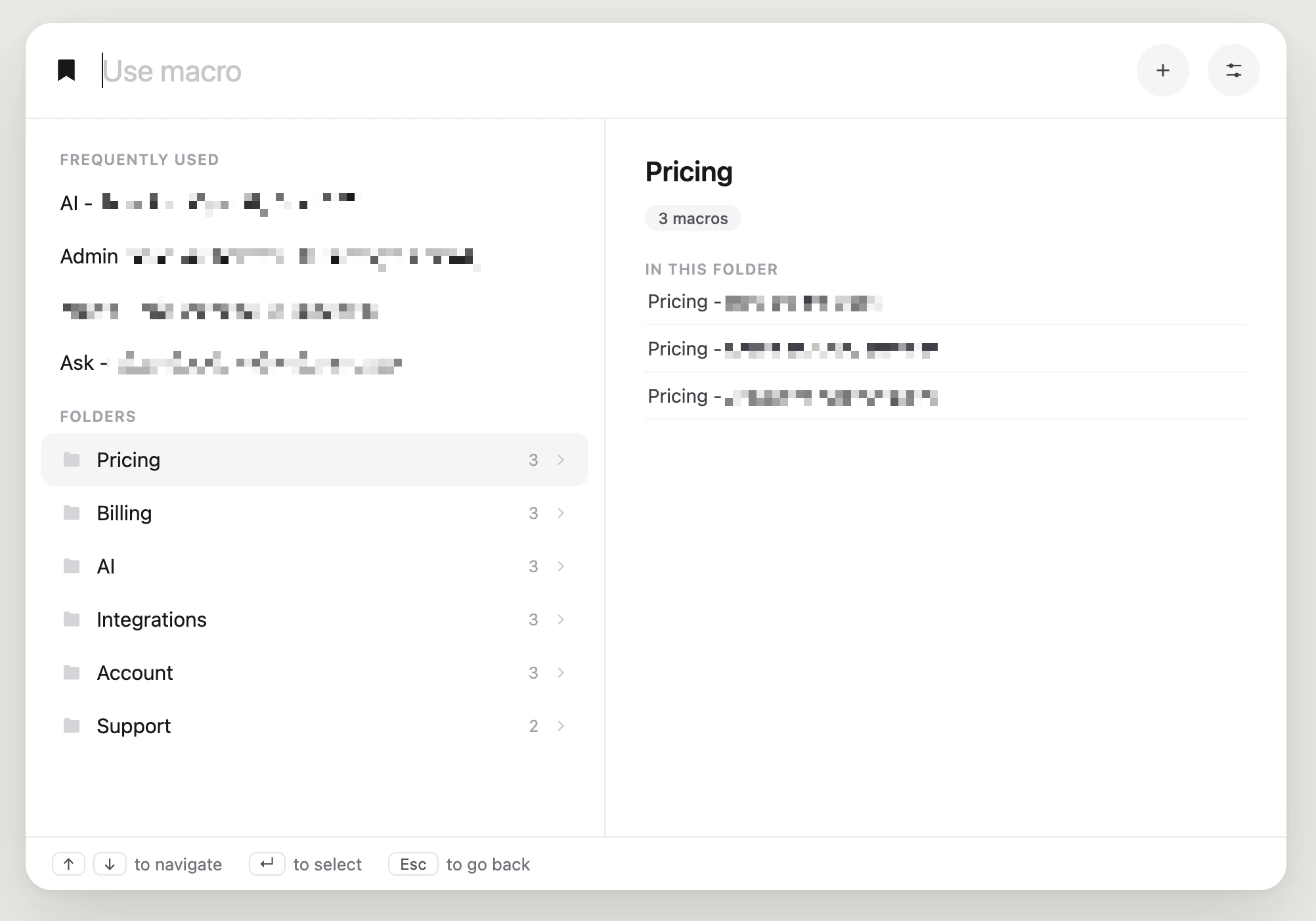
The problem: Macro search (cmd+K) only works if you already know the macro's name or exact keywords. That falls apart fast when:
- You don't remember the exact macro name, just the general topic
- Several macros overlap (e.g. multiple billing responses) and search doesn't help you tell them apart
- You're new to the team and still learning what macros even exist
What we'd love to see:
- Folder/category browsing — group macros into folders like Pricing, Billing, Technical Support, Onboarding — so you can browse by topic instead of guessing keywords
- A dedicated keybind for macros — separate from cmd+K, so inserting a macro is a distinct, discoverable action
- Cleaner layout — folders surfaced prominently, with macro previews so you're not guessing from the title alone
- Both, not either — keep keyword search for people who know exactly what they want, add folders for people who don't
Why it matters:
- New hires ramp faster — they can explore, not memorize
- Less time hunting between near-duplicate macros
- Macro libraries stay usable as they grow instead of turning into a wall of text
We mocked up what this could look like (image attached) — curious whether others have hit this same wall. If this sounds familiar, an upvote or a comment with your own workaround helps get this in front of Intercom's product team. 🙌