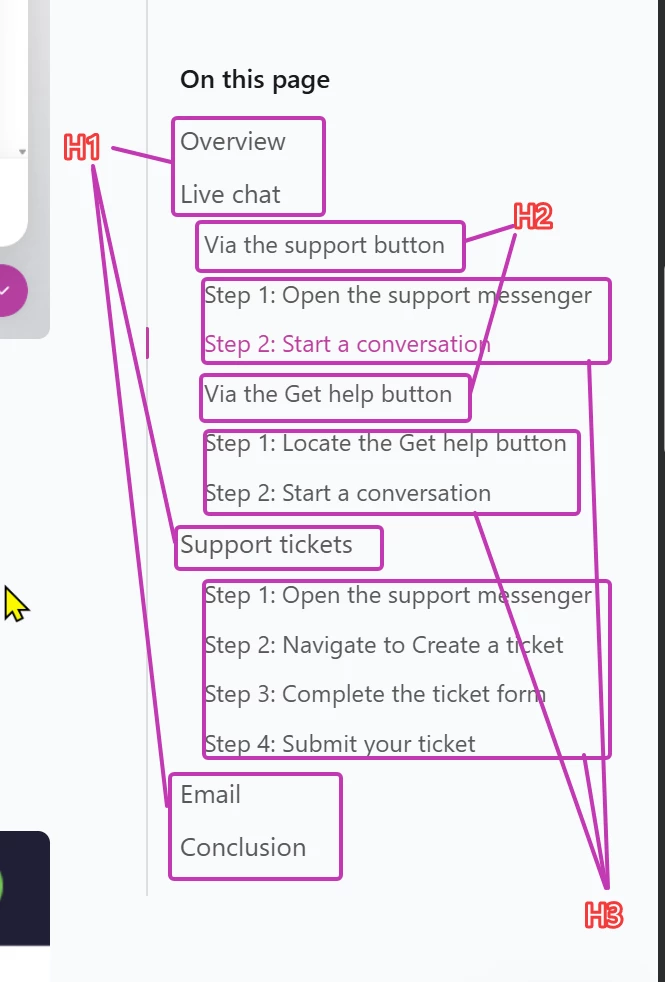
The Modern Help Center’s TOC design includes all heading levels, but indentation is only applies from H1 to H2/H3/H4. The result is an incredibly messy TOC that destroys previous work done to carefully format articles to that certain heading (H1/H2) appear in the TOC and others don’t (H3/H4).
Possible solutions:
- Toggle H3/H4 heading visibility in TOC on/off so that the TOC can match the Classic system
- Apply proper indentation. All headings should be indented below the heading above in the TOC.
In the posted screenshot, H3 previous did NOT show in the TOC. Now they do and it looks horrible. It would be great to not have to go back through all articles and change the tag.