


Numbered List Formatting Breaks When Adding Bullets in Intercom Emails | Community
Skip to main content
Submitted

Numbered List Formatting Breaks When Adding Bullets in Intercom Emails

Related products:Core InboxMessengerTickets
  • August 9, 2025
  • 1 reply
  • 56 views

The email composer in Intercom has a serious formatting limitation: you can’t properly mix numbered lists and bullet points without breaking the sequence.

For example, if I start a numbered list (1, 2, 3) and insert a bullet point between two numbered items, the numbering restarts at 1 instead of continuing. This makes it impossible to create structured instructions like:

  1. Step one
     • Sub-point

  2. Step two

Instead, after the bullet, it resets to 1, forcing awkward workarounds. This is incredibly frustrating when trying to write clear procedural instructions. It’s basic text editor behavior that should work in any modern email composer, especially one built for customer communication.

1 reply

Forum|alt.badge.img+3
  • Active User
  • May 4, 2026

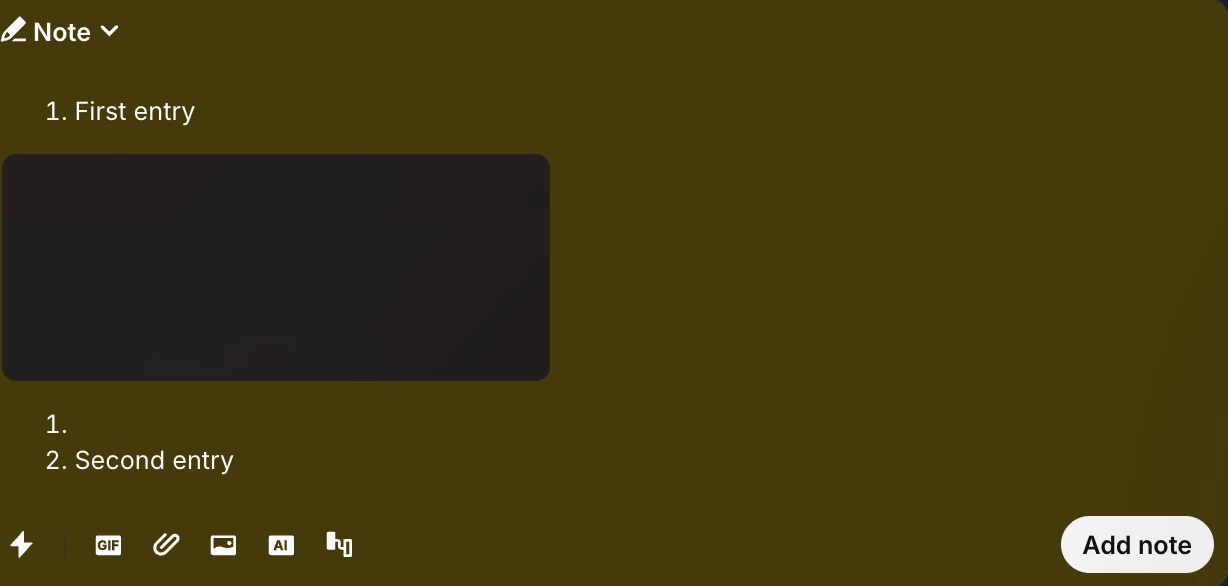
Same limitation is reflected if you want to add an image within the list—the counter resets and the image break format too:


Is crazy how such basic editing features are just not there. It shouldn’t be this difficult to improve this. Nowadays, considering people read less and read more with visual cues, having the option to properly add images to replies is more relevant than ever.