


Show elapsed time in user status | Community
Skip to main content
Submitted

Show elapsed time in user status

Related products:Reporting
  • August 28, 2025
  • 1 reply
  • 69 views

Currently, when an agent sets their status (e.g., Available, Away, Break), there’s no indicator showing how long they’ve been in that status. This makes it difficult to know if someone has been stuck in the wrong status for a prolonged period of time, or to track how long a break or other status has lasted.

A simple elapsed timer (e.g., “In Break – 27 mins”) or even just a visible timestamp of when the status was set would make it much easier to self-manage time and correct mistakes without relying on external tools.

This would be especially useful for:

  • Preventing extended time spent in the wrong status.

  • Tracking personal break or away times at a glance.

  • Improving accountability and efficiency without adding third-party trackers.
 

1 reply

  • New Participant
  • June 22, 2026

Upvoting this! Our team is facing the exact same challenge. Relying on an external dashboard to monitor status durations creates a disconnect, especially with the current 60-second dashboard sync delay making real-time break adherence difficult for agents.

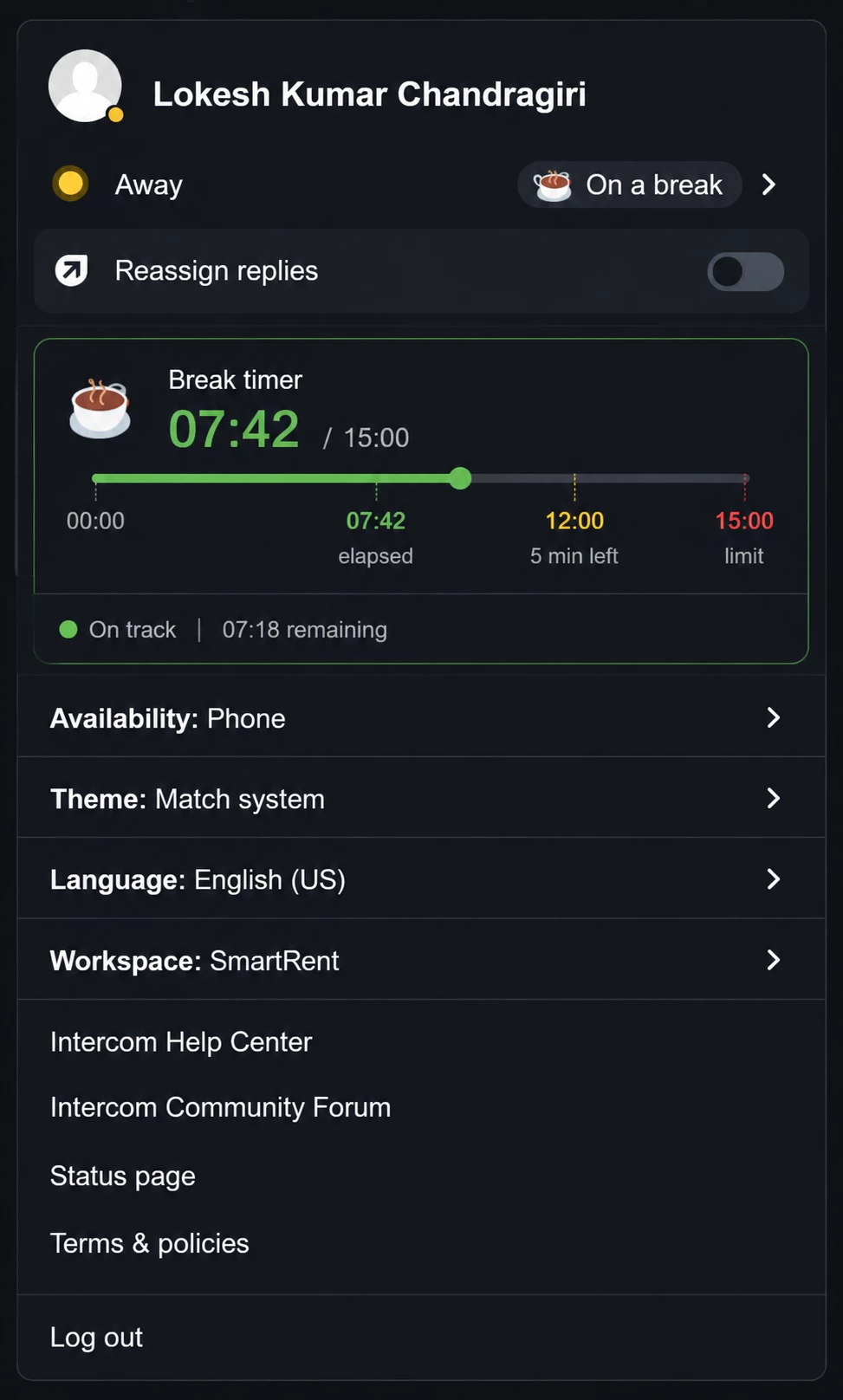
We strongly agree that bringing this visibility directly into the Intercom status menu is the right move. To show how aligned we are, our team put together a UI concept

of how this could look and function seamlessly:

  • Real-time Countdown/Count-up: Displays elapsed time directly against allocated duration (e.g., 07:42 / 15:00) with zero delay.

  • Visual Progress Bar: A clean visual indicator of time consumed versus time remaining.

  • Color-Coded Statuses: Shifting from Green (on track) to Yellow (approaching limit) and Red (exceeded limit) for effortless self-management at a glance.

This enhancement would completely eliminate dashboard-dependency for agents, eliminate accidental adherence issues, and drastically improve daily agent experience. We'd love to see Intercom prioritize this!