Hi everyone,
We love using Intercom, but we notice our users frequently struggling with a specific UI element when dealing with complex support cases.
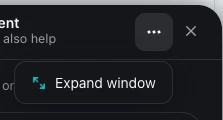
Currently, the "Expand window" option is hidden inside the three-dot ellipsis menu in the messenger. Since that menu literally only contains this one single option, hiding it feels like an unnecessary extra click.
Why this matters:
-
Discoverability: We handle highly complex cases with long conversation histories. When we show our customers that they can expand the window, they absolutely love it. However, almost nobody finds it on their own because it’s tucked away.
-
User Experience: Hiding a single, highly useful action behind a dropdown menu reduces efficiency for users who need a larger workspace to read through technical instructions or long logs.
-
Easy Fix: Since there are no other items in that menu, replacing the three dots with the direct "Expand window" icon/button would be a massive quality-of-life improvement for end-users, requiring minimal development effort.
It would be awesome to see this UI tweak implemented to make long conversations much easier to navigate from the get-go!