Inside an article is there a way to add a link to another existing article, by searching and connecting them, without having to type the article URL (in the same way you can do it in the Inbox)? | Community
Skip to main content
Submitted

Inside an article is there a way to add a link to another existing article, by searching and connecting them, without having to type the article URL (in the same way you can do it in the Inbox)?


Related products:Knowledge & Help Center
  • October 1, 2020
  • 17 replies
  • 770 views

Inside an article is there a way to add a link to another existing article, by searching and connecting them, without having to type the article URL (in the same way you can do it in the Inbox)?

17 replies

Roy
Top Expert ✨
Forum|alt.badge.img+7
  • Top Expert ✨
  • October 1, 2020

Hello @user356​ ,

Currently, it's not possible to search and link articles during creation. 


But it's a great feedback for @Product Wishlist​ .


Saved a lot of time.


  • Author
  • New Participant
  • October 1, 2020

Hey thanks Roy. I supposed so, just wondering if I was missing something. The feature would keep links consistent when you change the URL of an article.


Forum|alt.badge.img+5
  • Employee
  • October 2, 2020

Hey @user356​ 👋


While we do not directly support deep linking in articles, you can use some sneaky CSS and HTML to accomplish this. Since you cannot directly edit the HTML and CSS in an article, you need to create sections you want to deeplink to as H1's in the article composer. Once this is done, you can navigate to them by using the URL of the article and appending `#name-of-header` (you can check exactly what this is by right clicking the H1 and choosing "Inspect", and the "id" is what you're using) where the text after the `#` is the H1 text with whitespace replaced by dashes. 

Keep in mind that this will always be down-cased. For example, if the H1 is "How to edit a user" then you would append `#how-to-edit-a-user`. 

The only drawback here is that if you had this link in the article it will take you to the section, but in a new window. If you are not using a custom domain you can use the relative path (remove the beginning of the URL, and start with `/app-name/etc`) and this will allow you to have the link open in the same window. For example here, the relative path might be `/my-test-app/collection-1/managing-users#how-to-edit-a-user`


Hope this helps 😊


Roy
Top Expert ✨
Forum|alt.badge.img+7
  • Top Expert ✨
  • October 2, 2020

@lisa b11​, Sorry but I think you don't get it.


@user356​ asked about linking articles during creation.

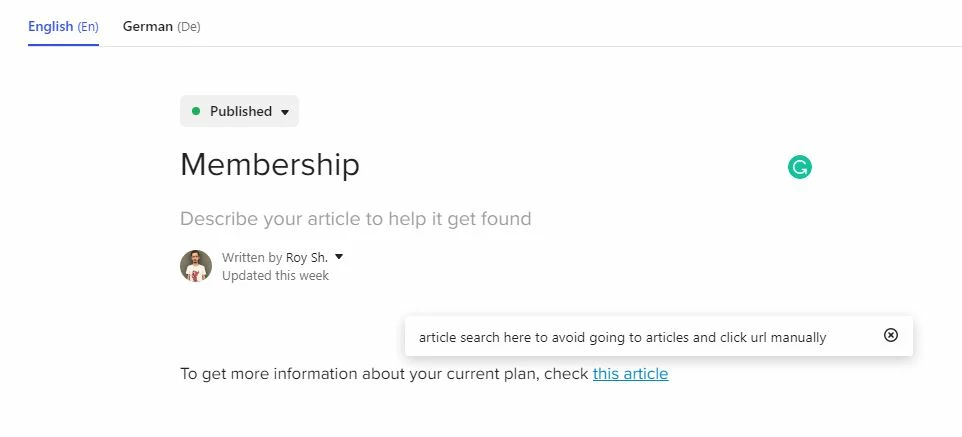
articleserach

If I want to put article url there, I Should go to articles, copy url and insert there. This feature will avoid this and give possibility to simply insert them.


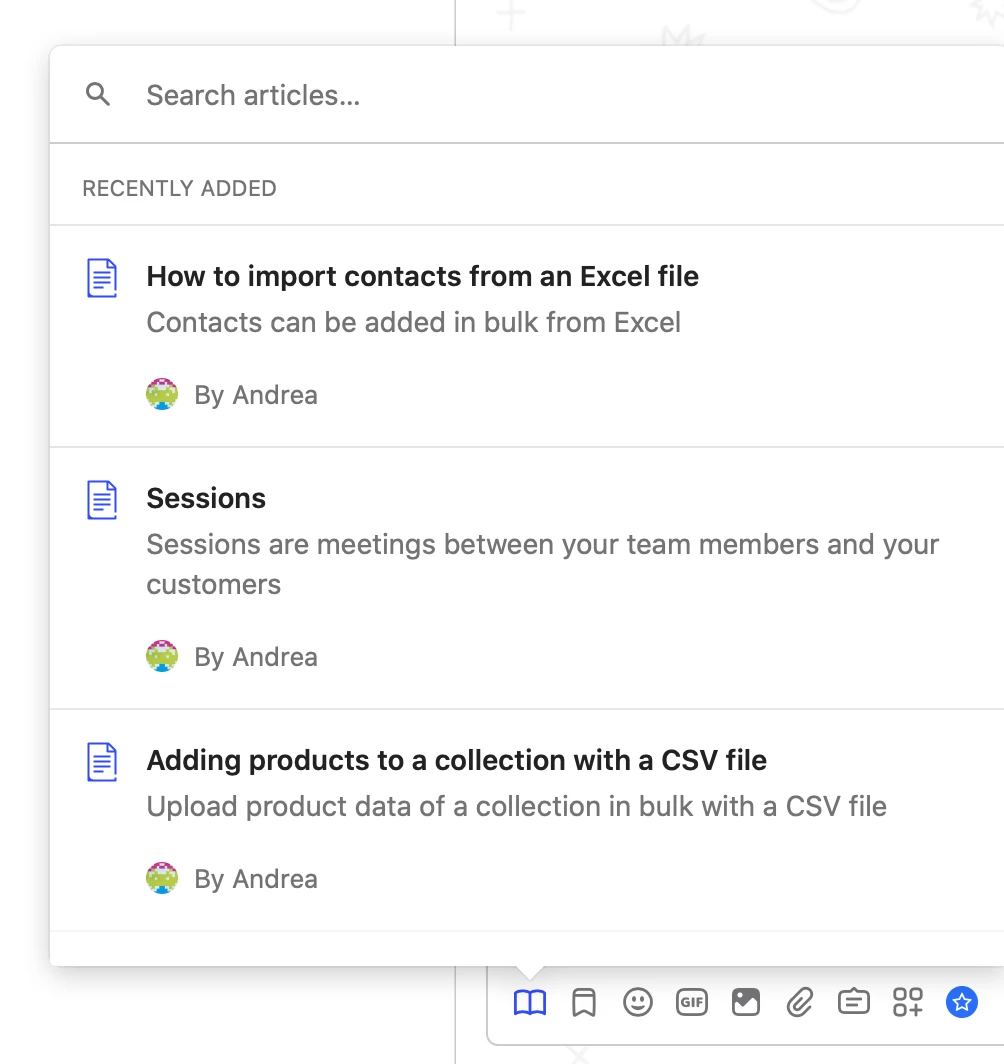
Like this one and it's definitely a great feature to suggest the product team.


  • Author
  • New Participant
  • October 2, 2020

Thanks for your message @lisa b11​ , but @roy s11​ is right, that's not what I was talking about.


The feature in the attached screenshot is what I was looking for. A simple and rapid way to create a link to an existing article while you are editing one, with the advantage of keeping that link consistent even if tomorrow you change the URL of the linked article.Schermata 2020-10-02 alle 17.16.44


Forum|alt.badge.img+5
  • Employee
  • October 2, 2020

Ah gotcha! Thanks for clarifying and sorry for the confusion 🙈 Definitely a great feature request shout!


Roy
Top Expert ✨
Forum|alt.badge.img+7
  • Top Expert ✨
  • October 2, 2020

200


  • New Participant
  • December 29, 2021

Hi there!


Having a feature like this would also allow removing the need to handle changes in the article URL (it's already handled if you simply rename it, but if you move it to a different collection or section it breaks right now) in all the languages the article is available in. Facilitating translation links management may require more effort, but collection and section change should be easier to be addressed.


Is there any news from the @Product Wishlist​?


  • New Participant
  • March 6, 2024

@lisa b11​, Sorry but I think you don't get it.


@user356​ asked about linking articles during creation.

articleserach

If I want to put article url there, I Should go to articles, copy url and insert there. This feature will avoid this and give possibility to simply insert them.


Like this one and it's definitely a great feature to suggest the product team.

Has this product idea been submitted? This would be so helpful when writing articles.


mateusz.leszkiewicz
Intercom Team
Forum|alt.badge.img+7

Hi Val, It’s Mat from the Support Engineering Team 😀

The feature request was submitted, but I can’t give you any timeframe for introduction. 
You can follow our update page for more details on new releases.


Forum|alt.badge.img

I would really love to see this feature, please add my upvote if possible! This should be pretty easily accomplished within any help center, and the current process is slow and allows for very easy link breaking when getting your help center set up initially, as things are very likely to change throughout. +++++++10000!


Nathan Sudds
Top Expert ✨
Forum|alt.badge.img+8
  • Top Expert
  • April 9, 2024

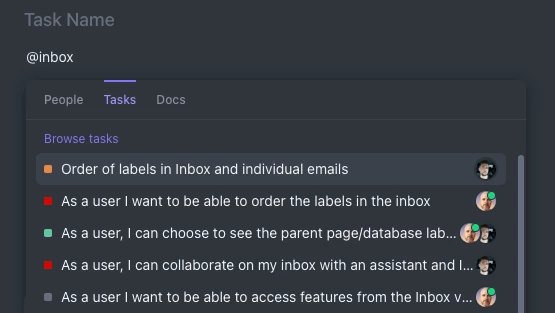
I would love to see this as well, in tools like Clickup, Asana etc they do this via @mentions where you can also @ a task in addition to a person, this is extremely helpful and time saving even beyond having to click a specific button for it.   Clickup you can do the @ then toggle between different properties, in Asana it just shows a list of all the different results from different objects.  Both work well!

@mateusz.leszkiewicz  Here’s a screenshot of what pops up if you type the @ symbol, you can see if you toggle to Tasks you will get a list of tasks containing the word you’ve typed after the symbol like @inbox

Maybe this would be helpful for the team to consider as well but I’m sure the button would be a big improvement already. 


mateusz.leszkiewicz
Intercom Team
Forum|alt.badge.img+7

Thank you @Sophie Humphrey and @Nathan Sudds for your feedback. I will pass this on to our Product Team.


  • New Participant
  • April 10, 2024

I’d really like to see this too. We are setting up a whole help center and things need to be linked to eachother, but it’s hard to do so without them being published.


Jennifer K
Intercom Team
Forum|alt.badge.img+3
  • Intercom Team
  • April 23, 2024
NewDiscussion ongoing

Michaela Hone
Intercom Team
Forum|alt.badge.img+1
  • Intercom Team
  • October 4, 2024
Updated idea statusDiscussion ongoingNot planned yet
Idea merged into:

All the votes from this idea have been transferred.

Michaela Hone
Intercom Team
Forum|alt.badge.img+1
  • Intercom Team
  • October 8, 2024
The following idea has been merged into this idea:

All the votes have been transferred into this idea.